
HR teams today aren’t struggling because they lack effort. They’re struggling because they’re buried in repetition.
Spreadsheets. Manual approvals. Endless email chains. And somewhere in between all that, actual “people management” gets lost.
That’s exactly where HR automation starts to matter; not as a trend, but as a necessity.
Through this blog, we’ll explain what HR automation really means, how it works, where businesses go wrong, and how you can actually implement the usage of HR management software without turning your operations upside down.
What is HR Automation?
HR automation is the process of using technology to handle repetitive, rule-based HR tasks without constant human intervention.
Instead of manually sending onboarding emails → the system triggers them.
Instead of calculating payroll in spreadsheets → the system processes it automatically.
Instead of chasing approvals → workflows move things forward.
Basically, HR automation is about:
- Reducing manual effort
- Improving accuracy
- Speeding up HR workflows
- Giving HR teams time to focus on strategy (not admin work)
It’s not about replacing HR teams. It’s about freeing them up.
Why is HR Automation Important in 2026
Things have changed. Quite a bit. Employee expectations are higher. Compliance requirements have become stricter. And businesses are scaling faster than ever.
Here’s what’s driving HR automation in 2026:
- Remote & hybrid work environments
- Real-time employee data expectations
- Increasing compliance complexity
- Need for faster hiring cycles
- Pressure to improve employee experience
Also, AI is no longer “new.” It’s embedded.
So the question isn’t “Should you automate HR?” It’s more like, “How much are you already behind if you haven’t?”
Key Benefits of HR Automation Workflows
Before we get into the details, let’s look at the benefits that HR automation offers. Let’s break this down practically.
1. Reduced Manual Work
Repetitive tasks get automated. Like data entry, approvals, documentation and others. That means fewer errors and fewer late nights fixing them.
2. Faster Employee Onboarding
New hires don’t wait for emails anymore. Everything – documents, training, system access – can be triggered instantly.
3. Better Payroll Accuracy
Automation reduces calculation errors, missed deductions, and compliance risks. This, honestly, saves you from uncomfortable conversations.
4. Better Employee Experience
Employees can apply for leave, access payslips or update details without chasing HR. This actually matters more than you think. You don’t have to contact the HR every now and then.
5. Better HR Compliance
Automated systems keep records updated and aligned with regulations. Less risk. More confidence.
6. Centralized Employee Data
Everything sits in one place. No more “Which file is the latest version?” chaos.
Core Technologies Behind HR Automation
HR automation isn’t one tool. It’s an ecosystem. It’s a mix of technologies working together in the background.
1. HRMS Software
This is the foundation of everything. It stores employee data, manages payroll, tracks attendance, and connects different HR functions into one system. Without it, automation feels scattered.
2. AI-Powered HR Tools
These tools bring intelligence into the process – screening resumes, answering employee queries, even predicting hiring needs. It’s less about replacing decisions and more about speeding them up.
3. Workflow Automation Engines
Think of these as the “flow managers.” They move tasks from one step to another, like sending a leave request to a manager or triggering onboarding tasks, without anyone having to follow up manually.
4. Employee Self-Service Portals
These give employees control over their own basic HR tasks. Applying for leave, downloading payslips, updating personal info, all without needing HR to step in every time.
5. Cloud-Based HR Systems
Everything runs online, which means access from anywhere. This becomes especially important with remote teams, real-time updates, and scaling operations without heavy infrastructure.
6. Attendance & Biometric Integrations
These systems track employee working hours through biometric devices or apps. The data feeds directly into payroll and compliance systems, reducing errors and manual corrections.
Let’s take a quick glance at these:
|
Technology |
What It Does |
Why It Matters |
|
HRMS Software |
Central system for employee data |
Foundation of automation |
|
AI-Powered Tools |
Resume screening, chatbots |
Speeds up decision-making |
|
Workflow Automation Engines |
Approval flows, triggers |
Removes manual coordination |
|
Employee Self-Service Portals |
Employee access systems |
Reduces HR dependency |
|
Cloud-Based HR Systems |
Remote access, scalability |
Supports modern teams |
|
Attendance & Biometric Systems |
Time tracking |
Accurate payroll & compliance |
If your systems don’t “talk” to each other, automation breaks. Simple as that.
Examples of HR Automation Processes
Once you start looking closely, you’ll realize that a big chunk of HR work is repetitive. And that’s what makes it perfect for automation. You don’t need to automate everything at once. Start with high-impact areas.
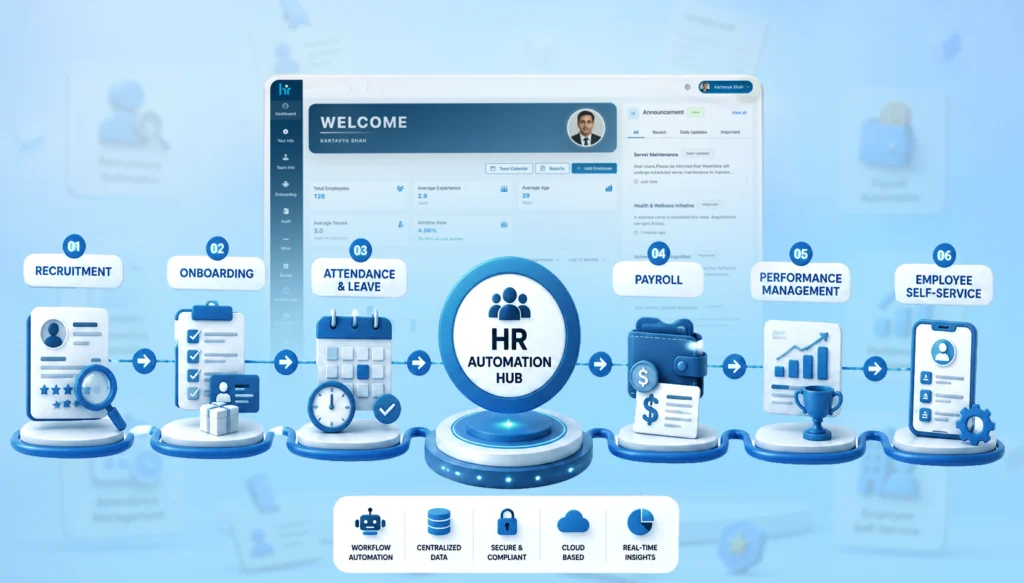
1. Recruitment Automation
Hiring usually involves a lot of back-and-forth – screening resumes, scheduling interviews, tracking candidates. Automation takes care of these steps, so HR teams can focus more on choosing the right people, not just managing the process.
2. Employee Onboarding Automation
Instead of manually sending documents, reminders, and instructions, everything gets triggered automatically once a candidate is hired. It creates a smoother first experience and avoids those awkward “Did you get the email?” moments.
3. Attendance & Leave Management
Leave requests, approvals, attendance tracking – all of it can run without constant supervision.
Employees apply, managers approve, and the system keeps everything updated in real-time.
4. Payroll Processing
Payroll is probably one of the most sensitive areas. Automation ensures salaries, deductions, and taxes are calculated accurately and on time.
5. Performance Management
Tracking goals, collecting feedback, and running reviews. These processes become structured and consistent with automation. Which makes performance discussions a lot more meaningful.
6. Employee Exit Process
When someone leaves, there are multiple steps, clearances, documentation, and final settlements. Automation ensures nothing gets missed and the process stays smooth, even at the end.
Some quick examples:
|
Process |
Examples |
|
Recruitment Automation |
Resume screening, Interview scheduling, Candidate tracking |
|
Employee Onboarding |
Document collection, Welcome emails, Task assignments |
|
Attendance & Leave Management |
Leave approvals, Holiday tracking, Attendance logs |
|
Payroll Processing |
Salary calculations, Tax deductions, Payslip generation |
|
Performance Management |
Review cycles, Goal tracking, Feedback collection |
|
Employee Exit Process |
Clearance workflows, Final settlements, Documentation |
A Simple HR Automation Workflow Example
Let’s say a new employee joins.
Without automation:
- HR sends emails manually
- IT sets up accounts after reminders
- The manager assigns tasks late
With automation:
- Offer letter accepted
- System triggers onboarding workflow
- Documents requested automatically
- IT receives a system setup request
- Manager gets task assignment notification
- Employee receives onboarding kit
Everything moves without chasing.
Step-by-Step HR Automation Strategy for Businesses
Here’s where most businesses mess up. They jump straight to tools. Don’t. Let’s understand what needs to be done:
1. Identify Repetitive Tasks
The first step is to observe what your HR team keeps doing over and over again. Tasks like attendance tracking, leave approvals, onboarding paperwork, payroll calculations, or interview scheduling usually eat up a lot of time. These are the tasks that don’t really need human judgment every time.
2. Audit Existing HR Processes
Before jumping into tools, take a close look at how your current HR processes actually work. You’ll often find delays, unnecessary approvals, spreadsheet dependencies, or people following different methods for the same task.
3. Select the Right HRMS Software
Now comes the tool selection, and this is where many businesses go wrong. The goal isn’t to pick the most feature-heavy HRMS. It’s to pick the one that fits your workflows. A good system should comfortably handle payroll, attendance, recruitment, and performance management, while also letting you set automation rules easily.
4. Create Approval Workflows
Once your system is in place, the next step is defining how approvals should move. Who approves leave requests? What happens when a new hire is approved? How do expense claims move up the chain? Instead of relying on emails and reminders, you set clear rules inside the system. With this, requests are automatically directed to the right people.
5. Train HR Teams
Automation only works when people actually use it properly. That’s why training is critical. HR teams should feel confident navigating the system, handling exceptions, checking dashboards, and managing workflows.
6. Monitor and Optimize Automation
Finally, remember that automation isn’t a “set it and forget it” setup. Once things go live, you need to keep an eye on how they’re performing. Over time, you refine the system so it keeps getting smoother and more efficient.
Challenges in HR Automation
Let’s not pretend it’s all smooth. Come, take a look at the challenges:
1. Employee Resistance
One of the first hurdles you’ll likely face isn’t the software; it’s people. Employees and even HR teams are often comfortable with the way things already work, even if it’s slow or manual. So when automation is introduced, there’s usually some hesitation.
2. Poor Data Migration
A lot of automation projects struggle here. It looks easy to move HR data from old systems, spreadsheets, or scattered files into a new HRMS. But it rarely is. You often discover missing information, duplicate employee records, or inconsistent formats.
3. Integration Issues
HR doesn’t work in isolation. It connects with payroll, accounting, attendance tools, and sometimes even project management or CRM systems. When these tools don’t integrate properly, teams end up switching between platforms or manually transferring data again.
4. Security & Compliance Concerns
HR systems store some of the most sensitive company data: salary details, personal employee information, performance records, etc. So naturally, security becomes a serious concern. Also, companies need to stay aligned with labour laws and data protection rules.
5. Lack of HR Training
Even the best HR automation system won’t help much if people don’t know how to use it properly. Without proper training, HR teams stick to old habits or use only basic features, leaving the real benefits.
Best Practices for Successful HR Automation
Some things just work better.
- Start with one department or process
- Clean your data before automation
- Keep workflows simple initially
- Choose scalable tools
- Focus on employee experience (not just efficiency)
And one underrated tip. Don’t over-automate. Some human touch should stay.
How to Choose the Right HR Automation Software
There’s no “best” tool. Only the right fit. Here’s a quick comparison:
|
Factor |
What to Look For |
|
Ease of Use |
Minimal learning curve |
|
Integrations |
Works with existing tools |
|
Customization |
Flexible workflows |
|
Scalability |
Grows with your business |
|
Security |
Strong data protection |
|
Support |
Reliable customer service |
If it feels complicated during the demo, it’ll feel worse after purchase.
HR Automation Trends in 2026
This is where things get interesting.
- AI-driven hiring decisions
- Predictive employee analytics
- Hyper-personalized employee experiences
- Voice-enabled HR assistants
- Deeper integration with business systems
Also, speed matters more now. Businesses that automate faster, scale faster.
Automate Your HR Operations with WeekMate HRMS
If you’re still managing HR on spreadsheets. That’s not just inefficient, it’s risky.
A structured HR automation system like WeekMate HRMS helps you:
- Centralize employee data
- Automate workflows
- Improve employee experience
- Reduce manual workload
And more importantly, it gives your HR team time to focus on what actually matters – people.
Conclusion
HR automation isn’t about technology. It’s about clarity. Speed. Consistency. If your HR team is constantly firefighting, automation isn’t optional anymore.
Start small. Fix one process. Then build from there. That’s how real transformation happens.
Start by identifying one process you can automate this week. Just one. You’ll feel the difference almost immediately.
Frequently Asked Questions
1. How does HR automation work?
Instead of manually tracking attendance, sending onboarding emails, or calculating payroll again and again, the system just does it automatically. You set up workflows once, and the software takes over the repetitive parts. It connects different data points, triggers actions, sends reminders, and updates records.
2. What processes should HR automate first?
If you’re just starting, don’t try to automate everything at once. Begin with the obvious, high-volume stuff. Payroll, attendance and onboarding. These are the areas where errors happen easily, and time gets drained. Once these are running smoothly, you can move to more layered processes.
3. Is HR automation suitable for small businesses?
Actually, yes. Small teams often don’t have a big HR department, so a lot falls on just a few people. Automation balances that out. It removes the constant back-and-forth and the manual follow-ups. It’s not about replacing people. It’s more about giving them space to focus on things that actually need human attention.
4. Which software is used for HR automation?
There isn’t just one answer here. Some businesses go for full HRMS platforms that handle everything end-to-end. Others prefer combining tools like payroll software, workflow automation tools, and even AI-based systems layered on top. The right choice depends on how complex your processes are and how much flexibility you want.
5. How much does HR automation software cost?
It varies. Some tools charge per employee, some have monthly plans, and others charge based on features. For a small business, it could be quite affordable. But as your team grows and your needs get more advanced, the cost can increase.
6. Can HR automation improve employee experience?
It can. Faster onboarding, fewer payroll errors, quicker responses to requests. These things matter more than we think. Employees notice when systems just work. When they don’t have to chase HR for updates or wait days for simple approvals. It creates a smoother experience overall.