Remote work did not suddenly arrive. It quietly settled in and then stayed. It has become the default setup for a large section of the global workforce. Once teams were in offices, and now they are scattered across cities, time zones, and sometimes even continents.
Is it flexible? Yes. But it can also be a bit messy if not managed right. Everyone is supposed to stay aligned, accountable and engaged. And when teams aren’t in the same physical space, small problems like a missed update, an unclear task owner, or a delayed reply can lead to serious productivity issues.
This is where cloud-based project management software steps in. Let’s break this down properly.
The Real Challenges Behind Remote and Hybrid Teams
At first glance, hybrid work sounds ideal. Freedom, flexibility, fewer commutes. But behind the scenes, teams face a different reality. Let’s take a look at some challenges.
Communication Gaps
In an office, conversations happen naturally. A quick desk chat, a spontaneous meeting. Remote teams don’t get that luxury. Instead, communication becomes scheduled, delayed, or, worse, lost in endless threads. And over time, this creates information silos.
Visibility Issues
Managers can’t “see” progress anymore. Not physically, not even intuitively.
- Who’s working on what?
- What’s delayed?
- What’s stuck?
Without proper task assignment and tracking, things get easily blurry. And nobody knows exactly what is happening.
Engagement Slowly Declines
Remote employees often feel disconnected. Not always immediately, but gradually. No casual interactions. No shared moments. Just tasks and deadlines. And culture? It becomes harder to maintain than most companies expect.
Why Task Management Software Is Essential for Hybrid Workforce Productivity
Let’s be honest. Spreadsheets and scattered tools don’t work anymore. If your team is hybrid, you need a system that acts as a single source of information and facts. That’s exactly what modern task management software does.
Centralized Work Management
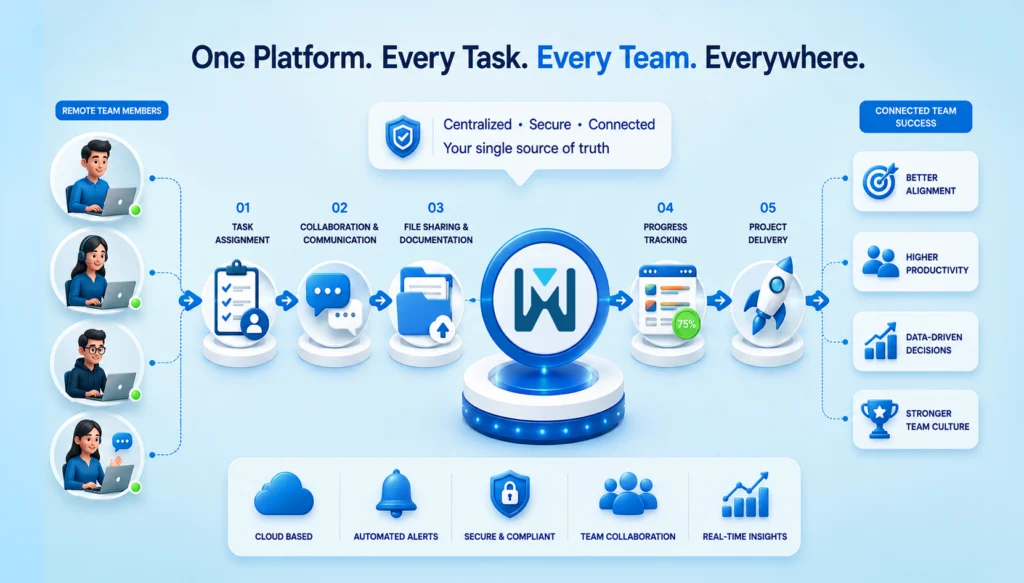
Tasks, deadlines, files, and updates are all centralized. No more digging through emails or messages. No more “Can you resend that?” Everything is in one place – clear and up to date.
Improved Transparency Across Teams
Everyone instantly sees what’s happening. Task status, ownership and progress are all transparent. It builds accountability without micromanagement. And that balance is extremely important.
Better Time and Resource Management
Workload distribution becomes visible, helping managers improve resource planning and overall workflow efficiency. You can actually see who’s overloaded and who has bandwidth. Which, honestly, is something most teams guess incorrectly without data.
Features to Look for in Workplace Collaboration Solutions
Not all tools are equal. Some look good but don’t solve real problems. Before you feel overwhelmed with too many features, here’s what actually matters.
Task Assignment and Tracking Capabilities
Clear ownership changes everything. When tasks are assigned properly, deadlines are given due importance, confusion around tasks drops, and accountability increases naturally.
Real-Time Collaboration Tools
Think shared workspaces, live discussions, and file sharing. Not scattered tools, but connected workflows.
Automated Notifications and Reminders
Good software reminds people without stressing them out. Missed deadlines are reduced, and follow-ups are automated.
Reporting and Performance Analytics
Decisions shouldn’t rely on assumptions. You get productivity insights, task completion trends, and performance data, which help leadership make informed calls rather than just guess.
Integration with Existing Business Tools
Your task management tool should connect with CRM systems, HR platforms and Communication tools. Because disconnected tools = broken workflows.
Building a Strong Remote and Hybrid Team Culture with Technology
Culture is not something you define and forget. It shows up in everyday actions and in how people work.
Establish Clear Expectations and Workflows
Unclear expectations decrease productivity. It is better to define roles, responsibilities, and workflows clearly and document them in your system.
Promote Transparency and Trust
We all know that transparency builds trust. In fact, it is a critical component of successful hybrid workforce management. When everyone can see progress, blockers, and contributions, teams naturally align better. No chasing. No guessing.
Encourage Collaborative Problem-Solving
There’s a difference. Collaboration means having shared ownership, cross-functional discussions and inputs and collective problem-solving. So, your software should support that, not restrict it.
Recognize Achievements and Milestones
Remote teams need recognition more than office teams. So, use your system to highlight achievements, share milestones and appreciate their contributions. This keeps morale alive and makes them feel connected to the company.
Best Practices for Using Team Productivity Software for Businesses
You don’t need complicated systems. Just consistent ones.
Create Structured Task Workflows
Templates help more than people realize. They reduce setup time and ensure consistency across projects.
Set Measurable Goals and KPIs
Every task should connect to a larger objective. Otherwise, teams stay busy but not productive.
Conduct Regular Check-Ins
Weekly syncs, quick reviews, and progress updates become much more effective when supported by employee productivity insights and performance data.
Encourage Employee Adoption
Even the best software fails if people don’t use it properly. So train your team, simplify onboarding and offer continuous support. Adoption isn’t a one-time step. It’s ongoing.
How Business Collaboration Software Enhances Employee Experience
This part is often overlooked. But it shouldn’t be.
Encourage Continuous Communication
Communication just has to be consistent and not scattered. All the communication has to be in one place – the updates, discussions, and feedback. It reduces isolation. Makes people feel connected.
Flexible Work Arrangements
Cloud-based tools allow you to work from anywhere. Mobile, desktop, remote access; everything stays synced.
Strengthen Team Relationships
When everyone works toward shared goals with visibility, something interesting happens. People feel more involved, more valued and more connected.
Measuring Success in a Hybrid Environment
You cannot improve what you can’t measure. Tracking success in a hybrid setup isn’t just about “are people working?” It’s more about how teams are collaborating, and whether people actually feel good doing it.
Let’s break it down in a practical way.
Productivity Metrics to Track
Task completion rates: This tells you how consistently work is getting finished. If tasks are piling up or frequently delayed, it’s usually a sign of unclear priorities, overload, or gaps in task assignment and tracking. On the flip side, steady completion rates often mean your workflows are actually working.
Project turnaround times: This is about how long it takes to move from “start” to “done.” If timelines are stretching more than expected, something’s off. Maybe approvals are slow, dependencies aren’t clear, or communication is lagging. Faster turnaround usually indicates a well-aligned, efficient team.
Collaboration Metrics
Team participation levels: Look at how actively people are engaging – commenting on tasks, updating progress, contributing to discussions. Silence in a hybrid setup doesn’t always mean focus. Sometimes it means disengagement.
Cross-department engagement: Hybrid teams often struggle with scattered data. Hence, it is important to track how often the teams actually work together. Strong cross-team collaboration leads to better decisions and fewer shocks.
Employee Satisfaction Indicators
Feedback surveys: Sometimes, the simplest way to understand what’s happening is to ask. Regular, short surveys can show what data can’t. Like frustration, confusion, or even burnout signals. The key is consistent surveys and not complex ones.
Retention and engagement rates: If people are leaving or disengaged, it shows here. High retention means your team feels supported and clear. And honestly, it’s a big thing in a hybrid environment.
Here’s what to track:
| Metric Type | What to Measure | Why It Matters |
| Productivity | Task completion rate, turnaround time | Shows efficiency |
| Collaboration | Participation levels, cross-team interaction | Reflects teamwork |
| Employee Experience | Feedback, engagement, retention | Indicates culture health |
These metrics give real insight and not surface-level assumptions.
Choosing the Right Cloud-Based Solution for Your Team
Not every tool fits every team. So don’t rush this. It’s not about the tool that gives you the most number of features. It should always be about what you actually need.
Assess Your Team’s Needs
Always ask how big your team is or how complex your projects are. And then pick based on reality, not trends.
Check Scalability and Security
As your business grows, your system should grow with it. And security? It’s non-negotiable. Especially with distributed teams.
Compare Features and User Experience
Check for the features that you actually need. And further, it should be as easy to use as possible. If it’s hard to use, people won’t use it. Simple as that.
Conclusion
Hybrid work isn’t a temporary shift anymore. It’s how modern businesses operate. And while flexibility is great, it needs structure to truly work. That structure comes from the need for cloud-based task management software that helps teams work together, stay accountable, and stay connected, even from different places.
If you still rely on scattered tools or manual tracking, this might be the right time to rethink things. Because productivity doesn’t just happen. It’s built, supported, and sustained – with the right systems in place.
FAQs
1. What is cloud-based task management software?
It’s a tool that helps teams organize and track their work online. There’s no need to use spreadsheets or scattered messages. Tasks, deadlines, and updates live in one place and can be accessed from anywhere.
2. Is it useful for small businesses?
Yes, very. In fact, small businesses often benefit the most. It helps them stay organized early on, avoid confusion, and manage growing workloads without needing complex systems.
3. How does it improve hybrid workforce productivity?
It brings clarity. Everyone knows what they’re working on and what others are doing. This reduces delays, avoids duplication, and keeps work moving smoothly, even when teams are working from different places.
4. Can it replace communication tools?
Not really. It works alongside them. Task management software turns the conversations in communication tools into structured work that can be tracked and completed.
5. How much time does implementation take?
It depends on the team, but usually not long. Most teams can get started within a few days and begin seeing real benefits in a couple of weeks once everyone gets used to it.