Managing a project used to mean a whiteboard or a shared spreadsheet. If you were feeling organized, a color-coded Gantt chart. Simple task management software with checklist boxes was enough for most teams. It isn’t anymore.
Today’s project management tools are something fundamentally different. They don’t just record work. They shape how work happens through automation and real-time visibility. AI flags problems before anyone’s noticed them. WeekMate is built around this shift: from tracking tasks to actually managing outcomes.
The Evolution of Project Management Tools
The early tools were functional but limited. Microsoft Project gave enterprise teams digital Gantt charts. Trello gave everyone else a drag-and-drop board. Both were useful. Neither was enough.
Here’s how the category evolved:
| Era | What Changed |
| 1990s–2000s | Desktop tools, complex Gantt charts, enterprise-only |
| Early 2010s | Cloud tools democratized task tracking: lighter, faster, visual |
| Mid 2010s | Integrations with Slack, GitHub, Google Workspace. The tool became a hub |
| 2020s onward | AI, automation, analytics. Tracking gave way to optimizing |
The ceiling on task management software became obvious as teams grew, projects multiplied, and remote work removed the organic coordination that used to happen in an office. Teams didn’t just need better to-do lists. They needed systems that could keep up with how they actually worked. Businesses wanted answers to how to manage projects beyond task lists?
Why Task Lists Alone Are No Longer Enough?
A product launch isn’t a list of 40 tasks. It’s a design sprint running parallel to an engineering backlog, a marketing calendar, a legal review, and a budget that keeps getting revised. That too across multiple time zones. A flat list can’t hold that.
There are a few specific ways traditional task management software breaks down:
- Visibility gaps. Stakeholders need a real picture of project health, not a weekly summary email assembled from 12 different updates.
- Collaboration friction. When conversation lives outside the project tool (email threads, Slack) context disappears. Decisions become untraceable.
- Scaling problems. Simple tools buckle when team size grows or cross-team dependencies stack up.
- Reactive management. Without analytics, you find out about problems after they’ve already burned a deadline.
If you want to manage projects beyond task lists, you need a tool built for that, not one that was designed for task tracking and bolted on extra features.
Key Features of Smart Project Management Systems
The word “smart” gets thrown around a lot. In practice, smart project management systems earn the label through a specific set of capabilities.
1. AI-Driven Insights
Risk flags, priority suggestions, bottleneck alerts — surfaced automatically, without someone manually reviewing a spreadsheet every morning.
2. Integrated Communication
Conversations tied directly to tasks and milestones. Not a separate Slack channel, not an email chain — context that lives where the work lives.
3. Real-Time Reporting
Live dashboards that every stakeholder can read, without asking someone to compile a status update first.
4. Resource Optimization
Who’s over capacity? Who has bandwidth? Smart project management systems answer that before it becomes a problem, not after someone burns out or misses a deadline.
When these work together, the tool stops being a record-keeper and starts being useful.
Workflow Automation in Project Management Tools
Every status update is written by hand. Every reminder is sent manually. Every reassignment made without context. It adds up. Workflow automation in project management tools removes that load, systematically, at scale.
The numbers aren’t abstract:
- 68% of managers say repetitive admin cuts into strategic thinking time
- Teams using automation close projects 3.5x faster on average
- Automated reminders reduce missed deadlines by roughly 40%
What does that automation actually look like?
- Auto-assignment — tasks route to the right person based on role or availability, no triage meeting required
- Status triggers — when a task moves to “in review,” the approver gets notified and a deadline gets set automatically
- Smart reminders — escalation based on priority, not just how long something’s been sitting there
- Recurring templates — spin up a sprint cycle, content calendar, or onboarding flow in one click
WeekMate’s automation engine lets teams set rules once and stop thinking about them. The routine runs itself. The manager handles what only a manager can handle.
Also Read: How Project Management Software Improves Workflow Efficiency?
Collaboration and Team Alignment
The best project plan fails if the team executing it isn’t aligned. Duplicate work, unclear ownership, misread priorities. These don’t happen because people are careless. They happen because the tool didn’t surface the right information to the right person at the right time.
1. Centralized Communication
When every conversation, decision, and file is attached to the relevant task or milestone, teams stop losing context. Someone joins mid-project and can actually get up to speed without hunting through email archives.
2. Remote and Distributed Teams
Hybrid and remote work didn’t kill coordination. It just made synchronous coordination expensive. Good project management tools compensate: asynchronous comments, shared goal trees, status digests, time-zone-aware scheduling. Teams in different continents can stay aligned without a 7am call that nobody wants.
3. Shared Goals and Transparency
When everyone can see not just their task but the project’s broader health, individuals can make smarter judgment calls. They don’t need to escalate every small decision. They understand where things stand.
The Future of Project Management Tools
The future of project management tools isn’t a better to-do list. It’s something closer to an operating system for work.
A few trends that are already materializing:
- Predictive analytics — AI that forecasts delays and budget overruns before they happen, based on current trajectory and historical patterns
- Personalized dashboards — a developer, a product manager, and a CFO all need different views of the same project; the tool should know that
- Deeper integrations — two-way sync with Slack, Figma, GitHub, Jira, CRM platforms; the context-switching tax disappears
- Natural language interaction — update a task, pull a report, or query project data by typing a sentence. No navigation or training
- Outcome metrics — moving past “tasks completed” to track what actually mattered: revenue influenced, time-to-market, customer satisfaction
WeekMate is built with this direction in mind. Not retrofitting AI onto a legacy task tracker, but designing from the ground up for how teams work now.
How WeekMate Helps You Go Beyond Tasks?
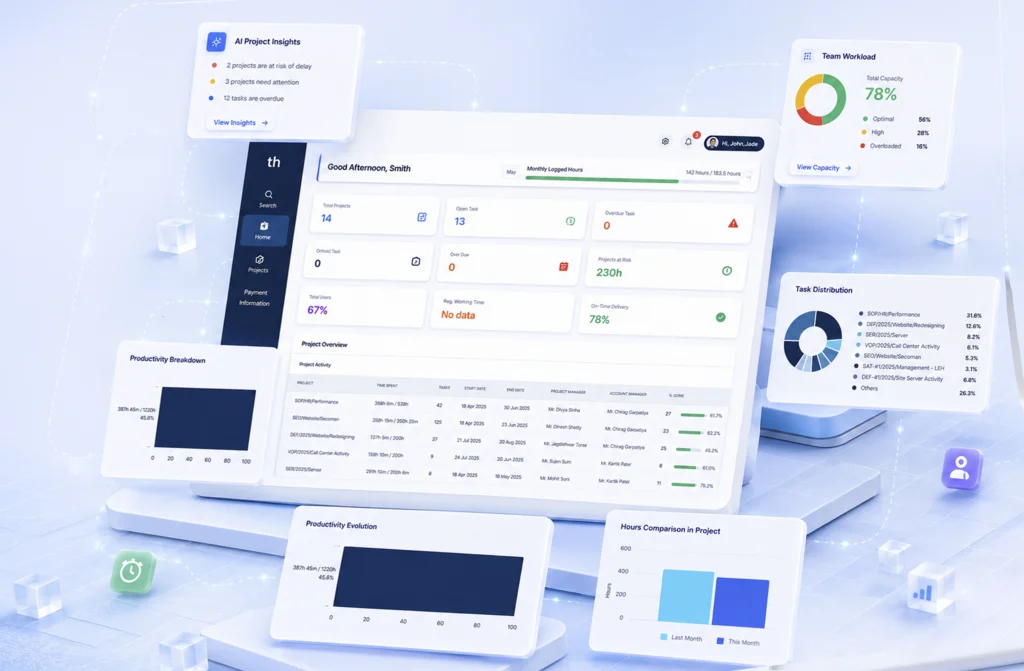
WeekMate runs on one assumption: task tracking is the floor, not the destination. Here’s what that looks like in practice.
| Capability | What It Does |
| Smart Planning | AI-assisted scheduling that balances capacity, deadlines, and priorities |
| Unified Workspace | Tasks, docs, goals, and conversations in one place |
| Workflow Automation | Visual rule-builder. No code required |
| Live Analytics | Real-time dashboards, customizable by role |
| Team Alignment | Shared OKRs, transparent goal tracking across the org |
| Integrations | Slack, Google Workspace, GitHub, Zapier, and more |
Whether you’re a solo founder managing a roadmap or an operations manager overseeing five concurrent workstreams, WeekMate scales to what you’re actually dealing with. Less time managing the tool. More time making progress.
Conclusion
Project management tools have come a long way from checklists and Gantt charts. The teams that are consistently shipping, staying aligned, and hitting deadlines aren’t doing it because they work harder. They’re using smarter systems.
The shift from barely understanding how to manage projects beyond task lists to real project management isn’t a technology upgrade. It’s a change in how work gets done: from reactive to proactive, from scattered to coordinated, from recording activity to driving outcomes.
WeekMate is built for that shift. Try it free and see what project management looks like when it’s designed around results, not checkboxes.
FAQs
1. What’s the difference between task management software and project management tools?
Task management software handles individual to-dos like create, assign, check off. Project management tools cover the whole picture. You can do planning and decide timelines. Assign resources. Get reporting tools. Setup automation. Task management is one feature inside a broader project management system.
2. How do smart project management systems use AI?
They surface what you’d otherwise miss or take too long to find manually. That means predicting delays based on current velocity. They also flag resource conflicts before they blow up. AI can suggest priorities, and generate stakeholder summaries automatically.
3. What are the main benefits of workflow automation in project management tools?
Less manual admin, fewer errors and faster project cycles. Your team can focus on the work that actually needs human judgment. Automation also creates consistency. The process runs the same way every time. No need to rely on anyone to remember the steps.
4. How can I manage projects beyond task lists with WeekMate?
Use the full toolkit: set goals, track milestones and run live dashboards. Keep communication inside the project. Automate your recurring workflows. WeekMate brings that together in one place. So you can zoom between strategic view and task level without switching tools.
5. Is WeekMate suitable for small teams or solo users?
Yes. It scales from individual users managing personal productivity to large teams running complex, multi-stream projects. The interface doesn’t get in your way when things are simple, and it has the depth you need when they’re not.
6. What does the future of project management tools look like?
More AI and tighter integrations with the rest of your tool stack. There’ll be a shift from tracking activity to measuring business outcomes. WeekMate is actively building in that direction.