
Picking CRM software for a small business in India usually starts the same way. Someone on the team says “we’re losing leads because nobody’s following up,” and within a week you’ve got six tabs open comparing tools that all claim to be the best. Some of those claims hold up. Most don’t.
This comparison looks at eight CRM platforms small and growing Indian businesses actually use in 2026, what they cost with real numbers, and where each one falls short. Not just the sales pitch version.
Top 8 CRM Software for Small Businesses in India Compared
| CRM Software | Starting Price* | Best For | Ease of Use | Mobile App |
|---|---|---|---|---|
| WeekMate CRM | ₹400/user/month | Small & growing Indian businesses | ⭐⭐⭐⭐⭐ | ✅ |
| Zoho CRM | ₹800/user/month | SMBs needing a feature-rich CRM | ⭐⭐⭐⭐☆ | ✅ |
| Freshsales | ₹999/user/month | Sales teams focused on automation | ⭐⭐⭐⭐☆ | ✅ |
| HubSpot CRM | ₹1,500/user/month | Startups and growing businesses | ⭐⭐⭐⭐⭐ | ✅ |
| Salesforce Starter | ₹2,000/user/month | Businesses planning to scale | ⭐⭐⭐☆☆ | ✅ |
| LeadSquared | Custom Pricing | High-volume lead management | ⭐⭐⭐⭐☆ | ✅ |
| Kylas CRM | ₹999/user/month | Indian SMEs | ⭐⭐⭐⭐☆ | ✅ |
| Pipedrive | ₹1,200/user/month | Sales-driven teams | ⭐⭐⭐⭐⭐ | ✅ |
*Note: Prices are approximate starting monthly rates and may vary based on the plan, billing cycle, taxes, and vendor updates. Please check each provider’s official website for the latest pricing.
1. WeekMate CRM
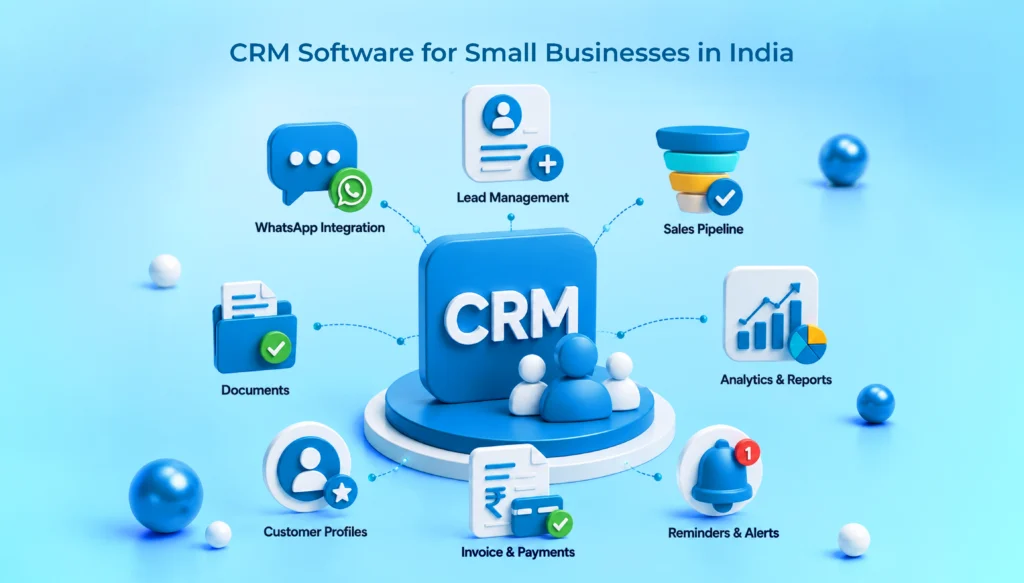
A cloud crm software product that targets Indian service-oriented teams that, on one end, interact with customers through WhatsApp and, on the other, work with Meta Ads and IndiaMART leads. The deals slip away not because the product is wrong, but rather because a follow-up got lost in the maze of a spreadsheet. WeekMate CRM currently manages over 10,000 leads and over 500 active sales pipelines for its users. Switching to WeekMate CRM has improved follow-up rates by 3x for sales teams, based on the reports.
Key Features
- Real-time dashboard with visual pipeline tracking across teams
- Lead capture built directly from Meta Ads, Google Ads, and IndiaMART, no manual entry
- WhatsApp integration for follow-ups and prescription or order reminders
- Built-in invoice and payment tracking, so the finish line doesn’t need a separate tool
- Multiple pipelines and custom modules for businesses running more than one sales process
- Gmail and Outlook sync, plus a customer portal for transparency
- Industry-specific workflows already mapped out for pharmacy, BPO, accounting, manufacturing, and software or IT teams
Pros and Cons
Worth knowing upfront: WeekMate isn’t trying to be everything. It skips the enterprise bloat that makes tools like Salesforce hard to onboard a five-person team onto.
| Pros | Cons |
|---|---|
| WhatsApp-first design means reps actually log activity instead of avoiding the CRM. | Less name recognition globally compared to Zoho or HubSpot, so you’re trusting reviews and a demo more than brand familiarity. |
| Onboarding includes hands-on training, not just a help doc. | Deeper enterprise-scale customization may need a conversation with sales rather than a self-serve toggle. |
| Pricing isn’t locked into a rigid per-seat subscription; there’s a one-time licensing option too. | — |
Pricing
Starts at ₹400/user/month, scaling up based on modules and team size. A one-time licensing option is also available for businesses that would rather avoid recurring fees altogether, which is unusual in this market. Full breakdown on the pricing page.
Best For
Service-led Indian businesses in pharmacy, BPO, accounting, manufacturing, or software and IT who need WhatsApp native follow-ups and don’t want to pay enterprise prices for basic pipeline visibility.
2. Zoho CRM
Zoho is the default answer for a reason. It’s an Indian company (Chennai HQ), which shows up operationally: native GST fields, INR billing with no exchange rate drift, and support that runs on Indian business hours. The free tier is genuinely permanent for three users, not a 15-day trial, so it’s a fair place to test adoption before spending anything.
Key Features
- Multiple sales pipelines and blueprint-enforced sales stages (from Professional up)
- Custom modules, layouts, and fields
- Native GST invoicing and INR billing
- WhatsApp and telephony integration
- Zia AI assistant and predictive scoring (Enterprise and Ultimate only)
Pros and Cons
The jump from Standard to Professional roughly doubles the price. Most of what you’re paying for there is workflow automation, genuinely useful if you’ll configure it, wasted if you won’t.
| Pros | Cons |
|---|---|
| Cheapest credible paid CRM in the Indian market | AI features locked behind Enterprise and Ultimate, not available as an add-on for lower tiers |
| Deep customization once you’re past the free tier | Reporting and multiple pipelines require at least the Professional plan |
Pricing
Free for up to 3 users. Standard ₹800, Professional ₹1,400, Enterprise ₹2,400, Ultimate ₹2,600 per user per month, annual billing, plus 18% GST (reclaimable as input tax credit for registered businesses).
Best For
Businesses already inside the Zoho ecosystem who want everything under one login, and budget-conscious teams testing CRM adoption on the free plan first.
Also Check: Best Zoho CRM Alternatives for Indian Businesses
3. Freshsales
Another product launched by Freshworks is Freshsales. This platform is quite similar to Zoho except that, besides AI integration, it also makes use of Fred the AI lead scoring assistant. Freshsales can be your go-to choice provided that features like built-in calling functionality or a slightly more user-friendly user interface are a bigger concern for you than whether it is not the cheapest available.
Key Features
- Freddy AI lead and deal scoring based on engagement signals
- Shared inbox and omnichannel support (WhatsApp, Facebook, email)
- Built-in phone (Freshcaller), billed per minute as an add-on
- Multilingual dashboards for teams operating across regions
- Native Salesforce data import for teams migrating over
Pros and Cons
Pricing here varies noticeably by source, so confirm current rates before budgeting.
| Pros | Cons |
|---|---|
| AI scoring included from the entry paid tier | Built-in calling isn’t bundled; it’s a separate per-minute charge |
| Native Salesforce migration tooling | Bot sessions and CPQ licenses cost extra beyond the base plan |
Pricing
Reported roughly ₹1,000 to ₹1,300 for the Growth plan, ₹3,200 to ₹3,600 for Pro, and ₹4,900 to ₹6,000 for Enterprise per user per month. Figures vary across sources; check Freshworks’ own pricing page.
Best For
Teams wanting AI-powered lead scoring and built-in calling more than they want the cheapest possible sticker price.
4. HubSpot CRM
HubSpot’s main CRM is completely free and always will be. But it is also a great tool that can be used for tracking both contacts and deals if you do not use automation. The issue comes up when you realize you have to do a lot of manual work to handle everything. For most companies looking at HubSpot, they are really just looking at whether to stay on the free starter plan or gradually upgrade towards the professional one.
Key Features
- Free CRM with contacts, companies, deals, and tasks, no time limit
- Starter tier adds automation basics across Marketing, Sales, and Service Hubs
- Predictive lead scoring and meeting scheduling (Professional and up)
- 900+ integrations across the HubSpot ecosystem
Pros and Cons
There’s a real price cliff between Starter and Professional. One tracked example showed Marketing Hub Professional at $890 a month plus a $3,000 onboarding fee, a jump of roughly 44 times over Starter.
| Pros | Cons |
|---|---|
| Free tier has no time limit and covers genuine CRM basics | Professional tier pricing jumps sharply, with mandatory onboarding fees |
| Starter tier is honest value for a small team’s first paid CRM | Contact allowances get restrictive quickly once marketing automation is involved |
Pricing
Free CRM available indefinitely. Starter tiers run roughly $15 to $20 per seat per month (about ₹1,300 to ₹1,700). Professional tiers start around $890/month and climb from there.
Best For
Businesses wanting a genuinely free CRM to start with, and comfortable planning ahead for a steep price increase if marketing automation becomes necessary later.
5. Salesforce Starter
Salesforce’s Starter edition is the accessible entry point into a platform mostly known for enterprise pricing and depth. Small teams sometimes buy it expecting Salesforce’s famous feature set and find the entry tier fairly basic by comparison, worth knowing before you sign up.
Key Features
- Automatic data capture
- Lead and opportunity management
- Customizable sales process
- Salesforce mobile app
- Support for up to 10 users on the Starter edition
Pros and Cons
| Pros | Cons |
|---|---|
| Same platform you’d scale into later, no migration needed if you outgrow Starter | Starter feels basic next to what Salesforce is known for at higher tiers |
| Mobile app and automatic data capture included from day one | Capped at 10 users, so growing teams hit a ceiling fast |
Pricing
Around $25 per user per month for up to 10 users.
Best For
Small businesses that plan to scale into Salesforce’s broader ecosystem later and want to start on the same platform rather than migrate mid-growth.
6. LeadSquared
LeadSquared targets high-velocity sales, the kind education companies, real estate portals, and BFSI teams run, where lead volume is high and speed to contact matters more than deep customization. There’s no free tier here. This one assumes you already know you need structured, high-volume lead workflows.
Key Features
- Zero lead leakage capture across multiple channels
- Role-based access and secure customer or partner logins
- Cross-sell signal capture for triggered campaigns
- Mobile-responsive forms and offline mode for field teams
- Two tiers: Sales Pro and Sales Super
Pros and Cons
| Pros | Cons |
|---|---|
| Purpose-built for high-volume, high-velocity industries like real estate and BFSI | No free tier or budget entry point for smaller teams testing the waters |
| Strong mobile and offline functionality for field sales teams | Can feel like overkill and overpriced for a small team with a simple sales process |
Pricing
Sales Pro around $25 per user per month, Sales Super around $50 per user per month. Some India-specific sources cite entry pricing closer to ₹1,250 per user per month.
Best For
Real estate, education, and BFSI businesses managing 500+ leads a month who need aggressive automation over flexibility.
7. Kylas CRM
Kylas completely differs in pricing from the rest: their main plan is a flat-rate pricing system that gives access to unlimited users, while other teams usually apply per-seat models. In reality, there is just one pricing option here that totally overturns the way cost is usually discussed for a team that is growing, which is actually the main audience Kylas seeks to serve.
Key Features
- Unlimited users on a single flat monthly fee
- Email automation and AI-powered insights
- Unified dashboard across the sales cycle
- Made in India, positioned specifically for startups and SMBs
Pros and Cons
| Pros | Cons |
|---|---|
| Cost stays flat as headcount grows, no per-seat penalty for hiring | Not cost-effective for very small teams (3 to 5 people) paying for unlimited seats they don’t need yet |
| Simple, unified dashboard with a low learning curve | Less deep customization than Zoho or Salesforce at higher tiers |
Pricing
Reported around ₹13,000 to ₹15,000 a month for the entire team, regardless of headcount.
Best For
Growing Indian businesses expecting to add sales headcount quickly, who want cost predictability instead of a bill that climbs with every new hire.
8. Pipedrive
Pipedrive built its reputation on one thing: a visual pipeline that sales reps actually enjoy using. It’s not the deepest CRM on this list, and reporting isn’t its strongest suit, but adoption tends to be higher simply because the interface doesn’t fight the user, which counts for a lot in practice.
Key Features
- Visual, drag-and-drop pipeline view
- Deal tracking with a strong focus on simplicity
- Popular among small and mid-sized teams avoiding complex setups
- Integrations available, though fewer native options than Zoho or HubSpot
Pros and Cons
| Pros | Cons |
|---|---|
| High actual adoption rates; teams use it consistently instead of abandoning it | Reporting and analytics are limited compared to Zoho or Freshsales |
| Fast to set up with minimal training needed | Fewer built-in India-specific features like native GST handling |
Pricing
Cited anywhere from entry tiers well under Zoho’s Standard plan up to roughly ₹2,100 per user per month at higher tiers. Check current rates directly, as this range is broader than most competitors on this list.
Best For
Small sales teams who’ve tried a more complex CRM before and abandoned it because nobody used it consistently.
Must Check: List of Top CRM Software in India
How to Choose the Right CRM Software for Your Small Business?
- Understand Your Sales Process First: Skip the feature list for a minute. Map out how a lead actually moves through your business today, even if that process lives in three WhatsApp groups and a shared spreadsheet. A CRM should mirror that process, not force you into someone else’s idea of a sales funnel.
- Estimate Future Team Growth: A 5-person team and a 25-person team need different pricing models. Per seat pricing (Zoho, Freshsales, HubSpot) gets expensive fast at scale. Flat rate pricing (Kylas) works better once you’re confident about growth. Guessing wrong here is the single most common regret business owners mention after a year of use.
- Evaluate Integration Requirements: WhatsApp, Gmail, Meta Ads, Google Ads, IndiaMART. Whatever your lead sources actually are, confirm native integration exists before signing anything. A CRM that needs Zapier or a developer to connect your main lead channel adds ongoing cost and fragility that doesn’t show up on the pricing page.
- Compare Pricing and ROI: Add up GST, per-minute calling charges, bot session limits, and implementation fees before comparing final numbers across platforms. The lowest listed price and the cheapest actual bill are often two different numbers.
- Assess Vendor Support Quality: Ask this directly during a demo: what happens when something breaks on a Friday evening? Indian business hours support, WhatsApp support channels, and hands-on onboarding matter more once the CRM is actually running your pipeline.
Hidden CRM Costs Small Businesses Should Know Before Buying
- User-based Pricing Models: Per seat pricing sounds simple until your team doubles in a year. Run the math for your 12-month headcount plan, not just today’s team size.
- Customization charges: Custom modules, fields, and workflows are sometimes included, sometimes billed separately depending on the tier. Confirm this before assuming a plan covers what you actually need.
- Integration Costs: Native integrations are free. Third-party connections through Zapier or Make usually aren’t, and those subscriptions add up quietly over a year.
- Training Expenses: Some vendors include hands-on onboarding. Others hand you a help doc and a support ticket queue. That difference affects whether your team adopts the tool in week one or abandons it by month three.
- Premium Support Fees: Faster response times, dedicated account managers, and priority phone support often sit behind a higher tier or a separate add-on entirely.
CRM Trends Every Small Business Owner Should Watch in 2026
1. AI-powered Lead Management
Lead scoring that used to be an enterprise feature is now standard even in entry-tier plans from Zoho, Freshsales, and WeekMate. Worth testing during any trial, not just reading about.
2. WhatsApp First Communication
For Indian small businesses, this isn’t a nice-to-have anymore. It’s usually where the actual conversation with a customer is happening, whether the CRM supports it natively or not.
3. Mobile CRM Adoption
To make salespeople, distributors, and remote workers efficient, CRM software should work seamlessly on phones and not only display beautifully on a desktop dashboard.
4. Workflow Automation
Automated reminders for follow-ups and automatically triggered sequences can fix one of the major causes of dropped sales: sales reps forgetting to bring the deal up again.
5. Unified Customer Data
One timeline showing every call, email, WhatsApp message, and invoice per client. When a customer calls in, whoever answers shouldn’t be starting from zero.
Final Verdict: Which CRM Software Should You Choose?
If you’re a service-led Indian business managing leads across WhatsApp, IndiaMART, and Meta Ads, and you want a team that’ll actually log activity instead of avoiding the tool, WeekMate CRM is built specifically for that scenario, with pricing that doesn’t lock you into a rigid subscription.
- If budget is the only constraint and you’re happy to configure things yourself, Zoho’s free tier is hard to beat as a starting point.
- Freshsales and HubSpot suit teams wanting more polish or AI scoring baked in.
- Salesforce Starter and LeadSquared make sense if you’re planning for serious scale from day one.
- Kylas is worth a look the moment your team size becomes unpredictable.
- Pipedrive wins if your last CRM failed because nobody used it.
- There’s no universal best here. There’s a best fit for your sales process, your team size in 12 months, and how your leads actually reach you.
Ready to stop losing leads to a missed follow-up? Book a quick call to see how it fits your sales process.
Frequently Asked Questions
1. Which CRM software is best for small businesses in India?
It depends on your sales channels and team size. WeekMate CRM works well for WhatsApp-heavy, service-led businesses. Zoho CRM suits budget-conscious teams starting with its free tier. There isn’t one universal best, only a best fit.
2. How much does CRM software cost in India?
Entry pricing ranges from free (Zoho, HubSpot) to around ₹400 to ₹800 per user per month for budget options like WeekMate CRM and Zoho Standard, climbing to ₹2,000 or more per user monthly for enterprise tiers like Salesforce or Freshsales Enterprise.
3. Which CRM offers WhatsApp integration?
WeekMate CRM, Zoho CRM, and Freshsales all support WhatsApp integration natively or through connected apps, making them common picks for Indian sales teams that communicate primarily over WhatsApp.
4. Is CRM software necessary for small businesses?
Not legally required, but most lead leakage in small businesses comes from missed follow-ups and no visibility into where deals stall. A CRM fixes that process problem directly, and the ROI usually shows up within the first quarter of consistent use.
5. Which Indian CRM software is best?
WeekMate CRM and Kylas CRM are both built specifically for the Indian small business market, with WeekMate leaning into WhatsApp first, industry-specific workflows, and Kylas offering flat-rate, unlimited user pricing.
6. How long does CRM implementation take?
Simple setups with a small team typically go live within 3 to 7 days. More complex implementations involving custom modules, data migration, and multiple integrations can take 2 to 4 weeks.