
Here’s a pattern worth noticing. Ask a sales ops manager why their CRM rollout fell flat, and rarely will they blame the software. They blame the rollout.
Three months in, the “modern CRM” everyone was excited about has quietly turned into an expensive contact list. Nobody logs calls in it. Reps go back to WhatsApp and Excel the second nobody’s watching. Leadership stops checking the dashboard because the data’s half-empty anyway.
None of that is a software problem. It’s a planning problem.
If your business is looking at a CRM implementation right now, this guide covers what genuinely needs to happen before, during, and after go-live. Not the version from a vendor’s onboarding deck. The version that holds up once your sales team is actually using it.
What is a CRM implementation?
CRM implementation is the structured process of planning, choosing, configuring, and deploying customer relationship management software to centralize customer data, automate sales workflows, and improve team adoption across an organization.
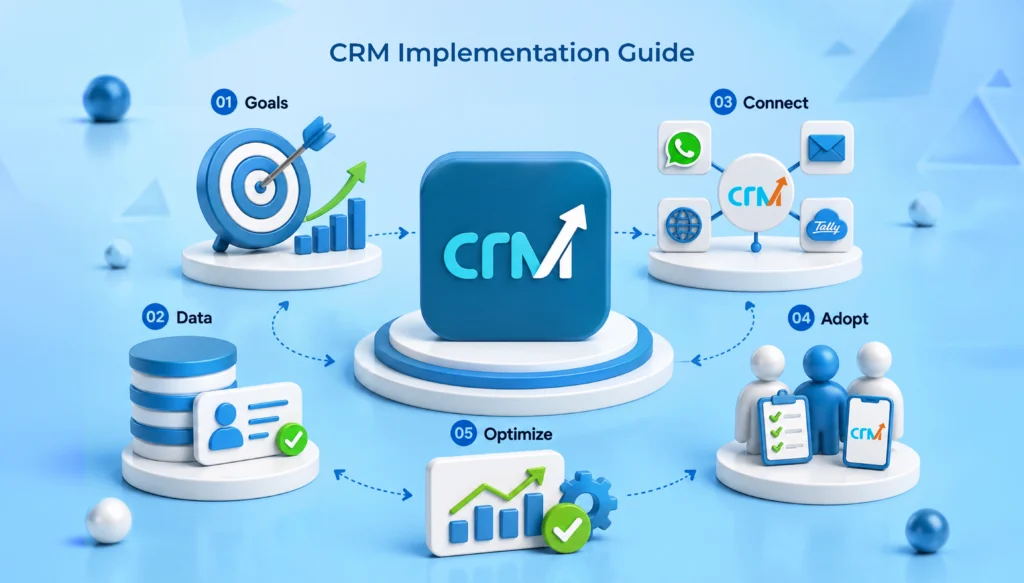
A real CRM implementation covers goal setting, data migration, workflow configuration, integrations with whatever tools your team already relies on, training, and a change management plan that helps the team adopt it.
Buying software is a purchase decision. You compare a few tools, sit through some demos, and sign a contract. Done in an afternoon, maybe a week if procurement is slow. Implementing it is different entirely. That is the part measured in weeks, sometimes months, and it’s the part that decides whether any of this was worth the money.
Why CRM Implementation Matters More Than CRM Selection?
Teams spend three, four, or sometimes six weeks comparing Zoho against HubSpot against Salesforce against whatever their competitor uses. Feature grids get built. Pricing tiers get argued over in Slack. Then, once the contract’s signed, implementation gets handed off like an afterthought, “the vendor’s onboarding team will sort it out.”
We would rather work with a decent CRM software that is implemented well than a great CRM implemented badly. Making a powerful platform with unsorted data, no responsibility, and no training results in shelfware within two quarters. Using a less advanced tool with clean, organized data, a mapped sales pipeline, and a team that fully utilizes the technology is the way to get it adopted.
Selection happens once. Implementation is where the value gets built, or quietly lost. Most CRM failures trace back to a rushed rollout. Not weak software.
CRM Implementation Checklist: Requirements & Roles
Six things need to be in place before configuration even starts. Skip one, and you’re doing rework later, for sure.
- Clear business goals come first. What’s the actual problem? Faster lead response, fewer follow-ups slipping through the cracks, better pipeline visibility for leadership? Write it down in specific terms. “Improve sales” is not a goal. It’s a wish.
- Executive and stakeholder support matters more than people expect. If leadership treats the CRM as optional, the sales floor will too. You need visible backing from whoever sales and support report to. Budget approval alone isn’t enough.
- Defined business processes need mapping before anything gets configured. Lead stages, handoff points, approval steps. A CRM can’t repair a process that was never written down in the first place.
- Clean and organized customer data. Duplicate contacts, dead phone numbers, three different spellings of the same company name. Migrating a mess into shiny new software just relocates the mess.
- CRM software selection and integrations. Confirm the platform actually connects to what your team uses daily. Email, WhatsApp Business, accounting software, website forms. Gaps here are where daily workflows quietly fall apart.
- And user training with real change management behind it. Not a checkbox. An actual plan, with actual time budgeted. Adoption almost never happens on its own.
9 Steps of A Successful CRM Implementation Process
This is the sequence that holds up in the real world, not the tidy version from a vendor’s slide deck. A practical CRM implementation steps.
Step 1: Define Business Goals
Start with outcomes, not features. “Fewer leads falling through during the follow-up window” gives you something to configure around. “We want something modern” gives you nothing.
Pick two or three measurable targets: response time, conversion at a specific pipeline stage, forecast accuracy. These become your yardstick later, when someone asks whether this was worth it.
Step 2: Form a CRM Implementation Team
Keep it small. Someone from sales, someone from IT or ops, and a project owner with actual authority to make calls. Two to four people are usually the sweet spot. Bigger committees just slow things down without improving anything.
One person needs to own this. Not a rotating cast of “whoever has bandwidth this week.” One name, accountable when something breaks, or a decision needs to happen fast.
Step 3: Analyze and Map Existing Processes
Sit down with sales and support and document how work actually happens. Not what the process manual claims happens. The real version, warts and all. There’s usually a gap between the two, and that gap is exactly what your CRM configuration needs to account for.
Map lead sources. Map stage definitions. Map who hands off to whom, and when. This becomes your blueprint for step six.
Also check : Excel to CRM Migration Guide for Indian Sales Teams
Step 4: Choose the Right CRM Software
Haven’t finalized this yet? Evaluate against the process you just mapped, not a generic feature checklist copied from a review site. Look at the ease of use for your team’s actual comfort level with software. Look at pricing that scales sanely; not per-user costs that punish you the moment you hire.
For Indian SMBs specifically, WhatsApp-first workflows tend to matter more in practice than an enterprise feature list nobody on a 12-person sales team will ever touch.
Must Check : List of Top CRM Software for Businesses in India
Step 5: Prepare and Clean Customer Data
Deduplicate. Standardize formats like dates, phone numbers, and company names. Decide what actually gets migrated versus what gets archived and left behind.
This is the step that gets skipped under deadline pressure most often. It’s also the one that causes the most frustration three months later, when someone pulls a report and half the numbers don’t make sense.
Rough rule of thumb: budget at least a week for cleanup on anything beyond a few thousand records.
Step 6: Configure and Customize the CRM
Set pipeline stages, custom fields, and automation rules for the custom crm software based on the mapping from step three, not a wishlist. Resist copying every single field from your old spreadsheet into the new system. Some of that was clutter. Leave it behind.
Keep the first version lean. You can always add complexity once the team is comfortable. Adding it back later is easy. Stripping out an overbuilt system nobody understands is not.
Step 7: Integrate the CRM with Existing Systems
Integrate crm software with existing systems like email, calendar, WhatsApp, accounting, whatever generates leads: website forms, ad platforms, the lot. Test each connection with real data before go-live. Not a demo scenario. Real records, real edge cases.
An integration that fails after launch causes far more damage than one that fails during a test run nobody’s counting on yet.
Step 8: Train Users and Go Live
Role-based training beats one generic session for the whole company. A rep needs different training than a support agent. A manager reviewing dashboards needs something different again.
Consider going live with one team or one region first. Gather feedback. Fix whatever’s broken. Then expand. Launching company-wide on day one, with zero real-world testing, is how small friction points become permanent adoption blockers.
Step 9: Monitor and Optimize
Go-live isn’t the finish line.
Check usage at 30, 60, and 90 days. Are people actually logging calls and updating deals, or has everyone quietly drifted back to old habits? Pull up the goals from step one, compare them against real numbers, and adjust the configuration as patterns show up. They always do.
Common Challenges of CRM Implementation
- Poor user adoption is the number one reason. Inevitably, your staff will not bother updating data if the call log feature takes longer than just sending a WhatsApp. In most cases, ease of use takes precedence over feature depth.
- Dirty customer data is a close second. Garbage in still means garbage out. Skipping cleanup is the shortcut that comes back around eventually.
- Lack of executive support turns the CRM optional in practice, even when it’s mandatory on paper. People notice what leadership actually checks, not what leadership says matters.
- Over-customization is sneaky. Trying to replicate every quirk of the old process inside the new system tends to produce something bloated and confusing. Not always, but often enough that it’s worth watching for.
- Integration issues turn the CRM into a second inbox nobody checks. That defeats the entire point of having one system.
- And unrealistic expectations round it out. A CRM doesn’t fix a broken sales process on its own. It’s a system. Not a substitute for actual strategy.
CRM Implementation Strategy: 6 Best Practices
1. Start with business processes, not features. Configure around how your team genuinely sells and supports customers, not around whichever feature the sales rep spent the most demo time on.
2. Keep initial setup simple. Launch with the essentials only:
- Pipeline stages
- Core fields
- Basic automation
Add complexity gradually, once the team’s actually comfortable navigating the basics.
3. Assign CRM ownership to one person. Not a committee, not “the IT team” as a vague collective. Ownership creates consistency; shared ownership usually means no ownership.
4. Focus on user adoption above almost everything else. Make the CRM easier to use than to avoid. In practice, that usually means fewer clicks, mobile access, and WhatsApp or email built right in rather than bolted on.
5. Measure CRM success regularly, quarterly at a minimum. Go back to the goals from step one and check: is the system actually moving those numbers, or just sitting there looking functional?
6. Optimize based on real usage data, not assumptions. A field nobody fills in? Remove it. Reps consistently skipping a step? Ask why before slapping on another mandatory field to force compliance. That approach rarely works anyway.
Final Thoughts: Next Steps for Your CRM Rollout
CRM implementation isn’t a weekend project. Treat it like one, and you’ll be back here in six months wondering why adoption never took off.
Get the goals clear. Get the data clean. Map the process, train the team properly, and the software part becomes almost the easy half.
For growing businesses in India, the practical path is usually the simplest one that actually fits how your team already works. Not the one with the longest feature list on the pricing page.
So, are you planning to implement CRM for your team? WeekMate CRM is built around how Indian sales teams actually work: WhatsApp-first, guided onboarding, and pricing that doesn’t punish you for growing.
Frequently Asked Questions
1. How much does a CRM implementation cost?
Mostly, it all comes down to the number of people on the team, the amount of data you handle, and how deep you want the personalization to be. Small companies with a basic sales cycle manage the implementation phase with hardly any extra costs except the subscription fees. For implementing larger systems that require custom integrations, costs will mainly arise from labor and consultation, apart from the licensing fee.
2. How long does CRM implementation take?
For small or medium teams, it takes around two to six weeks between goal-setting and go-live. It usually works if everything proceeds smoothly. If a larger organization involves multiple departments or calls for complex integrations, the implementation may take a few months.
3. What should a company do before implementing a CRM system?
Define goals clearly. Get leadership on board, not just budget-approved but genuinely invested. Map the existing sales process and be honest about your current data quality before you commit to a timeline. If you skip any of these, it tends to resurface later. Usually at a worse moment.
4. Why does having a CRM timeline matter?
Without one, “we’ll get to training next month” quietly becomes three months of low adoption and a system nobody trusts. A timeline also sets expectations with leadership about when results should realistically start showing up, which matters more than people think when budget conversations come around again.
5. Who should lead CRM implementation?
Someone with visibility into both the sales process and day-to-day tool usage. It could often be a sales ops lead or a senior team member who is close to the actual workflow. Not necessarily an IT person with no sales context, though IT support obviously helps. Whoever leads it needs authority to make configuration calls without waiting for sign-off for every small change.
6. When should you hire a CRM implementation partner?
It is worth considering when your data is large or genuinely messy, when integrations get complex, or when your internal team just doesn’t have the bandwidth to run this properly alongside their day jobs. For simpler setups on platforms designed for guided onboarding, many growing businesses manage it internally. No additional consulting cost is required.
7. How do you increase CRM adoption?
The main idea is to provide a very easy-to-use user interface. This is done by integrating CRM with the tools employees already use, for example, WhatsApp and email. Also, one of the tricks is not to force users to adopt CRM but rather to let them use CRM as their main tool for work. They become involved in the process, resulting in higher acceptance rates.
8. How to measure CRM implementation success?
Track the specific goals set at the start: response times, conversion at key stages, forecast accuracy, fewer missed follow-ups. Usage metrics matter just as much. If reps are still logging activity consistently at the 90-day mark, adoption is stuck. If usage tapers off after the first few weeks, that’s your cue to revisit training or simplify the setup before it slides further.