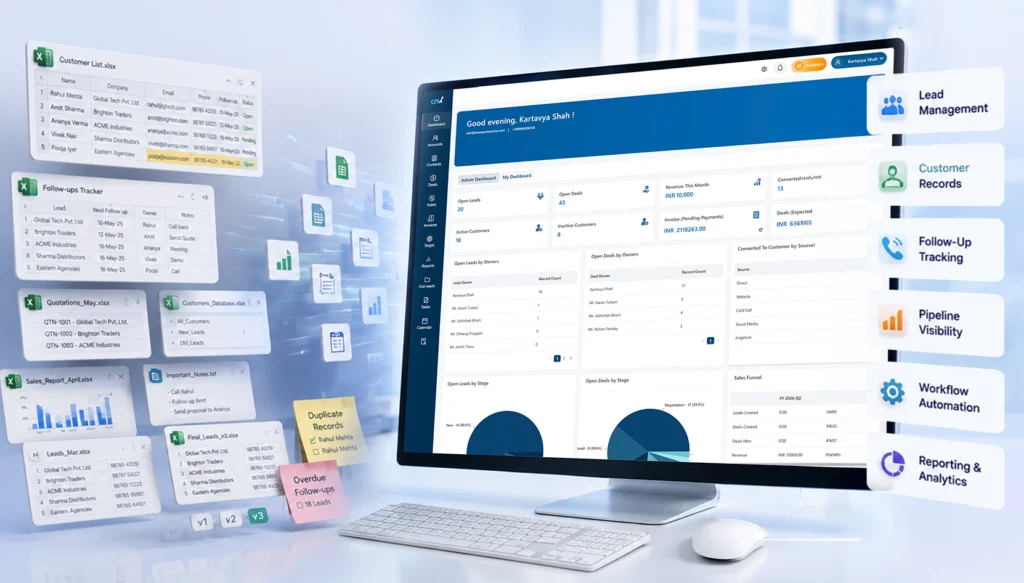

Everything looks fine from the top. Leads are in Excel, follow-ups are “tracked,” and reports are being made. But underneath? It’s messy. Files everywhere. Duplicate entries. Missed callbacks. Someone updates a sheet, someone else overwrites it.
And slowly, deals start slipping.
This calls for a cloud-based CRM software to streamline your data and make it user-friendly.
If you have been managing your sales pipeline using spreadsheets like Excel or Google Sheets, it’s fine. Most Indian businesses start like this only. It’s easy to use, widely available, and cheap. At some point or another, it stops working.
This guide helps you transition from spreadsheets to CRM software without disrupting your sales. No fluff. No theory overload. Just what actually works.
Why Businesses Move from Spreadsheet to CRM
Spreadsheets are easy to start with, but hard to grow with.
In the early days, when you’re handling maybe 50–100 leads, Excel feels manageable. But once your pipeline grows, cracks start showing, and fast. Let’s see how:
Limitations of Excel and Google Sheets
Honestly, spreadsheets were never designed for sales management. Here’s where they break:
- Manual data entry becomes overwhelming
- Version control turns chaotic (“Final_v3_updated_latest.xlsx”… sound familiar?)
- Data gets scattered across multiple files and teams
- No reminders for follow-ups
- Zero visibility into the customer journey
And the biggest one? No accountability. You don’t really know who followed up or who didn’t.
The Hidden Costs of Spreadsheet-Based Sales
It is not about inconvenience or messy files. Spreadsheets quietly start affecting your revenue, the team’s efficiency, and even customer experience.
Here’s what really happens:
- Lost leads: Leads drop more often than you think. A missed entry, an overwritten file, or a simple human error, and boom! A potential deal is gone.
- Delayed responses: Follow-ups are delayed as there are no reminders or real-time updates. Even a few hours can make or break a deal.
- Lower conversion rates: Your conversions suffer when there is no structured process. Moreover, leads are missed, conversations pause, and opportunities slip away.
- Reporting inaccuracies: Manual reports often have errors. Data gets outdated, numbers don’t match, and decisions are made on unreliable information.
Benefits of CRM Software Over Spreadsheets
A good CRM not only stores data. It also organizes, automates, and streamlines your sales process.
- Centralized customer database: All your customer information is stored in one place. So, your team does not have to go through multiple files to find what they need.
- Real-time collaboration: Everyone works on the same updated data. This means fewer miscommunications and no confusion.
- Better pipeline visibility: You can see the status of every deal clearly, making it easier to track progress and spot bottlenecks.
- Automated follow-ups: Reminders and workflows ensure no lead is forgotten, even when your team is handling multiple conversations.
- Improved forecasting: Your sales predictions become more reliable and easier to plan with accurate and real-time data.
5 Signs Your Business Needs CRM Software
Sometimes, the need for a CRM isn’t obvious at first.
It doesn’t suddenly become a big problem. It begins with small inefficiencies, missed tasks, and constant troubleshooting. If you look closely, the signs are usually right there, and then you realise why CRM is essential for your business.
1. Your Sales Team Is Missing Follow-Ups
This one hurts the most because it directly impacts revenue.
A lead shows interest, maybe even asks for details, and then nothing. There is no call, a message, or a reminder. It’s not like your team doesn’t care. It’s just that things slip away. Spreadsheets don’t remind people. They don’t nudge. They just sit there.
And in a busy sales environment, relying on memory or manual tracking almost always leads to missed opportunities.
2. Reporting Takes Too Much Time
If your team spends hours making reports, then something’s wrong. Pulling data from different sheets and fixing errors takes time. And by the end, the report is already outdated.
Reporting shouldn’t feel like another task. It should just exist. Real-time, accurate, and readily accessible.
3. Customer Data Is Scattered Everywhere
This is more common than most teams admit.
Some data is in Excel. Some in someone’s inbox. A few conversations are on WhatsApp. A few notes are somewhere else. So when a sales rep needs context, they start digging. Asking around. Guessing. And that slows everything down.
Worse, it creates a broken customer experience, where the client has to repeat things again and again.
4. Sales Managers Lack Visibility into Performance
If you’re a sales manager, you probably know this feeling.
You think deals are progressing, but you’re not really sure. You don’t have a clear view of who’s doing what, which deals are stuck, or where the bottlenecks are.
So decisions become reactive instead of strategic. Without proper visibility, managing a sales team turns into constant follow-ups and micromanagement, which isn’t scalable.
5. You Want to Scale Without Operational Chaos
Growth sounds exciting until operations start falling apart. More leads, more team members, more deals, and suddenly your existing system can’t keep up.
Spreadsheets weren’t built for scale. They don’t handle complexity well. So instead of growing smoothly, things feel messy, disorganized, and slightly out of control.
And that’s usually the point where businesses realize that they don’t just need more effort, but they need better systems.
CRM Migration Checklist Before You Start
Before jumping into a CRM, pause. A rushed migration creates more problems than it solves.
1. Audit Your Existing Data
Start with the cleanup.
- Remove duplicate entries
- Fix inconsistent formats
- Identify incomplete records
- Delete outdated contacts
Messy data in = messy CRM out. Simple.
2. Define Your Sales Process
This is where many teams struggle.
Ask yourself:
- What are your lead stages?
- How often should follow-ups happen?
- Who owns which leads?
Write it down. Even if it’s rough. Your CRM should reflect your process, not the other way around.
3. Set Clear Goals
Don’t migrate just because “everyone is using CRM.”
Be specific.
- Reduce lead response time
- Improve conversion rate
- Automate follow-ups
- Get accurate reports
Clear goals = measurable success later.
4. Choose the Right CRM Software
Not all CRMs are built for Indian businesses.
Look for:
- Easy-to-use interface (your team should adopt it quickly)
- Mobile accessibility (field sales matters)
- WhatsApp & email integration
- Affordable pricing
- Scalability as your team grows
And the best part would be to choose a cloud based CRM software for flexibility, which covers all these aspects.
How to Migrate from Excel to CRM (7 Steps)
Let’s get into the actual transition.
Step 1: Clean and Organize Your Data
Before importing anything:
- Remove inactive contacts
- Validate phone numbers and emails
- Classify leads (hot, warm, cold)
This step saves you hours later.
Step 2: Import Data into CRM
Most CRM tools support CSV imports.
Focus on:
- Correct field mapping
- Matching columns properly
- Verifying imported data
Take your time here. Small errors can create big confusion later.
Step 3: Set Up the Sales Pipeline
Now your CRM starts making sense.
Define:
- Deal pipeline (e.g., New Lead → Qualified → Proposal → Closed)
- Ownership rules
- Lead statuses
Make it simple. You can always refine later.
Step 4: Configure CRM Workflow Automation
Now the real magic.
Set up:
- Auto-reminders to follow up
- Lead assignment rules
- Email workflows
- Follow-up sequences
But don’t overdo it initially. Start small.
Step 5: Train Your Sales Team
A CRM is only as good as the people using it.
- Conduct hands-on sessions
- Create simple SOPs
- Encourage mobile CRM usage
And yes, it’s normal for people to resist initially.
Step 6: Test Before Complete Rollout
Don’t change everything in one go.
- Run a pilot with one team
- Validate workflows
- Check reporting accuracy
Fix issues early.
Step 7: Fully Transition Away from Excel
This is important. Set a clear deadline.
- Stop updating excel
- Shift all activity to CRM
- Monitor adoption
If you keep both systems running, your team will default to Excel.
5 Best Practices to Migrate from Excel to CRM
A migration from Excel to a CRM system can seem overwhelming. And it is.
But it doesn’t have to interrupt your ongoing sales scenario. You can take it as a gradual process rather than a sudden switch.
1. Start Small with One Team
You don’t have to roll it out across the entire organization on day one. Start with a smaller group. Maybe one sales team, or a specific region.
This gives you space to:
- Test how things actually work
- Identify gaps or confusion
- Fix issues before scaling
2. Migrate in Phases
Trying to move everything in one go can be a lot of work. You should rather consider breaking the migration into multiple phases to decrease the workload of your team.
- Start with active leads
- Then move recent customers
- Bring in older data later if needed
This keeps things manageable and makes sure your team can continue working without additional workload.
3. Maintain Backup Copies
Even if everything goes smoothly, it’s always better to be safe. Keep your original Excel files as backup during the shift.
Not because you’ll need them daily. But if something feels off, you can always go back and verify. It’s a small step that removes a lot of uncertainty.
4. Focus on User Adoption
A CRM only works if your team actually uses it. And adoption doesn’t happen automatically. People need clarity, comfort, and a reason to change their habits.
- Keep the system simple initially
- Show how it makes their work easier
- Encourage consistent usage from day one
When your team starts relying on the CRM naturally, that’s when the transition really succeeds.
5. Track Early Success Metrics
Don’t wait months to see if things are working. Start tracking small wins early.
- Are response times improving?
- Are follow-ups more consistent?
- Is data easier to access?
These signals help you understand what’s working and what needs fixing. They also build confidence within the team that the shift is actually worth it.
A smooth CRM transition isn’t about doing everything perfectly. It’s about moving step by step without losing momentum.
Common CRM Migration Mistakes to Avoid
Switching to a CRM can feel like a big upgrade. And it is, if done right. But a lot of teams rush into it, assuming the tool itself will fix everything. That’s usually where things go wrong.
Because the success of a CRM isn’t just about the software. It’s about how you implement it.
1. Migrating Dirty Data
If your spreadsheets are messy, your CRM will be messy too. Duplicate entries, outdated contacts, missing details; when all of this gets carried over, you’re not really starting fresh. You’re just moving the problem to a new system.
It’s tempting to migrate everything quickly. But cleaning your data first makes a huge difference.
- Remove duplicates
- Fix incomplete records
- Standardize formats
A clean CRM from day one saves a lot of frustration later.
2. Choosing Overcomplicated CRM Software
More features don’t always mean better. Some CRM tools look powerful. But end up overwhelming your team. Too many options, too many steps, too much to learn.
And when that happens, adoption drops. People go back to old habits. Spreadsheets, notes, and scattered tracking.
The goal isn’t to find the most advanced CRM. It’s to find one your team will actually use consistently. Make sure to compare different options and choose the right one from the top CRM software that fits your needs.
3. Ignoring Team Training
Even the best CRM won’t work if your team doesn’t understand it. A quick demo or an onboarding session usually isn’t enough.
People need time to get comfortable, to explore, ask questions, and make mistakes.
Without proper training:
- Features go unused
- Processes get skipped
- Data becomes inconsistent
And slowly, the system loses its value. Training isn’t a one-time activity. It’s part of the transition.
4. Lack of Management Buy-In
If leadership isn’t actively involved, the CRM won’t stick.
Sales teams take cues from managers. If managers aren’t using the system, reviewing dashboards, or setting expectations, it sends a message that this isn’t really important.
On the other hand, when leadership is engaged:
- CRM usage becomes part of daily workflow
- Accountability improves
- Teams take it more seriously
Adoption starts from the top.
5. Over-Automating Too Early
Automation is powerful, but only when your processes are clear. A common mistake is trying to automate everything right from the start.
But if your workflows aren’t fully defined yet, automation can create confusion instead of clarity.
- Wrong triggers
- Misassigned tasks
- Overcomplicated processes
It’s better to start simple. Get your basics right. Understand how your team actually uses the CRM. Then layer automation gradually, where it truly adds value.
Avoiding these mistakes doesn’t require perfection; it just requires proper thinking. A bit of patience and eagerness to build things step by step. Implementing a CRM thoughtfully will change not only how you do things now, but also how your company grows over time.
CRM Migration Success Metrics
Switching to a CRM isn’t the finish line. In a way, it’s the starting point. Because once everything is in place, the real question becomes, is it actually working? Is it making things faster, clearer, better or just different?
The only way to know is by looking at the right signals.
1. Lead Response Time
This is usually the first thing that improves and the easiest to notice. Earlier, leads would sit in spreadsheets. Waiting. Sometimes for hours, sometimes longer. Not intentionally, just because no one saw them in time.
With a CRM, things move quicker. Notifications, task reminders, instant access, it all adds up.
So if your response time is reducing, even by a little, that’s a clear sign things are moving in the right direction. And in sales, faster responses mean better chances.
2. Conversion Rate Improvements
More responses are good, but conversions are what really matter. After CRM adoption, you should start seeing a shift here. Maybe not overnight, but gradually.
Why? Because follow-ups become consistent. Conversations don’t get lost. Context is always available.
So instead of starting from scratch every time, your team builds on existing interactions. And slowly, you’ll notice more leads turning into actual customers.
3. Sales Team Productivity
This one feels subtle at first. Your team isn’t necessarily working more. But they’re working smarter. Less time searching for data, less time updating sheets, less back-and-forth confusion.
More time actually selling. You might notice quicker calls, cleaner pipelines, and fewer delays between stages. And then one day it hits you. The same team is handling more leads without feeling overwhelmed.
4. Customer Retention Metrics
A good CRM doesn’t just help you close deals. It helps you keep customers.
Because now, every interaction is tracked. Preferences, past conversations, issues, everything is right there. So follow-ups feel more personal. Support feels smoother. Nothing gets ignored.
And customers notice that. Over time, this reflects in retention rates – more repeat business, longer relationships, fewer drop-offs.
Also Read: How Custom CRM Solutions Improve Customer Retention
5. Reporting Accuracy
This is where things become clear. Earlier, reports might have felt like rough estimates. Numbers pulled together manually, sometimes inconsistent, sometimes slightly off.
With a CRM, reporting becomes real-time and reliable. No guesswork. No last-minute fixes. When you look at your dashboard, you trust what you see. And that leads to faster, more confident, more strategic decision-making.
How to know if it’s working? A quick look:
|
Metric |
What to Look For |
|
Lead response time |
Should decrease significantly |
|
Conversion rate |
Should improve steadily |
| Sales productivity |
More deals per rep |
|
Customer retention |
Higher repeat business |
| Reporting accuracy |
Near real-time insights |
How CRM Workflow Automation Improves Sales Productivity
This is where a CRM really starts to feel different. Not just a place to store data, but something that actively helps your team move faster.
Because when repetitive tasks get automated, your sales team gets their time back.
1. Automated Lead Assignment
Leads coming in is a good problem to have until no one knows who should handle them.
Without a system, leads often sit idle or get picked randomly. Sometimes multiple people reach out. Sometimes no one does. Automation fixes that instantly.
Leads get assigned based on rules — location, deal size, availability, or anything you define. So:
- No delays
- No confusion
- No missed opportunities
The right salesperson gets the right lead at the right time.
2. Follow-Up Reminders
Follow-ups are where most deals are won. And also where most deals are lost. Not because salespeople don’t care, but because things slip. Messages get buried. Priorities shift.
Automation steps in quietly here.
- Reminders pop up at the right time
- Tasks get created automatically
- Nothing depends purely on memory anymore
It adds consistency. And in sales, consistency changes outcomes.
3. Sales Activity Tracking
Earlier, tracking meant asking.
“Did you call this lead?”
“Was there a meeting?”
“What happened next?”
Now, it’s all recorded automatically. Calls, emails, meetings, notes, everything gets logged in one place. Managers don’t have to chase updates. And sales reps don’t have to manually document every step.
It creates visibility without adding extra work. And that’s a rare combination.
4. Automated Reports and Dashboards
Reporting used to take hours. Pulling numbers, updating sheets, fixing errors, and by the time it was ready, it was already outdated.
With automation, reports build themselves.
- Real-time dashboards
- Auto-updated metrics
- Instant insights into pipeline and performance
You don’t wait for reports anymore. You just look. And when data is always available, decisions get faster and sharper.
5. Customer Communication Automation
Staying in touch with every lead manually isn’t realistic. Especially as your pipeline grows.
Automation helps you maintain that connection without overwhelming your team.
- Scheduled emails and messages
- Drip campaigns for nurturing leads
- Instant acknowledgements when someone reaches out
It doesn’t replace human interaction. It supports it. So your team can focus on meaningful conversations, while routine communication keeps running in the background.
When all of this comes together, something shifts again. Less manual effort. Fewer dropped tasks. More structure.
And your sales team starts spending less time managing work and more time actually doing it.
Key Features Indian Sales Teams Should Look for in CRM Software
Not all CRM features are equally useful. Some look impressive on paper, but don’t really help in day-to-day sales. And then there are a few that quietly make a huge difference.
If you’re choosing a CRM for an Indian sales setup, these are the ones that actually matter.
1. Mobile CRM Access
Sales don’t happen at a desk anymore. Your team is on calls, in meetings, travelling, following up between things, constantly moving. So if your CRM only works well on a laptop, it’s already a problem.
A good mobile CRM means your team can:
- Update deals right after a call
- Check lead details on the go
- Add notes instantly
It keeps the momentum going. No delays, no “I’ll update it later”, because later usually doesn’t happen.
2. WhatsApp Integration
In India, this is almost non-negotiable.
Most customer conversations happen on WhatsApp. From first inquiry to final follow-up. But when those chats stay outside your CRM, you lose context.
With WhatsApp integration:
- Conversations get tracked automatically
- Sales teams don’t have to switch between apps
- Follow-ups become more timely and consistent
And honestly, it just feels more natural. Because that’s how customers prefer to communicate anyway.
3. GST-Friendly Reporting
This one’s practical.
Indian businesses deal with GST compliance, invoicing formats, and tax breakdowns. It’s part of everyday operations. So your CRM should support that reality, not complicate it.
GST-friendly reporting helps you:
- Generate accurate financial reports
- Align sales data with accounting needs
- Avoid manual adjustments later
It saves time and prevents small calculation errors that turn into bigger issues.
4. Multi-User Collaboration
Sales is rarely a solo effort. Leads get passed around. Managers step in. Teams collaborate on bigger deals. But without a proper system, this becomes messy: overlapping efforts, missed updates, confusion.
A CRM with strong collaboration features makes things clearer:
- Everyone sees the same updated information
- Tasks and ownership are well-defined
- Internal communication stays structured
5. Cloud-Based Accessibility
This is one of those things you don’t think about until you need it.
Cloud-based CRM means your data is accessible anytime, from anywhere – securely. No dependency on a single system or location.
Especially for growing teams, this matters a lot.
- Remote work becomes seamless
- Data stays synced in real time
- No risk of losing files or versions
6. AI and Automation Features
Modern CRM systems are slowly moving from just storing data to actually helping you make decisions.
With AI and automation, you start seeing:
- Smart lead prioritization
- Automated follow-up suggestions
- Predictive insights on deal closures
- Auto-captured customer interactions
It’s not about replacing your sales team. It’s about reducing manual effort and giving them better direction on where to focus.
And when these features come together, something shifts. Sales stops feeling reactive. Less chasing, more clarity. Less guesswork, more structure.
That’s when a CRM actually starts doing its job.
Excel vs CRM Software: Key Differences
| Excel | CRM |
|---|---|
| Manual updates | Automatic |
| No reminders | Automated follow-ups |
| No workflow | Workflow automation |
| Limited reporting | Real-time dashboards |
| Hard collaboration | Team collaboration |
| Error-prone | Centralized customer database |
Final Thoughts
Switching from spreadsheets to CRM can feel like a big step. There’s hesitation. Resistance. A bit of chaos in the beginning. But staying stuck in spreadsheets? That costs more.
Quietly & consistently. If your business is growing, your systems need to grow with it. Start small. Stay consistent. Keep it simple.
That’s what really works.
Ready to Migrate from Excel to CRM?
If you’re planning to move from Excel to a CRM without any confusion, trial-and-error, and setup headaches, getting expert help can save you a lot of time.
From data migration and workflow setup to team onboarding, the right implementation partner makes the transition smooth and way less stressful. Start with a structured plan. The results will follow.
FAQs
1. Is CRM software better than spreadsheets for small businesses?
Yes. CRM software is better than spreadsheets for small businesses because it offers better structure, automation, and visibility.
2. How long does CRM migration take?
It typically takes 1–4 weeks, depending on the data size and complexity.
3. Can I easily migrate data from Excel?
Yes. Most CRMs support CSV imports with simple mapping that helps you to migrate easily.
4. What is the biggest mistake during CRM migration?
Migrating unclean or duplicate data.
5. Do Indian businesses need WhatsApp integration in CRM?
In most cases, yes. It particularly improves communication and follow-ups.