Marketing finishes a campaign brief. Sales never sees it. Operations finds out about a product change three days after launch, usually from a customer complaint. Sound familiar? That’s what happens when departments work in isolation, and it’s one of the most expensive problems a growing business can have.
It is commonly believed that teams working in cross-functional areas can solve such problems very efficiently. Still, reality is completely different from that. Most companies try to initiate cross-functional collaboration via emails, spreadsheets, and WhatsApp groups. But it gets ignored after 6 PM. This does not work. Only custom project management software built around how the employees actually work is the key factor that bridges the gap. This kind of solution actually cannot just be a generic template downloaded from a SaaS company website used for marketing only.
This is where a good cross-functional project collaboration software steps in. It shouldn’t be just another app for you to log into, but rather, it should be a shared workspace where HR, marketing, sales, operations, and IT actually view each other’s work instantly and get rid of twenty status-update meetings a week. When team productivity goes up, it is because people no longer have to chase information and only then find a reason to act upon it.
What Is Cross-Functional Team Collaboration?
Cross-functional team collaboration is the joint effort of people in diverse fields or departments who are driven towards a common goal, which they attain through full transparency rather than simply by email forwards. For instance, when a new product rolls out on the market, it simultaneously affects marketing, sales, support, and operations, among other departments.
The members of one department cannot do their job really well if they ignore what the others in other departments are doing.
Why Modern Businesses Depend on Cross-Functional Teams
Growing businesses no longer enjoy isolated departments. A startup company that’s scaling team members from 20 to 100 will require HR, sales, and operations to be well-coordinated so that, rather than turning into a mess, the growth brings more revenue. Decisions will be made much faster with cross-functional teams. Another advantage of having cross-functional teams is that problems are detected earlier, as the person who first notices an issue is probably working in a different department than the one that needs to solve it. In effect, cross-functional teams provide a sort of safety net for companies.
Common Collaboration Challenges Across Departments
- Conflicting priorities between teams with different KPIs
- No single source of truth for project status
- Communication scattered across email, chat apps, and spreadsheets
- Handoffs that lose context between shifts or teams
- Delayed approvals because the right person doesn’t know a task is waiting
Most of these aren’t people problems. They’re tooling problems. Fix the tool, and a lot of the friction just disappears.
Why Traditional Project Management Tools Fall Short
Generic project management tools are intended to satisfy everyone somewhat but typically result in satisfying no one. The tools come equipped with default processes, and changing them based on the workflow usually turns out to be costly because of add-ons you had actually wanted to avoid buying in the first place.
Limited Customization
Compared to highly customized tools, standard off-the-shelf tools offer you the same task fields, views, and approval chains whether you’re handling a sales pipeline or a product sprint. This leads to a situation where companies have to tweak their business processes just to be able to work with the software instead of the software adapting to their processes.
Disconnected Workflows
When the three departments work with completely different systems, the sales department uses one, the development team another, and HR handles everything via spreadsheets, each team will come up with a different truth, and that will be the case of three versions of the truth. None of them pays attention until, of course, the deadline runs out of time and everyone turns on one another.
Data Silos and Communication Gaps
Departments typically store information on the application that suits their department the most. So when it comes to compiling reports, it’s done by hand or by copying and pasting. Management gets its information out of the loop and makes a decision based on old data, the consequence of which, quite honestly, is a risk that most companies overlook till it leads them to lose a client.
How Custom Project Management Software Enhances Collaboration
A custom project management system aligns with your departments, approval workflows, and reporting requirements rather than following a one-size-fits-all template.
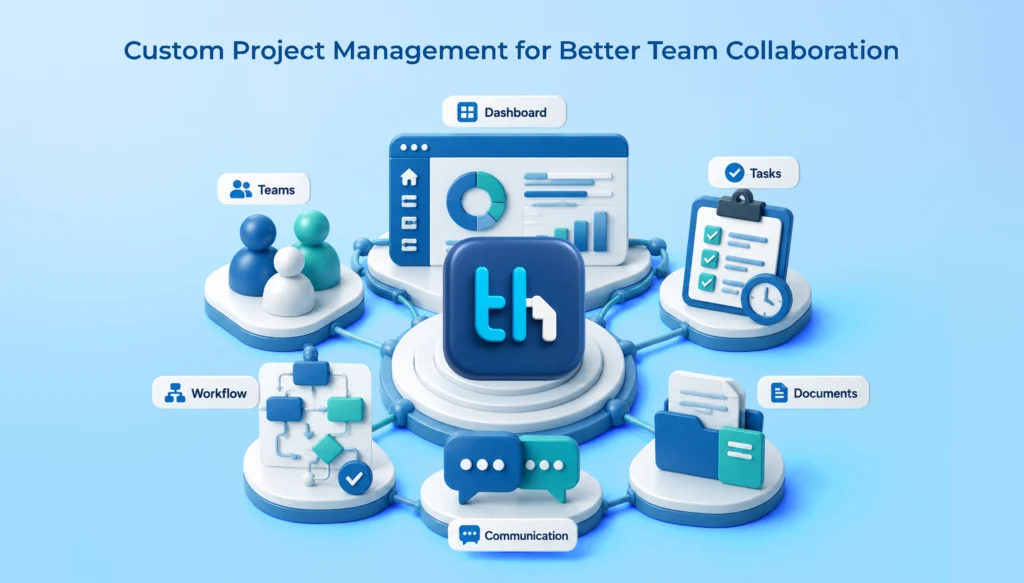
Centralized Project Dashboard
The dashboard is an all-purpose repository for every task, deadline, and project progress. If managers were to ask “what is the overall status” in five different Slack workspaces, the dashboard does it for them.
Role-Based Access and Permissions
Role-based access makes it simple yet effective to keep information confidential. People will have access only to those parts of the client database, salary information, and unreleased campaign plans that pertain to their roles. Hence, there is less opportunity for breaches, and yet cross-project transparency will help teams coordinate smoothly.
Real-Time Task Assignment and Updates
Tasks move the moment they’re assigned. No refreshing a spreadsheet at 5 PM to figure out what got done. Updates appear as they happen, which matters a lot when teams are working across shifts or time zones.
Automated Workflow Management
Custom workflow automation removes repetitive status-chasing. When a task is marked complete, the next person in line gets notified automatically instead of waiting for someone to remember to loop them in.
Integrated Communication
Discussions stay attached to the task they’re about. That one change alone eliminates the classic problem of decisions getting made in a chat app that nobody can find three weeks later.
Shared Documents and Knowledge Base
Files, notes, and reference documents sit next to the work itself. New team members onboard faster because the context is already there, not buried in someone’s inbox.
Key Features That Improve Cross-Functional Collaboration
Not every feature matters equally to every department, but together, they’re what separates a real collaboration tool from a glorified to-do list.
Custom workflows allow each department to set their processes based on their needs while the reports are gathered within a common system. Task dependencies help in recognizing at what stage a delay in one team may become an issue for another team. Resource allocation enables managers to know early on when a particular person is being overworked, which could bring problems downstream.
Gantt and Kanban offer different perspectives that reflect users’ thinking patterns. A couple of managers may want a timeline, whereas a few want to see cards moving around a board. Time management adds accountability without requiring workers to report their hours manually.
Notifications and alerts inform people regularly without having to check the dashboard every hour. Custom reports and analytics help convert raw data into things that leadership can act on. Third-party integrations allow the tool to be compatible with the systems your business currently uses, so you do not have to redesign your entire tech stack for it.
Benefits for Different Departments
HR Team
HR benefits when onboarding tasks, document collection, and policy approvals move through the same system used for project work. New hires get a clear task list from day one instead of a scattered welcome email and a folder link.
Marketing Team
Campaign timelines, content approvals, and creative reviews no longer exist as five different email chains. The marketing lead not only discovers at a glance which asset is in the approval stage with whom but also normally saves a whole day per campaign cycle.
Sales Team
Sales needs speed. When a deal requires input from operations or a custom quote from finance, task-based handoffs keep things moving instead of stalling in someone’s inbox. It’s a small thing, but it shows up directly at close rates.
Operations Team
Operations lives and dies by SLA adherence. Priority-based task queues and real-time status tracking mean nothing slips through simply because a shift changed or a handover got rushed.
IT & Development Team
Sprint tracking, bug logging, and release timelines need to stay visible to non-technical stakeholders too. IT teams often end up as the translation layer between engineering jargon and business priorities. Shared dashboards remove that burden.
Custom Project Management Software for Remote & Hybrid Teams
Indian SMBs and startups have come a long way in work mode. Now, it’s not a surprise if they have some combination of remote and hybrid team members. Shared workspaces are just a necessary part of this new working mode – nothing else but!
- Besides working in real time, distributed teams don’t need to call for check-in calls constantly.
- Cloud accessibility ensures that a job can be done wherever and whenever
- Mobile access matters for field staff, sales reps, and managers who aren’t at a desk all day
- Instant notifications close the gap that usually opens up when people work different hours
AI & Automation in Cross-Functional Collaboration
AI-powered task prioritization will mark items requiring immediate attention at the top without relying on whoever first glances at the dashboard for the decision. Smart notifications can help reduce the disturbance by displaying only relevant info for the particular responsibility of each role.
Besides workflow automation, the predictive capabilities of the project management tool give an advantage in making the right decisions in a timely and accurate manner. Automated reporting comes into play. Still, none of these capabilities can be relied upon to completely substitute human decision-making. Their purpose is merely to remove all repetitive, physical, mundane, time-consuming tasks that once used to dominate a manager’s Monday mornings, giving them some leisure hours to think creatively or make decisions.
You can read our blog to learn more about AI and automation in project management software.
Best Practices for Successful Cross-Functional Collaboration
- Define clear goals before assigning cross-team tasks
- Standardize workflows so every department reports the same way
- Assign ownership explicitly, not “the team will handle it”
- Encourage transparent communication, including flagging delays early
- Track KPIs that matter to the business outcome, not just department activity
- Review project performance regularly, not just at the end of a quarter
Software solves half the problem. These habits solve the other half. Skip them, and even the best tool ends up underused.
Why Businesses Should Choose Custom Project Management Software Over Generic Tools
|
Custom Software |
Generic Software |
| Tailored workflows |
Fixed workflows |
|
Scalable features |
Limited flexibility |
| Better integrations |
Limited integrations |
|
Department-specific dashboards |
Standard dashboards |
| Higher productivity |
General functionality |
Generic tools like Zoho Projects or Asana can be a solution that allows a single team with a simple workflow to be managed successfully. When multiple departments with various reporting requirements come into play, a fixed structure becomes evident through its limitations, and businesses regularly end up purchasing add-ons just to plug the gaps.
Conclusion
Cross-functional collaboration does not fail because teams are unwilling to work together. A failure stems from the available tools not being developed for the real way teams work. Custom project management software helps by bringing everything together. It gives a centralized place with a lot of information; it takes the burden of tedious handovers, and it brings departments workflows they would be happy with and do not have to work around. As a result, team members spend less time chasing each other for status updates and more time doing activities that actually contribute to the business’ development.
WeekMate TaskHub was built around exactly this problem. It brings project planning, task assignment, time tracking, and cross-team communication into one dashboard, with role-based access and workflow automation configured around how your departments already work.
FAQs
1. What is a cross-functional collaboration tool?
A cross-functional collaboration tool is typically a software platform that enables different work areas or departments of a company, e. g., HR, sales, marketing, operations, etc., through a common window of tasks, timelines, and communication so that they no longer need to do their jobs using separate spreadsheets or apps.
2. How is custom project management software different from generic tools like Asana or Zoho Projects?
Generic tools ship with fixed workflows meant to serve a broad range of industries. Custom software is configured around your specific departments, approval chains, and reporting needs, which usually means less manual workaround once it’s in daily use.
3. Can custom project management software work for remote and hybrid teams?
Yes. Cloud accessibility, mobile access, and real-time updates are built in, so distributed teams stay aligned without relying on constant check-in calls.
4. Does automation replace project managers?
No. Automation removes repetitive status-chasing and manual reporting. Project managers still make the judgment calls; they just spend less time on the administrative side of the job.
5. Is custom project management software worth it for a small business?
It depends on scope. A ten-person team with one workflow may not need it yet. Once a business is coordinating three or more departments on shared deadlines, the case for it gets a lot stronger.