
Implementing an HRMS sounds very easy on paper. It’s just a matter of a few steps. Select a tool, transfer data and educate users. It’s done. However, in reality it’s not as easy as it sounds.
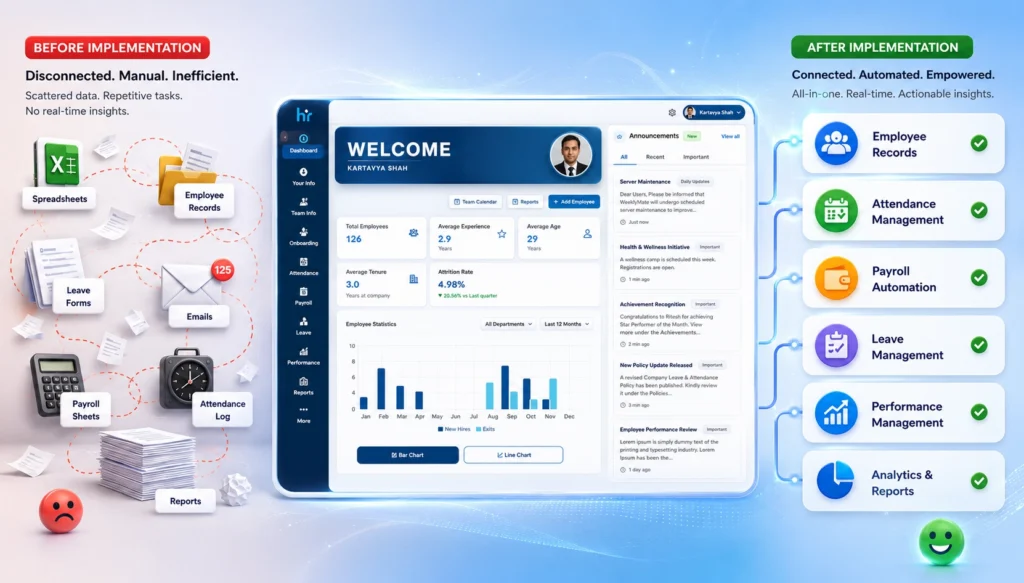
Businesses invest in HR management software with the hope that it will help them become more efficient and streamlined. However, they will initially experience confusion, resistance and poor workflow.
Believe it or not, it’s not the software’s responsibility. It’s the implementation.
This guide will introduce you to some frequent HRMS Implementation mistakes, their causes, and an easy approach to rectify them.
What is HRMS Implementation?
HRMS implementation is the adoption and configuration of an HRMS within an organization. It includes:
- Setting up employee data
- Customizing workflows (such as attendance, payroll, leave and so on).
- Integrating systems
- Training employees
- Testing and live time of the SWCD.
Sounds structured, right? However, implementation is where most of the issues start to arise from the “planned” to the “actual”.
Why HRMS Implementation Matters for Modern Businesses
That is not the only thing HR is about these days. It’s about data management, compliance and experience. HRMS comes in handy in the following ways:
- Eliminate repetitive HR tasks using automation.
- Improve payroll accuracy
- Obey the labour regulations
- Enhance employee self-service
- Deliver real-time analytics
However, if the implementation turns out to be less successful:
- Rather increase the work, don’t decrease it.
- Create payroll errors
- Frustrate employees
- Slow down operations
Yes, implementation is not only imperative, it is important. It’s everything.
Common HRMS Implementation Mistakes
Let’s touch upon the actual issues. These aren’t hypothetical. It is these things that prove to be the real problem in most HR software implementation projects.
1. Lack of Clear HR Objectives
At this point, it all begins. Or, where it unobtrusively starts to drop.
When companies begin their implementation process, the objective or objectives are not specific. There’s excitement, perhaps even pressure – it’s an urgency of leadership. But clarity? Not always there.
Instead, they ask questions such as what the issues are that they are looking to resolve, what the slow or inefficient HR processes are, and what they hope to achieve when the process is finally completed.
When the answers are not available, the system doesn’t do fixes.
2. Choosing the Wrong HR Management Software
Because, not all HRMS systems go well with all businesses, and even though they seem a great fit in a demo can’t be taken for granted.
Some decisions are made quickly and/or the price is a factor. It is also likely to rely on the equipment used by the competitors. What works for one company doesn’t necessarily mean it works for another company.
You’ll often see patterns like:
- Selecting a tool just because it’s cheaper
- Ignoring whether it can scale as you grow
- Overlooking how easy (or difficult) it is for employees to use
- Not checking if it integrates smoothly with existing systems
And over time, the mismatch starts to seep in with regular activities. Little issues turn into big issues.
3. Poor Data Migration Planning
It’s one of those things you know that you can’t do but then you do!
Data from previous systems is generally not clean. It is disjointed, illogical, out-of-date and, if carried out without due regard, is likely to cause issues from the get-go.
Typical problems are:
- Duplicate employee records
- Data lacking in or incomplete information.
- Payroll/compliance information that is inaccurate
- The unorganized formats which are not attached with the new system.
That bad data comes with all the other components on which it relies, including reports, payroll and analytics-when it arrives in the new HRMS!
4. Ignoring Employee Training
It allows the adoption of the most advanced HRMS solution. If people aren’t familiar with it, however, they may not use it after all.
Often training is not adequately attended to. It is hurried, often has too much technical detail and is sometimes not specific to each of the roles within the organization.
What usually happens:
- Employees feel overwhelmed
- They are not completely knowledgeable about the system
- Go back to the Old Ways. Get back to the old tools, e.g. spreadsheets, emails, tracked manually.
After that, the number of adoptions slowly drops. Not that the system is bad, it’s the way that people were not brought along properly.
5. Overcomplicated Workflows
There’s the need to automate everything at once. All approvals, processes, and small steps.
However, complexity can have adverse effects – particularly at the outset.
Over-engineered workflows tend to:
- Help newcomers to the fuzz;
- Increase the chances of errors
- Minimize rates of processes
Sometimes, simplicity is better. At least in the beginning, until people are comfortable and the system settles in.
6. Lack of Stakeholder Involvement
While HRMS may be managed by HR, it can’t just be HR.
It has an impact on various aspects of the organization, Think about it:
- Payroll is crucial to the financial sector.
- IT is responsible for integrations, system stability, etc.
- Self-service features are a part of the employees’ everyday usage.
- The use of reports and insights as the foundation of leadership.
Absence of these stakeholders from the early stages contributes to lack of alignment. Later resistance manifests itself in subtle ways.
7. No Post-Implementation Support
This one doesn’t always get noticed immediately, but it builds over time.
Many people think that the work is complete once the system is up and running. Though the prospect is just the start though.
After implementation:
- New problems begin to arise with use of the system.
- The system needs to be assisted with the use of features.
- Business Processes change and adjustment is needed.
Issues persist when support isn’t given or doesn’t continue. The effects of these over time influence the perception and use of the system. Choices for adoption are not made in a rush. It slowly fades.
Consequences of Failed HRMS Implementation
HRMS implementation does not go well then it creates a disruption in daily activities, payroll and trust of employees. Little errors can cause great trouble and result in poor performance of the overall business.
1. Payroll Errors and Compliance Risks
The first to be affected when HRMS implementation fails is usually the payroll. If there are any mistakes in data entry or if the end user sets it up wrong, the wrong salary might be calculated or the payments delayed or even compliance problems could arise.
2. Employee Frustration
No one can see problems as quick as employees. Frustration accumulates when there are incorrect leave balances, payslips are confusing or the portals are not functioning correctly. This will eventually trickle down to a lack of trust in the system and the organization.
3. Reduced Productivity
If you opt for a poorly implemented HRMS, it can actually end up creating more work, not saving time. HR teams find themselves having to troubleshoot, resolve routine inquiries and deal with workaround solutions. Staff also take additional time in sorting out problems. The result? Slower rate of processes and lowered overall productivity.
4. Increased Operational Costs
Things that are meant to save money can end up costing you quite a bit of money. Reworking, reconfiguring, hiring consultants or even replacing platforms: it costs money! These would be too high costs.
5. Poor HR Data Accuracy
The primary feature of any HRMS is “Data”. However, if the setup is not good, data will be unreliable. The task of reporting is difficult because of duplicate records, missing information, and inconsistencies. Where decisions are based on poor data… they’re poor decisions.
6. Low Software Adoption
No matter how cutting-edge a HRMS is, without people using it, it won’t produce any outcome. If employees are not having to rely on the system, they fall back into old practices – spreadsheets, emailing or manual tracking. Adoptees are lost and the whole idea of adoption fades away.
A quick glance:
| Impact Area | What Happens |
| Payroll | Errors, delays, compliance risks |
| Employee Experience | Frustration, low trust |
| Productivity | Slower processes |
| Costs | Increased operational expenses |
| Data Accuracy | Inconsistent and unreliable data |
| Adoption | Employees avoid using the system |
Step-by-Step Process for HRMS Implementation
Let us understand the step-by-step process for HRMS implementation. Instead of trying to get everything perfect on the first attempt, focus on how clear and easy to use the newly implemented system is. Eventually, it can get better.
Step 1: Define HR Goals
Discover the Requirements of How You Want to Use Your HRMS We would automate jobs, correct payroll mistakes or enhance employee experience. Ensure the objectives are simple and quantifiable so that you can monitor progress in future.
Step 2: Audit Existing Processes
Look at what you are doing in your HR workflows to discern what is working and what can be improved? Which will prevent you from bringing inefficient processes into the new system.
Step 3: Select the Right HRMS Vendor
Do not make this choice based on budget alone, select a vendor that will suit your business needs. Choose an option that is easy to use, scalable and well supported so you can be sure to grow with it.
Step 4: Plan Data Migration
Prepare and clean your existing data before you put in the new system. Proper data management organizes the information, ensures correct functioning, and does not face similar mistakes later.
Step 5: Configure Workflows
The first thing for you is to set up the workflows that will reflect your business processes but those must be simple initially. As your team gets more comfortable, you can always refine and automate.
Step 6: Train HR Teams & Employees
Give context, practical, role based training so users know how to navigate the system. Training ensures a higher level of adoption with minimal confusion.
Step 7: Test the System
Testing using real life scenarios such as payroll processing, leave approvals etc. to see if everything functions smoothly? Testing helps find issues before going live.
Step 8: Go Live and Monitor Performance
Go live, and track both user activity and errors with the system. Feedback is going to help you make improvements and optimize the system in real time.
HRMS Implementation Checklist
A simple checklist to guide your HRMS implementation process. It helps ensure key steps are covered without overcomplicating things.
1. Pre-Implementation
Before starting the HRMS implementation, it’s important to lay a strong foundation by clearly defining what you want to achieve. This phase involves selecting the right software that fits your business needs, cleaning and organizing existing data to avoid errors later, and ensuring all key stakeholders are aligned. Taking time here helps prevent confusion, reduces risks, and makes the entire implementation process smoother and more effective.
- Define goals
- Choose software
- Clean data
- Align stakeholders
2. During Implementation
This phase is about establishing the HRMS system based on the business requirements and workflows. It includes setting up modules, transferring the data (clean and accurate) and integration with existing tools. Close teamwork for testing aspects of the functionality and resolving issues at an early stage. Appropriate training is also offered to ensure seamless integration within departments.
- Configure workflows
- Migrate data
- Train users
- Test processes
3. Post-Implementation
The initial part of this phase starts after the HRMS has been activated and involves ensuring its smooth operation. It’s about tracking system performance, solving problems, and troubleshooting issues to help users adjust to the new workflows. Feedback collection is done regularly to highlight areas for improvement and gaps. The system is optimized on an ongoing basis, and this ensures its evolution in accordance with business needs while maintaining high adoption rates.
- Monitor performance
- Provide support
- Collect feedback
- Optimize workflows
Best Practices for Successful HRMS Implementation
Some things just… work better. Here are some HRMS implementation best practices:
1. Start with Core HR Modules
Start with core HR functionalities such as employee records, attendance and payroll. Trying to tackle everything in a single go can result in teams being overwhelmed and make adoption harder. Begin with the small which builds confidence and is a brief transition before scaling to advanced features.
2. Keep Workflows Simple Initially
You want to eliminate processes through automation immediately… but that will often just complicate everything. Simple workflows are easier to comprehend, validate and maintain. After users get used to it, you can add even more complexity slowly without affecting operations.
3. Prioritize Employee Experience
A good HRMS should make life easier for employees, not more complicated. Emphasis on very friendly UI, time efficacy and self services? Adoption improves naturally when employees find the system easy to use.
4. Ensure Mobile Accessibility
With the more modern work environment, employees want access on the go. With their HRMS being mobile-friendly, they can listen to attendance, leave applications and payslip details from anywhere at anytime! Having that flexibility increases engagement and experience overall.
5. Integrate Payroll & Attendance
This often causes errors due to the use of disconnected systems for business processes, requiring manually checking every workflow and causing unnecessary work. Automating payroll with attendance helps avoid calculation of manual effort, and compliance risk. It also accelerates the payroll, processing a great deal quicker.
6. Conduct Regular Training
Training shouldn’t stop after implementation. Routine sessions are intended to keep the worker up with the new highlights and methodologies. It also minimizes a dependence on HR for menial tasks.
7. Use Cloud-Based HRMS Solutions
Cloud applications provide easy adaptability, scalability as well as maintenance. They also allow for quicker updates and improved performance which fits with modern desires for better speed and availability. Well yes…but what really makes most sense for most businesses today…is cloud.
By the way, cloud systems also contribute to improving core web vitals faster load times and higher accessibility by providing a seamless user experience with optimum interaction between devices.
Must Read: How Can Cloud HRMS Solve Small Business HR Problems
How to Choose the Right HRMS Software?
Your choice of system will therefore eliminate most HRMS implementation challenges upfront. But this is not just about a tool with many features… it’s about pairing something actually fitted to the way your business works today and how that might change for you tomorrow.
1. Scalability
Scalable — Your HRMS growth with you. Something that works for a 50-person team may break at 500. Seek systems that can accommodate rising employee data (big data), more locations, and changing HR needs without being bogged down by slow performance or overly complicated.
2. Ease of Use
If it is difficult to use, folks simply will not. All of this leads to an easy interface, reduced learning curve and as such higher adoption. Sometimes… simpler really is better.
3. Workflow Automation
Automation needs to drive down manual work, not inject more of it. It needs to automate repetitive processes — everything from leave approvals to onboarding tasks but should allow room for flexibility when necessary.
4. Payroll Integration
Mistakes on payroll can be incredibly expensive: financially, but also legally. An HRMS should easily integrate with payroll systems, allowing for accurate calculations and compliant processing in a timely manner.
5. Customization
Every business has its quirks. Your Human Resource Management System (HRMS) must be malleable enough that with minimal tech support, you can change workflows, fields and processes at will. Overly rigid…and it speeds down the road of frustration fast.
6. Compliance Features
Labor laws change, and keeping up manually is tough. Built-in compliance features help ensure your processes stay aligned with regulations, reducing risks and penalties.
7. Customer Support
Things will go wrong at some point—it’s normal. What matters is how quickly they get fixed. Reliable, responsive support can make implementation and ongoing usage much smoother.
8. Reporting & Analytics
Data is only useful if you can actually understand it. Look for systems that offer clear dashboards, real-time insights, and customizable reports to support better decision-making.
Here’s a quick comparison:
| Feature | Why It Matters |
| Scalability | Supports business growth |
| Ease of Use | Improves adoption |
| Workflow Automation | Reduces manual work |
| Payroll Integration | Ensures accuracy |
| Customization | Fits business needs |
| Compliance Features | Avoids legal risks |
| Support | Helps during and after implementation |
| Analytics | Enables better decisions |
HRMS Implementation Challenges And Solutions
A quick look at the most common challenges businesses face during HRMS implementation. Also, practical ways to overcome them.
1. Employee Resistance
Resistance from employees may be hidden. The indicators are that people aren’t logging in, they are not completing the data entry, or they simply don’t want to make the switch from the old systems.
This is typically when staff are either not fully aware of the benefits or are feeling the pressure of change.
Solution: Clear communication and practical training. Describe how they find it easier to do their work with HRMS. Provide practical sessions, short guides, and support to allow them to feel able to use the system.
2. Data Migration Errors
Transferring data can be a messy process. Inaccurate duplication of data, missing data fields or stale data entering the new system. Such errors can have an impact on payroll, reporting, and compliance.
Solution: Prepare and verify your data prior to migration. Perform multiple checks, deduplicate and standardize formats. Although it may sound like a lot of work, it will save you lots of hassle when it comes time to put it to bed.
3. Integration Problems
Typically, integration problems occur when the HRMS system doesn’t integrate seamlessly with other existing systems, such as payroll, accounting, or attendance management. This results in “data silos” and manual workarounds.
Solution: Select software that has robust API features and test software integration early in the process. Don’t wait until go-live – problems are more difficult to correct at that time.
4. Budget Constraints
Limited budgets may limit features, slow down implementation or necessitate compromises. However, attempting to do it all at once can result in overspending.
Solution: Begin with basic hrms modules such as core HR, payroll, attendance etc. and grow step-wise. This is a gradual process, which means that costs are kept under control and yet, value is provided.
5. Compliance Concerns
One place where this could be costly is compliance. Labour laws, tax regulations and reporting requirements vary from region to region.
Solution: HRMS software with built-in compliance features is a way to mitigate risk. Your processes remain up to date with regulations, and you don’t have to manually check them, because of regular updates, automated calculations, and audit trails.
| Challenge | Practical Solutions |
| Employee Resistance | Communicate benefits early, train properly |
| Data Migration Errors | Clean and validate data before migration |
| Integration Problems | Choose systems with strong APIs |
| Budget Constraints | Start with essential modules |
| Compliance Concerns | Use software with built-in compliance features |
Cloud HRMS vs On-Premise HRMS Implementation
Cloud HRMS is a web-based solution, so you can access it from anywhere it goes, and is typically more affordable to implement.
On-premise HRMS will be installed on the company’s servers, which will provide greater control but also require more set-up, maintenance and IT support.
| Factor | Cloud HRMS | On-Premise HRMS |
| Setup Time | Faster | Slower |
| Cost | Subscription-based | High upfront cost |
| Maintenance | Vendor-managed | In-house |
| Scalability | High | Limited |
| Accessibility | Anywhere | Location-based |
This table shows that cloud HRMS solutions offer faster deployment, lower costs, and greater flexibility than on-premise systems.
For most modern businesses, especially those growing or working remotely, a cloud-based HRMS is the more practical choice.
Looking at the current scenario, the cloud is usually the better choice. Not always. Mostly.
HRMS Implementation Timeline: How Long Does It Take?
HRMS implementation usually depends on complexity, but here’s a rough idea:
| Business Size | Timeline |
| Small Business | 2–4 weeks |
| Mid-sized Company | 1–3 months |
| Large Enterprise | 3–6 months |
Rushing this process often leads to mistakes. So take your time where it matters.
Modern HRMS Trends You Shouldn’t Ignore
The current developments to keep your HRMS up with the times are.
HRMS is a rapidly maturing capability. A few trends that are driving implementations these days:
- AI-driven HR analytics
- Employee self-service portals
- Mobile-first HR systems
- Attendance taking is achieved using Facial Recognition Systems (FRS).
- Real-time payroll processing
The ability to connect with productivity applications. If executed properly, these trends can enhance both performance and users’ experience.
Simplify HRMS Implementation With WeekMate
Here’s the truth. The common failure rate of most HRMS deployment strategy is that they attempt too much too early; they aren’t complicated, just difficult to do.
Start small. Stay focused. Keep improving.
This is where the right system comes in handy. The idea of tools such as WeekMate HRMS is to make things easy in the initial stages. It gives teams a chance to get the fundamentals up and moving in the beginning without getting too much into it.
It does not have to be done all at once! It’s about creating a system that expands along with the processes!
Conclusion
Implementing HRMS is more than just a technical project. It’s a business changeover. As with any change, it may get a bit messy. However, when done properly, it:
- Saves time
- Reduces errors
- Improves employee experience
- Enables smarter decisions
Before embarking on putting in or upgrading HR software, consider taking a step back. Start by working on the strategy.
Frequently Asked Questions
1. How long does HRMS implementation take?
It normally takes a few weeks to months. Actually it relies on business size and complexity.
2. What are common HRMS implementation mistakes?
Common HRMS migration challenges involve not planning, data migration issues, insufficient training, and selecting the wrong software.
3. Why do HRMS projects fail?
The most common reasons that HRMS projects fail are: goals are not clearly defined, users are not used to working with HRMS software, and no stakeholders are involved in the process.
4. What is the cost of HRMS implementation?
There is a large variation in the implementation cost depending on business size, customization and software.
5. How can businesses ensure successful HRMS deployment?
Prioritizing clear objectives, effective planning, staff training, and ongoing improvement.