
If you’ve ever spent twenty minutes digging through five different apps just to find one file someone shared, you already get why collaboration tools exist.
At this point, it’s not even a “nice-to-have” thing anymore. It’s kind of the difference between teams actually getting work done and teams just talking about getting work done.
A few years ago, email plus a shared drive felt enough. It worked. Mostly. But now? Teams are scattered, half remote, half in-office, sometimes across time zones, and suddenly you’ve got tabs everywhere, notifications everywhere, and no real center to anything.
So yeah, one thing’s become pretty clear – businesses need a single place where conversations, files, and actual work can live together.
This guide walks through seven of the best team collaboration tools right now. What they’re good at, where they fall short, and honestly, who they’re actually right for.
What is Team Collaboration Software?
Team collaboration software helps people chat, share files, and get tasks done without everyone needing to sit in the same room
Instead of bouncing between email, a chat app, and some random task tracker, it puts most of that in one spot. Messaging, files, tasks, video calls, sometimes even company announcements, all together.
And really, the goal isn’t to hand your team one more app to deal with. It’s actually to minimise the chaos of using five different apps or tools. If your team is remote or in various time zones, this kind of software just makes everyday work less of a headache.
Benefits of Team Collaboration Software
The benefits are quite obvious. It further adds up once a team actually adopts the right tool properly.
Understanding the key benefits of team collaboration software helps you evaluate which feature set actually fits your team’s workflow before picking a tool.
- Quicker internal communication: Messages get answered within minutes. No more waiting for someone to read their email.
- Better employee engagement: People feel more connected when updates, wins, and announcements are visible to all, not just stay in a CC email chain.
- Better cross-team collaboration: Marketing coordinating with product, sales talking to support; it happens naturally when there’s a common space for it.
- Reduced email dependency: Honestly, this is the best part. Fewer “just following up” emails moving around.
- Centralized announcements: A common space for company news instead of five different group chats with misleading information.
- Remote team coordination: Different time zones are no longer a nightmare. Delayed communication actually works in the right way.
- Improved workplace productivity: With all the information available at your fingertips, less time is spent searching for information. This results in more time actually doing the work.
All of this does not happen automatically. The software you choose needs to meet how your team already works. Otherwise, it just becomes another thing people forget about.
7 Best Team Collaboration Tools in 2026
Let’s get into the actual tools. Starting with one that’s been quietly picking up traction.
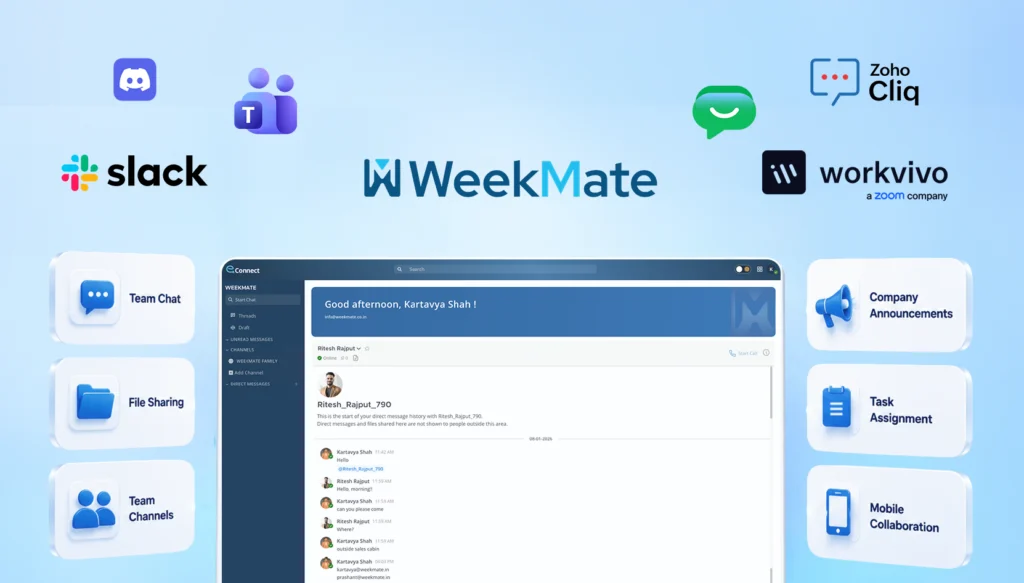
1. WeekMate Connect
WeekMate Connect is made for businesses that want one platform to do the work of three or four. It’s designed to be simple from day one. Teams can get started within a day, not after a week of onboarding calls.
What makes it stand out is the mix of real-time chat with actual structure. You’re not only messaging people. You know what got decided, who’s handling it, and when it’s due. All in the same conversation.
Key Features
- Real-time messaging with threaded conversations so context is not lost.
- Built-in task assignment directly from chat messages
- Centralized announcement boards for company-wide updates
- Document collaboration with version history
- Mobile app that actually feels built for mobile, not a shrunken desktop version
Pros
- Clean, intuitive interface; minimal learning curve for new employees
- Strong balance between communication and task management in one place
- Reasonably priced for small and mid-sized teams
- Responsive customer support (a rarity, honestly)
Cons
- Smaller third-party integration library compared to bigger players like Slack.
- Some advanced reporting features are still being rolled out
Pricing
WeekMate Connect offers flexible plans for growing teams, starting with a Professional Plan at $3.66/month for up to 5 employees. For larger teams, additional users can be added for just $0.63/user/month, making it one of the most cost-effective solutions for small to mid-sized businesses.
Best Use Case
It is good for small to mid-sized businesses that want chat and basic project tracking in one place. No need for the cost or hassle of using five different apps.
2. Slack
Slack has actually defined the meaning of team chat. It’s still one of the most reliable options. Channels, DMs, a huge app directory, it fits almost any workflow. Integrations are the best part. Whatever tool your business already uses, there’s probably a Slack plugin for it.
Key Features
- Public and private channels organised by team, project, or topic
- Quick voice or video check-ins without a formal meeting
- Workflow Builder for simple no-code automations
- One of the largest third-party app directories of any collaboration tool
Pros
- Flexibility is the best part of Slack. It aligns easily with every team structure. It has the best integrations with CRMs, dev tools, and project platforms.
- It also reduces the onboarding time because most new hires already know how to use it.
Cons
- Costs climb fast once you scale past a certain headcount
- Notification overload is a real thing if channels aren’t managed well
- It does not help much with task management, so most teams end up using a separate tool.
Pricing
Slack offers a limited free plan. Paid plans are priced per active user per month. It starts with $3.12/user/month. Costs scale quickly for larger teams, especially on higher plans with extended message history and admin controls.
Best Use Case
Mid-sized to large businesses that rely heavily on third-party tools and want a chat hub that connects everything together.
3. Microsoft Teams
If your business is already running on Microsoft 365, then Teams would be the clear choice. It plugs straight into Outlook, SharePoint, and Office apps, so document collaboration feels easy. It’s a bit heavier than Slack, but for teams already in the Microsoft world, it pays off pretty quickly once people settle in.
Key Features
- Native to Outlook, Word, Excel, and SharePoint
- Video meetings with background blur, recording, live captions
- Channel chats where people can co-edit files in real time
- The Premium version comes with AI meeting summaries and recaps
- Built-in enterprise-level security and compliance
Pros
- Best integration for businesses already using Microsoft 365
- Strong security and admin controls suited to larger enterprises
Cons
The interface can feel cluttered at first, mostly for smaller teams that do not use all the features. It’s not a good option if your business isn’t already running on Microsoft 365. Also, the performance can lag on older devices.
Pricing
Teams comes jointly with most Microsoft 365 business plans. Also, as a standalone subscription, that starts with $1.21/user/month(paid yearly) + GST. Enterprise plans with AI features and advanced compliance cost more per user.
Best Use Case
Larger organizations already using the Microsoft ecosystem, who want communication and document collaboration tightly connected together.
4. Google Chat
Google Chat is the quieter one in the Google Workspace lineup, but it’s become a genuinely solid tool. It integrates seamlessly with Gmail, Docs, Sheets, and Meet. Teams already on Workspace barely notice they’ve switched. It feels like the same system.
Key Features
- Direct messages and topic-based spaces for team conversations
- Native integration with Gmail, Docs, Sheets, and Google Meet
- Smart compose and AI-assisted replies
Pros
It feels effortless for teams already on Google Workspace, with a clean interface and a short learning curve. Search across messages, files, and spaces is also surprisingly strong — better than a lot of people expect from a “simple” chat tool.
Cons
- Fewer third-party integrations outside the Google ecosystem
- Lacks advanced task management or workflow automation
- Not much reason to adopt it if your team isn’t already on Workspace
Pricing
Google Chat is included with all Google Workspace business plans at no extra cost, with pricing tied to the overall Workspace subscription. It starts with $1.04/user/month
Best Use Case
Businesses already running on Google Workspace that want simple, no-fuss communication without adding another standalone app.
5. Workvivo by Zoom
Worth a quick note here: Workplace from Meta, which used to sit in most “best collaboration tools” lists, officially shut down in 2026 after Meta wound the platform down over the past couple of years. Businesses that relied on it have largely moved to Workvivo, which Zoom acquired and has positioned as the direct replacement. Workvivo leans heavily into employee experience – company news feeds, recognition shoutouts, engagement surveys; layered on top of solid chat and video tools, thanks to the Zoom backbone underneath.
Key Features
- Company-wide social feed for announcements and recognition
- Native Zoom video integration for meetings and town halls
- Employee engagement surveys and pulse checks
- Mobile-friendly design for frontline and distributed teams
Pros
- Genuinely strong focus on culture, engagement, and recognition
- Solid video quality, backed by Zoom’s infrastructure
- Built with large, dispersed workforces in mind
Cons
Pricing inclines toward larger organizations, so it’s not the most natural fit for small teams. It’s noticeably less focused on day-to-day task management. The migration path for former Workplace users is also still fairly new, so expect a few rough edges.
Pricing
Workvivo uses enterprise-style pricing based on employee count, typically quoted directly through sales rather than a self-serve checkout.
Best Use Case
Large or distributed organizations, especially those migrating off Workplace from Meta, that prioritize employee engagement and internal culture alongside communication.
6. Discord
It started as a gaming chat app, but plenty of businesses have adopted it for internal communication. Voice channels, low cost (often free), and a casual vibe make it appealing for teams that don’t want corporate stiffness in every interaction.
Key Features
- Drop-in voice channels with no scheduling required
- Text channels organized by topic or project
- Custom bots and integrations for light automation
Pros
It’s mostly free, even for fairly large communities. There’s a casual, low-friction feel that smaller teams enjoy. The voice channels make quick syncs easy without needing to schedule a formal meeting for every little thing.
Cons
- Not built for enterprise compliance or formal admin controls
- Lacks native task or project management features
- Can feel too informal for traditional corporate environments
Pricing
Discord is free for core features. There is an optional Nitro subscription for individuals that boosts upload limits and perks rather than unlocking business-specific tools. It starts from $2.99/month.
Best Use Case
Startups, online communities, and creative teams that want a low-cost, informal space to communicate.
7. Zoho Cliq
Zoho Cliq is built around channels, threads and calls. It does not use a feed-style layout like some tools. This works great if you are already using Zoho One or Zoho apps. Zoho Cliq is still solid on its own if you just want a good simple team chat.
Key Features
- Channels and threads, organized by team or project
- Audio and video calls with screen sharing built in
- Schedulers and bots that handle repetitive tasks for you
- Connects easily with other Zoho apps like Mail, CRM, Projects, and Desk
Pros
- Zoho Cliq costs a lot less than Slack. It covers most of the same features.
- It is a win if you are already using other Zoho tools.
- A few users like the column layout. This makes it easier to keep track of chats at once.
Cons
Calls aren’t quite as smooth as Slack or Teams, and some users mention occasional lag or delayed notifications on mobile. There’s also a character limit per message, which catches people off guard sometimes.
Pricing
There’s a free plan for small teams, and paid plans run about $2 to $18 per user, per month. If you’re already paying for Zoho One, it’s included at no extra cost.
Best Use Case
Great for small to mid-sized businesses, especially ones already using Zoho, who want Slack-like chat without the Slack-like price.
Quick Comparison of the Best Collaboration Tools for Teams
| Tool | Best For | Pricing Style | Standout Feature |
|---|---|---|---|
| WeekMate Connect | Small-mid teams wanting chat + tasks combined | Free tier + affordable paid plans | Task assignment directly from chat |
| Slack | Integration-heavy workflows | Per-user, scales with team size | Massive app directory |
| Microsoft Teams | Microsoft 365 users | Bundled with M365 or standalone | Deep Office integration |
| Google Chat | Google Workspace users | Bundled with Workspace | Simplicity and speed |
| Workvivo by Zoom | Large orgs, employee experience | Enterprise pricing | Engagement + culture tools |
| Discord | Startups, creative teams | Mostly free | Casual voice channels |
| Zoho Cliq | Existing Zoho customers | Affordable, per-user | Slack-style chat at a lower cost |
Essential Features to Look for in Team Collaboration Software
It becomes much easier to select the right tool once you know what matters and what does not. Some of the most important features to consider in team collaboration software are as follows:
- Real-Time Team Communication: This is the minimum standard. There should be no delay in the messages between the sender and the receiver. Collaboration software improves workplace communication and must feel seamless and natural.
- Group Channels and Discussions: Topic-based channels help keep conversations organized. It’s better than one big group chat. Team-based channels work too.
- File Sharing and Document Collaboration: Sharing documents is easy. You can comment on them without switching apps. This actually saves a lot of time.
- Employee Announcements: We need a space for company updates. This way important news isn’t lost in chats.
- Task and Workflow Collaboration: Assigning tasks and tracking them isn’t hard. It would be great if it connects to the conversation.
- Video Meeting Integration: Video calls should be built-in. At least work well with other apps. No one wants to switch apps for a five-minute call.
- Mobile Accessibility: A mobile app should be easy to use. Not frustrating, for people who want to check messages on the go.
- Role-Based Permissions: This is crucial as teams grow. Not everyone needs to see everything.
- Third-Party Integrations: The tool should connect with existing ones. Like CRM, calendar and project management. No manual work needed.
How to Choose the Right Collaboration Software?
There is no best tool for this. It really depends on your business. A few things to think about are:
- Team size: A small startup with ten people and a big company with five hundred people have different needs. Do not overbuy.
- Remote work needs: If your team works from home or different time zones, finding effective ways to improve remote team communication becomes essential. You need tools that keep work moving even when people aren’t online together.
- Communication workflows: Does your team prefer structured channels or more free-flowing conversation? Match the tool to existing habits.
- Integration requirements: Check what tools you already rely on and make sure the software aligns with them.
- Employee engagement goals: If culture and engagement are a priority, lean toward tools built with that in mind, not just messaging.
- Budget considerations: Make sure you consider your budget well. Per-user pricing adds up fast while growing. Keep that in mind, not just current headcount.
A good thing is to try the tool with a group of people first. Most tools have free versions. There is no better way to see than to use it every day. Your business and the tool you choose are important, so take your time and think about what your business needs from the tool.
Future Trends in Team Collaboration Software (2026)
Collaboration tools aren’t standing still, and a few shifts are worth keeping an eye on.
AI-powered workplace communication is showing up everywhere now. Think smart summaries of long chat threads, auto-suggested replies, and meeting notes that write themselves. It’s no longer a gimmick; it’s actually saving people time.
Smart collaboration workflows are also gaining ground, where tools start predicting what needs to happen next based on conversation context, instead of waiting for someone to manually create a task.
Unified communication platforms are becoming the norm too. Businesses are tired of juggling separate apps for chat, video, and tasks, and vendors know it. Expect more all-in-one offerings.
Employee experience tools are getting more attention as companies realize engagement isn’t just an HR initiative. It’s tied directly to retention and productivity.
Hybrid work optimization continues to shape feature roadmaps, with more tools building specifically for the in-office-some-days, remote-other-days reality most businesses now operate in.
And voice & video collaboration keeps growing, with platforms investing in lower-latency calls and more natural-feeling virtual meeting spaces.
Improve Workplace Communication with WeekMate Connect
If you’re trying to decide and don’t want to overcomplicate things, WeekMate Connect is honestly a solid place to start.
It gives you chat, tasks, and structure in one place, without feeling heavy or expensive.
Try the free version, get your team in for a few days, see how it feels. You’ll know pretty quickly if it fits or if it doesn’t. And that’s really what this comes down to. Not the “best” tool on paper; just the one your team will actually use.
Frequently Asked Questions
1. Which collaboration software is best for businesses?
It depends on your team size and needs. WeekMate Connect works well for small to mid-sized teams, while Slack and Microsoft Teams are good for larger organizations.
2. What features should collaboration tools include?
Look for messaging, file sharing, task tracking, video calls, and mobile access. As teams grow, integrations and user permissions become more important.
3. Is collaboration software useful for remote teams?
Yes, it is. It keeps communication clear, stores files in one place, and makes it easier to track tasks when teams work from different locations.
4. What is the difference between communication tools and collaboration software?
Communication tools focus on chatting. Collaboration software includes chat but also adds task management, file sharing, and workflow tracking.
5. Which collaboration software is best for employee engagement?
Workvivo by Zoom is great for engagement. For smaller teams, tools like WeekMate Connect can also support communication and recognition without high costs.