Choosing the right CRM is a business decision. Not a tech decision. One that impacts how your teams work, how fast you respond to customers, and honestly, how smoothly your entire operation runs.
If you’re reading this, you’re likely stuck between two options that both sound reasonable – cloud CRM vs on-premise CRM. Cloud CRM keeps coming up because everyone’s choosing that. On-premise CRM keeps coming up because it’s safer, as per your IT team.
Somewhere in between, you just want a direct answer. Let’s simplify it. No jargon. No fluff. Just a clear and practical guide to help you decide what actually fits your business model.
Cloud CRM vs On-Premise CRM: Quick Overview
Before we go deeper, here’s a simple way to understand the difference:
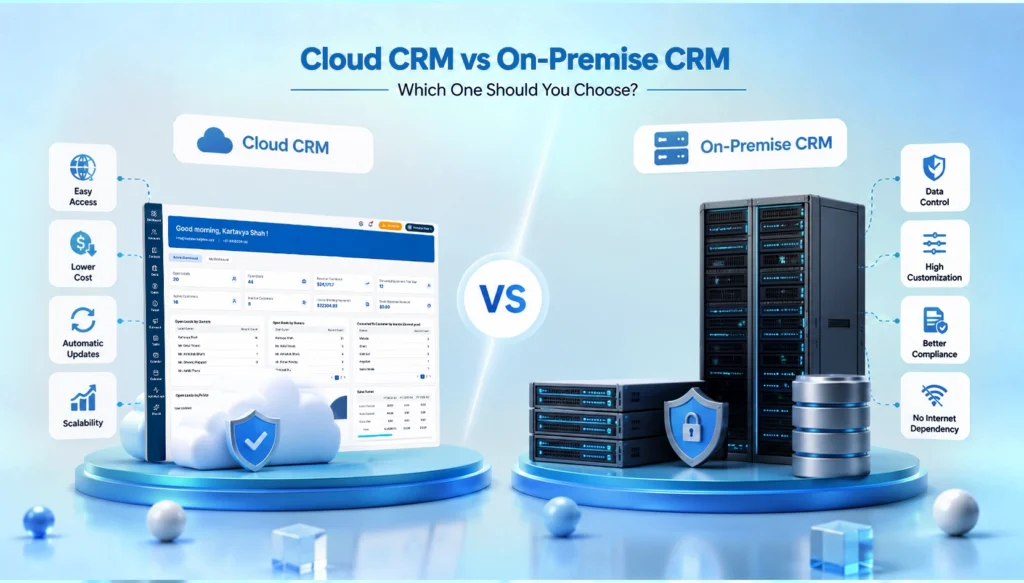
- Cloud CRM → Hosted online, accessed through the internet
- On-Premise CRM → Installed on your company’s own servers
This difference between cloud CRM and on premise CRM changes everything else. It impacts the cost, time to set up, accountability, data access, and the security.
We’ll take a look at each of these, but first, let’s define both properly.
What Is Cloud CRM?
Cloud CRM, sometimes called SaaS CRM, is customer relationship management software hosted on the vendor’s infrastructure. You don’t install anything heavy. You just start working by logging in.
You can consider options like Salesforce, HubSpot, or Zoho CRM. The vendor handles servers, updates, security patches, and backups. You just focus on the tool, not the maintenance.
Cloud CRM Features
- Browser and mobile access from anywhere
- Pricing based on subscription (monthly or yearly)
- Automatic software updates
- Built-in integrations with email, marketing, and support tools
- Vendor-managed data storage and backups
Advantages of a Cloud CRM
This is why most businesses prefer cloud CRM. Here are some cloud CRM benefits
- Faster Setup: You can easily get started in days or hours. No heavy installation.
- Lower Cost: No investment in servers or infra. You only have to pay for a subscription.
- Easy Access: You can access from anywhere. The office, home, or even while traveling.
- Automatic Updates: No need for manual upgrades. Everything runs on the latest version.
- Easy Scalability: Add users, features, or storage as your business grows. It just adapts.
Also Read: Benefits of Custom CRM Software for Growing Businesses
Challenges of a Cloud CRM
It’s not perfect, though. You’re relying on the vendor’s uptime and internet connectivity. If your internet goes down, so does your access. Some businesses also worry about handing sensitive customer data to a third party, especially in industries with strict compliance rules. Long-term subscription costs can add up too, more than people expect when they first sign up.
Implementation of Cloud-Based CRM
Setup usually takes days, not months. Most vendors provide guided onboarding, pre-built templates, and migration tools. It helps them pull data from your old system. Since cloud CRMs are generally built to be intuitive, training is lighter too.
What Is On-Premise CRM?
On-premise CRM software is the traditional model. You buy a license and install the software on your own servers. Then, your internal IT team manages everything from setup to security. There’s no need for the internet for it to function. Also, you have full physical control over the data.
On-Premise CRM Features
- Hosted on your company’s own servers
- One-time license fee (sometimes with annual maintenance costs)
- Full control over data storage and infrastructure
- Deep customisation potential
- In-house IT support required
Advantages of On-Premise CRM
Some of the on premise CRM benefits due to which businesses prefer this model:
- Full Data Control: Your data stays within your infrastructure.
- Higher Customization: You can tailor the system deeply based on your processes.
- Better Compliance Handling: Useful for industries with strict regulations.
- No Dependency on Internet: Local access can work even without internet.
Challenges of On-Premise CRM
The upfront cost is high. You have to pay for servers, licenses, and IT staff to maintain everything. Updates aren’t automatic. So your team has to plan and execute them manually, which takes time and resources. Moreover, scaling up means buying more hardware. Not just clicking a button.
On Premise CRM Implementation
Implementation usually involves purchasing hardware and licenses, installing the software on servers, handling custom development and configuration, migrating data, and then testing everything before deployment. It can take weeks… sometimes months.
Cloud CRM vs On-Premise CRM: Full Comparison
Here’s where it gets practical. Let’s break this down side by side so you can see exactly where each option wins. We have covered everything from cloud CRM vs on premise CRM cost comparison to customization. Here it is:
|
Factor |
Cloud CRM |
On-Premise CRM |
|
Cost |
Lower upfront, ongoing subscription |
High upfront, lower long-term recurring cost |
|
Deployment time |
Days to a few weeks |
Weeks to several months |
|
Data control |
Managed by vendor |
Fully managed in-house |
|
Scalability |
Easy, usually a plan upgrade |
Requires new hardware/infrastructure |
|
Accessibility |
Access from anywhere, any device |
Typically limited to internal network |
|
Customisation |
Moderate, within vendor’s framework |
High, fully tailored to your needs |
|
Maintenance |
Handled by vendor |
Handled by your internal IT team |
|
Security |
Vendor-managed, strong but shared responsibility |
Fully in your control, but you own the risk too |
These factors matter differently for every business. It’s not about which one is “better.” It’s about which one fits you.
Why Most Modern Businesses Choose Cloud CRM
If you look at where the market’s heading, cloud CRM adoption keeps climbing year over year, and it’s not hard to see why once you look at the practical side of running a business today.
- Faster deployment: Teams want to start selling, not spend three months setting up software.
- Lower initial costs: Small and mid-sized businesses especially can’t always justify a massive upfront IT investment.
- Easier scaling: Adding ten new users on a cloud CRM often takes minutes. On-premise, it can mean new servers.
- Better remote accessibility: With hybrid and remote work becoming normal, teams need tools that work from anywhere. Not only from the office network.
- Automatic updates: No more waiting on IT to schedule a weekend update window. The vendor handles it in the background.
Must Read: How to Switch from Spreadsheets to CRM Software
When On-Premise CRM Is the Better Option
However, cloud is not always the best option. While some scenarios obviously require on-premise, there are others where it is more appropriate. So, it is not advised to reject it completely.
- Industries with strict compliance requirements: Industries such as the banking sector, defence and healthcare, often require data storage within the organisation. It’s the law!
- Data residency laws: Some countries stipulate that data of customers must remain within their borders. Cloud vendors can’t always guarantee this.
- Specific business processes: If your business processes are industry specific. On-premise provides you the flexibility of creating what you require.
- Infrastructure investments: If you have already made infrastructure investments and IT staff, then it might not be the best time to switch to the cloud.
Final Verdict: Cloud CRM vs On-Premise CRM
So, which is the one you should choose? Truthfully, it is dependent on the phase of your business you are in.
Have a smaller staff, limited budget, and want to get things done quickly? You’ll likely be better off with cloud CRM software.
Operating in a space where compliance is critical, or already have servers and IT personnel that you invested in? However, on-premise may still be a good option.
There is no quick cut in this case. Review budget, compliance, and business plans for the next two years. That’s what should drive the decision, not what’s trending.
And if you’re still confused between cloud CRM vs on-premise CRM, it’s not a bad idea to get in touch with a CRM consultant who’s actually experienced with both. They will help you decide the best CRM software for your business. It’s time to ask now, not later – to switch systems.
Frequently Asked Questions
1. Which is the more secure CRM?
They can both be safe; it’s just whether they’re managed well or not. Cloud puts security in the vendor’s hands. On-premise installs it on your.
2. Is cloud CRM more affordable than On-Premise CRM?
Usually, at first. Cloud is less expensive in the initial stages. However, over the years, subscription prices quickly accumulate and end up at the same cost as on-premise.
3. Which CRM is better suited for small businesses?
In most cases, Cloud CRM. It’s quick to install, requires no IT staff, and can be easily scaled. However, it further depends on your business needs.
4. Can cloud CRM be customized?
Yes, but not fully. You have lots of choices, just in the vendor’s website. It’s not as flexible as on-premise CRM software.
5. Why are businesses moving to cloud CRM?
This is due to its speed, cost and flexibility. Additionally, it requires less special expertise in the IT field. In addition, remote work was even more critical.
6. Which industries still prefer on-premise CRM?
Industries such as banking, healthcare, and government sectors that have stringent compliance requirements may opt for on-premise solutions.