

Running an accounting firm today is not just about numbers anymore. It’s about relationships. Follow-ups. Timelines. Deadlines that don’t forgive delays.
And somewhere in between client calls, tax filings, and audits, things slip.
That’s exactly where CRM software for accounting firms steps in. Not as another tool, but honestly, more like a control center.
Let’s break this down in a simple, practical way. No fluff, no jargon.
What Is Accounting CRM Software?
A CRM, or Customer Relationship Management system, is where all your client information lives. Not just names and email addresses. It holds conversations, reminders, documents, tasks, and pretty much every touchpoint you’ve ever had with a client.
For accounting firms, that same idea gets sharper and more specific. An accounting CRM keeps track of your clients’ financial history, upcoming tax deadlines, follow-ups for pending documents, communication logs, and revenue tracking, all in one place.
Put simply, it’s your firm’s memory. The difference is, this one never forgets a deadline, never loses a document request, and never lets a client slip through the cracks.
Why Accounting Firms Need CRM Software
You can run a small firm without a CRM, sure. But once you cross even 20 – 30 clients, things get messy. Let’s talk about where CRMs actually make a difference.
1. Managing Leads and Prospects Efficiently
New inquiries come from everywhere -emails, referrals, website forms. Without a system, they get lost. Or worse, ignored.
A CRM keeps all leads in one place, tracks where they came from, and shows what needs to happen next. No guesswork.
2. Improving Client Retention and Relationships
Clients don’t leave because of pricing most of the time. They leave because they feel ignored.
Missed follow-ups. Delayed replies. No proactive communication.
A CRM helps you stay consistent. Even small reminders, like checking in before tax season, can make a big difference.
Must Read: How Custom CRM Solutions Improve Customer Retention
3. Automating Follow-Ups and Reminders
This one’s huge. Instead of remembering everything manually, you set automated reminders:
- “Follow up for pending GST documents”
- “Send tax filing reminder”
- “Invoice due in 3 days”
And the system nudges you. Simple, but powerful.
4. Tracking Sales Opportunities and Revenue
If your firm is growing, you need visibility.
Who’s converting?
Which services bring revenue?
Where are deals getting stuck?
CRMs show you the full pipeline, not just closed clients.
5. Enhancing Team Collaboration
When multiple people handle the same client, confusion happens. A CRM ensures everyone sees:
- Last communication
- Pending tasks
- Shared documents
No more “I thought someone else handled it…”
Suggested Read: Why Cloud Based CRM Software is Essential for Modern Businesses
8 Best CRM Software for Accountants (2026)
Alright, let’s get into the real comparison. Here are some of the best CRM tools accounting firms are actually using in 2026.
1. WeekMate CRM – Best CRM for Small and Mid-Sized Accounting Firms
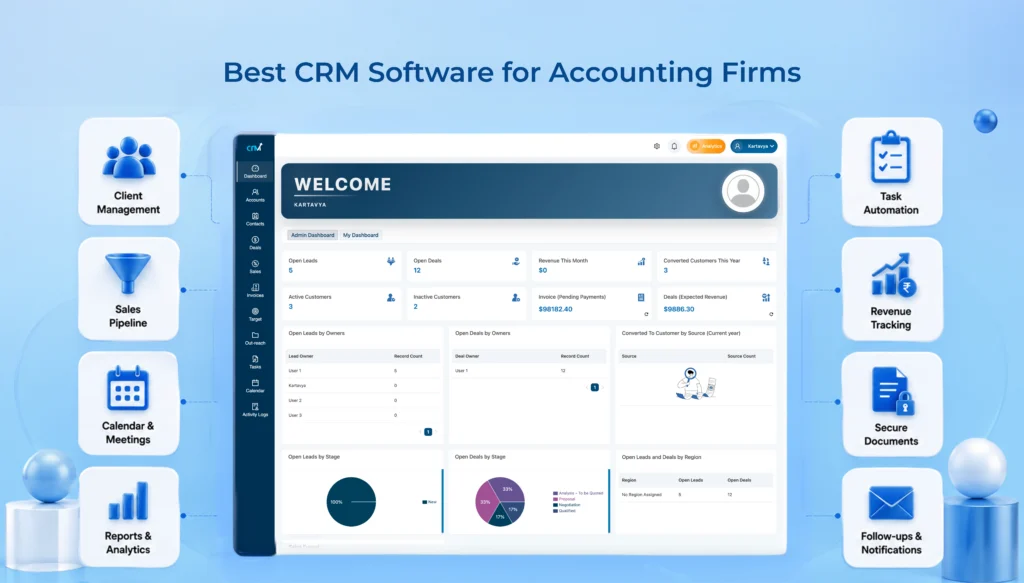
WeekMate CRM is designed for accounting firms which need simplicity along with functionality. It combines client management, task tracking, and automation in one place. This helps teams stay organized without juggling multiple tools or overcomplicated systems.
Key Features
- Client and lead management in one dashboard
- Task and follow-up automation
- Built-in invoicing and pipeline tracking
- Integration with HR and operations modules
- Real-time notifications and reminders
Pros
- Easy to use (no steep learning curve)
- Designed for SMEs and service businesses
- Combines CRM + task + operations
Cons
- Not ideal for very large enterprise setups
Pricing
Starts from custom pricing (typically more affordable than global CRM tools)
Why Accounting Firms Choose It
Because it solves multiple problems at once, without making things complicated.
2. HubSpot CRM – Best Free CRM for Accountants
HubSpot CRM is a good starting point for firms new to CRM tools. It offers essential features like contact management and pipeline tracking. Since it’s free to start, there’s no pressure or big investment upfront.
Key Features
- Contact and lead management
- Email tracking and notifications
- Sales pipeline visibility
- Meeting scheduling tools
Pros
- Free plan available
- Easy to use
- Quick setup
Cons
- Paid plans get expensive
- Automation locked behind higher tiers
Pricing
Starts from $0 (free plan) and paid plans from ~$20/user/month
Why Accounting Firms Choose It
It removes the risk of getting started, since there is a free option, and that’s a big deal.
3. Zoho CRM – Best Affordable CRM for Accounting Practices
Zoho CRM is an affordable tool with strong customization and automation features. It is ideal for accounting firms wanting to streamline processes, manage clients efficiently, and integrate with other business tools without spending too much.
Key Features
- Lead and client management
- Workflow automation
- Sales forecasting
- Zoho Books integration
Pros
- Budget-friendly
- Flexible workflows
- Strong integrations
Cons
- Initial setup takes time
- Interface isn’t the simplest
Pricing
Starts from ~$14/user/month
Why Accounting Firms Choose It
It balances cost and capability really well, especially for growing firms.
4. Salesforce CRM – Best Enterprise CRM for Large Accounting Firms
Salesforce CRM is a powerful, enterprise-level platform built for large accounting firms with complex needs. It offers deep customization, advanced automation, and detailed reporting, making it ideal for firms managing high volumes of clients and operations.
Key Features
- Advanced automation
- Deep customization
- AI insights and forecasting
- Enterprise reporting
Pros
- Extremely powerful
- Scalable for large firms
- Industry standard
Cons
- Expensive
- Requires training
- Long implementation time
Pricing
Starts from ~$25/user/month (can go up to $330+/user/month depending on features)
Why Accounting Firms Choose It
When operations get complex, simpler CRMs just don’t fit in anymore.
5. Pipedrive – Best CRM for Managing Accounting Sales Pipelines
Pipedrive focuses on simplifying the sales process with its visual pipeline approach. It helps accounting firms track leads, manage deals, and stay on top of opportunities, making it especially useful for teams actively working on client acquisition.
Key Features
- Visual sales pipelines
- Deal tracking
- Activity reminders
- Email integration
Pros
- Very intuitive
- Easy pipeline visibility
- Fast onboarding
Cons
- Limited accounting-specific features
- Less focus on full client lifecycle
Pricing
Starts from ~$14/user/month
Why Accounting Firms Choose It
It keeps your sales process clear, and honestly, that clarity matters.
6. Freshsales – Best AI-Powered CRM for Accounting Firms
Freshsales helps you manage leads and automate communication using smart features. It’s useful for accounting firms that want to save time, stay organized, and handle client interactions more efficiently.
Key Features
- AI lead scoring
- Email automation
- Built-in communication tools
- Pipeline tracking
Pros
- Smart insights
- Good automation
- Clean UI
Cons
- AI features not always necessary for small teams
- Learning curve for full usage
Pricing
Starts from $0 (free plan) and paid plans from ~$15/user/month
Why Accounting Firms Choose It
It helps prioritize work automatically, which saves time when things get busy.
7. Insightly – Best CRM for Client Relationship Management
Insightly combines CRM with project management features. This makes it useful for accounting firms handling long-term client work. It helps track relationships, manage ongoing tasks, and maintain visibility across the entire client lifecycle in one system.
Key Features
- Contact and project management
- Task tracking
- Workflow automation
- Reporting tools
Pros
- CRM + project management combo
- Good lifecycle tracking
- Useful for ongoing engagements
Cons
- No free plan
- Slightly dated interface
Pricing
Starts from ~$29/user/month
Why Accounting Firms Choose It
It connects client relationships with actual work, not just sales.
8. Monday CRM – Best CRM for Workflow Automation
Monday CRM is a flexible tool that helps you manage tasks and workflows visually. It’s a good fit for accounting firms that want a simple, customizable way to organize work and team collaboration.
Key Features
- Workflow automation
- Visual dashboards
- Task and team collaboration
- Integration support
Pros
- Highly customizable
- Easy to visualize workflows
- Strong collaboration tools
Cons
- Not accounting-specific
- Can feel overwhelming initially
Pricing
Starts from ~$10/user/month
Why Accounting Firms Choose It
It adapts to your workflow, instead of forcing you into one.
Quick Comparison Table
| CRM Tool | Best For | Complexity | Pricing Level |
| WeekMate CRM | SMB accounting firms | Low | Affordable |
| HubSpot CRM | Beginners | Low | Free → High |
| Zoho CRM | Budget-conscious firms | Medium | Affordable |
| Salesforce | Enterprises | High | Expensive |
| Pipedrive | Sales-focused firms | Medium | Moderate |
| Freshsales | AI-driven workflows | Medium | Moderate |
| Insightly | Project + client management | Medium | Moderate |
| Monday CRM | Workflow automation | Medium | Moderate |
Also Check: List of Top CRM Software for Manufacturing Companies
Key Features to Look for in CRM Software for Accounting Firms
Not all CRMs are built the same. And honestly, choosing the wrong one can slow you down instead of helping.
Here’s what actually matters:
- Client Database Management: Keeps all client details – contacts, documents, and interaction history, in one place so nothing gets lost or scattered.
- Task and Activity Tracking: Helps you stay on top of deadlines and daily work without constantly second-guessing what’s pending.
- Automated Follow-Ups: Sends reminders and follow-ups automatically, so you don’t miss important client touchpoints (because let’s be honest… manual reminders slip).
- Document Management: Stores financial files, agreements, and reports securely, making them easy to access whenever needed.
- Email and Communication Tracking: Tracks every conversation so you always know what was discussed and when – no more digging through inbox chaos.
- Custom Reports and Analytics: Gives you clear insights into performance, revenue trends, and growth, helping you make smarter decisions.
- Data Security and Compliance: Protects sensitive financial data and ensures your firm stays compliant with regulations; this one isn’t optional.
Also Read: Key CRM Modules That Help Businesses Grow Faster
How to Choose the Right CRM for Your Accounting Business
There’s no “one best CRM” for everyone. It depends a lot on various factors of your business. Some of the factors to be considered to choose the best CRM for accountants:
- Consider Your Firm Size: The size of your accounting firm plays a big role in choosing the right CRM. Smaller teams usually need something simple and easy to manage. Larger firms, on the other hand, often need advanced customization and multi-user flexibility.
- Identify Your Growth Goals: If you’re planning to scale quickly, you’ll need a CRM that can grow with you. But if your focus is on stabilizing operations, then a simpler, more structured system might work.
- Evaluate Integration Requirements: Your CRM should connect smoothly with the tools you already use – especially accounting software. You will end up doing a lot of manual work without proper integration. This defeats the whole purpose.
- Compare Automation Features: CRM really starts to make a difference with the automation features. The right features can save hours every week. For example, follow-ups to task reminders, they can be automated. It may not seem huge at first. But it adds up gradually.
- Set a Realistic Budget: You can easily get carried away by feature-heavy tools. Not all of them are necessary. Focus on what your firm actually needs right now and avoid overspending on things you may never use. A practical choice usually wins here.
Benefits of Using CRM Software in an Accounting Firm
Just like all other firms have their own benefits of using CRM software, even accounting firms can benefit:
- Better Client Retention: When clients feel heard and taken care of, they stick around longer; it’s that simple. A CRM helps you stay consistent with follow-ups and communication. Over time, this builds trust, and trust keeps clients coming back.
- Faster Response Times: Endless emails and spreadsheets are now a thing of the past. Everything you need is in one place, organized for you. This means faster response times, and clients really appreciate that.
- Increased Referral Opportunities: Happy clients tend to talk, and refer. When relationships are managed well and communication stays smooth, people naturally recommend your services. A CRM quietly supports this by helping you stay connected over time.
- Improved Team Productivity: Processes become clearer, and collaboration is less chaotic. Your team is able to spend more time on important tasks by relying on CRM software to manage monotonous tasks. It allows you to work better, not harder.
Final Verdict: Which CRM Software Is Best for Your Accounting Firm?
Powerful CRM systems are not necessary for small to mid-sized accounting firms. You need the most practical one. Something your team uses daily.
Many mid-sized accounting firms can choose among Weekmate CRM, Zoho CRM, or HubSpot. On the other hand, Salesforce is a powerful CRM, and its complexities are justified among large-scale accounting firms.
The most appropriate CRMs, among the many options available to small and mid-sized accounting firms, are the ones that will best meet the needs of your workflow.
Final Thought
If you’re still managing clients on spreadsheets, it might feel manageable right now. But growth breaks that system.
A good CRM doesn’t just organize your work; it quietly removes friction you didn’t even realize was there. And once that happens, you don’t go back.
At the end of the day, choosing the right CRM accounting software can make a noticeable difference in how smoothly your firm operates and how clients experience your service.
Frequently Asked Questions
1. What is the best CRM software for accounting firms?
There’s no single answer. For most small- to mid-sized firms, WeekMate eCRM or Zoho CRM works well. Larger firms often go with Salesforce.
2. Do small accounting firms need a CRM?
Yes. Especially if you’re handling multiple clients. Even basic CRM usage improves organization and client communication, which are really important for accounting firms.
3. Can CRM software integrate with accounting tools?
Most modern CRMs integrate with tools like QuickBooks, Zoho Books, and others. It is always advised to check the integration feasibility before choosing.
4. What CRM features are most important for accountants?
Features that are important for accountants include client management, task tracking, automation, and document handling, which are the core ones.
5. How much does CRM software cost?
It ranges from free (like HubSpot Basic) to premium enterprise pricing (like Salesforce). Mid-range tools are usually the sweet spot.
6. Is a CRM worth it for tax consultants and accounting professionals?
Absolutely. It reduces missed follow-ups, improves client experience, and helps scale operations without chaos. These are all some of the crucial factors of CRM for tax consultants and accounting professionals.