Spreadsheets stop working. That’s usually the first sign.
Then, it’s WhatsApp groups turning into chaos, someone missing a deadline because the update got buried under forty other messages, a manager asking “wait, who’s handling this?” three days before launch. Sound familiar? That’s typically when the search for SaaS project management software begins.
Most guides jump straight into feature comparisons. Task boards, Gantt charts, integrations. Useful stuff, sure. But they skip the decision that actually shapes everything else: where does this software live? On a vendor’s servers, accessed through a browser? Or on your own infrastructure, managed by your own people?
That one decision shapes your budget, who controls your data, when and how much you have to comply, and even how quick your team is. This article will help you compare cloud-based project management with on-premise project management software with no sales lingo or hype. It simply shows what each model represents for daily use, whether you are a 5-person small business located in a Bangalore co-working space or a two-hundred-person manufacturing company managing three plants.
What Is Cloud Based Project Management Software?
Here’s an easy way to think about it: cloud based project management software is hosted on third-party servers, and you simply log in via the web or an app on your device to access it. No server to buy. No software installation for the IT department to handle. You register, receive your login details, and you are up and running in no time. Sometimes it’s even quicker.
This is the SaaS project management software model most teams default to now, and for good reason. The vendor handles infrastructure, security patches, backups, and uptime. All of it. Your job is just to log in and get work done.
A few things define this model:
- Accessed via browser or mobile app, from pretty much any device
- Subscription pricing, usually per user, per month
- Vendor manages servers, updates, and maintenance
- Data lives on the provider’s cloud infrastructure, often across regional data centers
- New features show up automatically, no upgrade cycle to schedule
Who picks this route? Startups without a dedicated IT function, for one. Remote and hybrid teams are scattered across cities. SMBs that want to launch fast without sinking money into hardware upfront. Basically, anyone who’d rather spend their week managing projects instead of managing servers.
What Is On-Premise Project Management Software?
Flip the model entirely, and you get on-premise project management software. It runs on servers your company owns, either sitting in your office or housed in a private data center you control. The vendor sells you a license, your team installs it, and from that point forward, it’s yours. Fully.
Think of the cloud as renting an apartment. On-premise is building the house yourself, then living with everything that comes after: the maintenance, the repairs, the decisions nobody else makes for you.
How it actually works:
- Software installed on internal servers or company hardware
- IT team handles setup, configuration, security, and ongoing upkeep
- Data never leaves your infrastructure unless you move it yourself
- Updates are manual, scheduled whenever your team gets to it
- Usually a one-time license fee, plus whatever infrastructure it takes to run
Who needs this? Government departments. Defense contractors. Banks. Healthcare providers. Large enterprises in regulated industries where data residency isn’t a preference, it’s a mandate written into a compliance document somewhere.
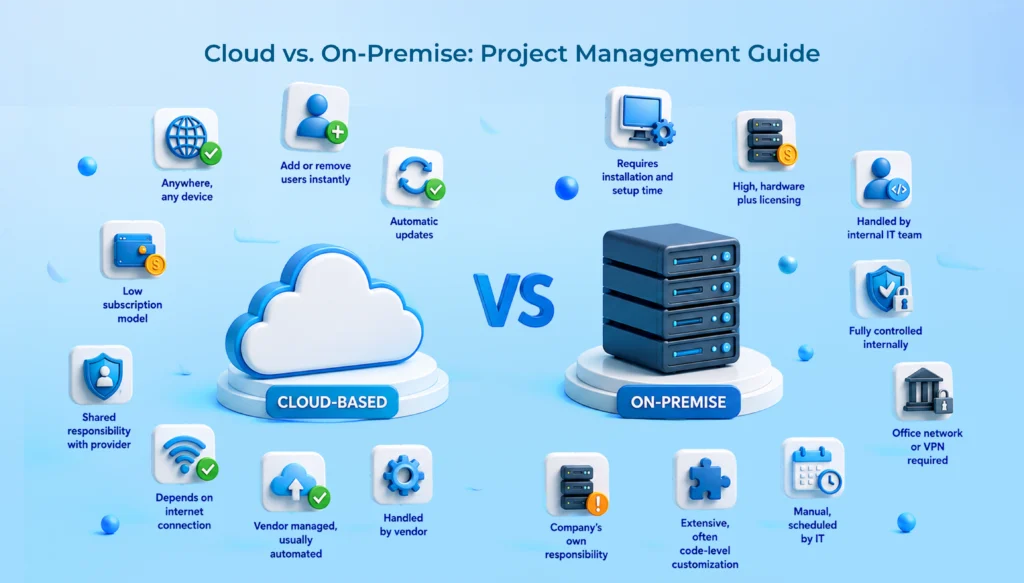
Cloud Based vs On-Premise Project Management Software: Key Differences
|
Factor
|
Cloud Based |
On-Premise
|
|
Deployment
|
Instant, browser-based access |
Requires installation and setup time
|
|
Initial Cost
|
Low subscription model |
High, hardware plus licensing |
| Maintenance |
Handled by vendor |
Handled by internal IT team
|
|
Scalability
|
Add or remove users instantly |
Requires hardware planning |
| Security |
Shared responsibility with provider |
Fully controlled internally
|
|
Accessibility
|
Anywhere, any device |
Office network or VPN required |
| Software Updates |
Automatic |
Manual, scheduled by IT
|
|
Performance
|
Depends on internet connection |
Depends on internal infrastructure |
| Customization |
Limited to vendor’s configuration options |
Extensive, often code-level
|
|
Backup & Disaster Recovery
|
Vendor managed, usually automated |
Company’s own responsibility |
| IT Requirements |
Minimal |
Dedicated team, usually non-negotiable
|
Neither side wins outright, honestly. It comes down to what your business needs more right now: speed and low overhead, or control and deep customization.
Advantages of Cloud Based Project Management Software
There’s a reason cloud has become the default. A few things stand out.
Lower upfront investment, for starters. No servers to buy, no capital expenditure to justify in a board meeting. Most tools run on a per-user monthly fee, which keeps cash flow predictable. Founders like that. Finance teams like it even more.
Quick implementation matters too. Sign up today, onboard your team tomorrow. Not an exaggeration for most cloud project management tools; that’s genuinely how fast it moves.
Access from anywhere is the obvious one. Field teams, remote employees, a manager checking status from an airport lounge. Log in from a laptop or phone; no VPN required.
Automatic updates happen quietly in the background. New features, bug fixes, security patches, none of it needs anyone to lift a finger.
Better team collaboration follows naturally when everyone’s looking at the same live version of a task list instead of five outdated copies floating around in different inboxes.
Easy integrations round it out. Most cloud-based project management systems connect natively with Slack, Google Workspace, Microsoft 365, and whatever HR or payment tools you’re already running.
High scalability, reduced IT workload. Growing from 10 users to 100 usually means adjusting a subscription tier, not procuring new hardware and waiting three weeks for delivery.
Advantages of On-Premise Project Management Software
There’s a reason large enterprises and regulated industries still choose this path, even with everything the cloud offers.
Complete data control tops the list, and it’s not a small thing. Nothing leaves your network unless you decide it should. For banks, defense contractors, and healthcare providers, that’s not a nice-to-have. It’s often written into a regulatory requirement somewhere.
Extensive customization comes next. On-premise deployments can be modified at a code level to fit workflows so specific that no off-the-shelf cloud tool would ever accommodate them.
A few more worth mentioning:
- Internal security policies apply directly, without leaning on a third party’s shared responsibility model
- Compliance requirements around data residency and audit trails get easier to satisfy internally
- Highly regulated industries, where even encrypted third-party hosting raises eyebrows during an audit, tend to prefer this route
Challenges of Cloud Based Software
Not all upside, though. A few honest trade-offs worth knowing before you sign anything.
Internet dependency is the obvious one. No connection, no access. Simple as that. For teams in areas with patchy broadband, this genuinely matters, more than most vendors will admit during a sales call.
Subscription costs add up. What looks cheap in year one can, stretched across five years, cost more than a one-time on-premise license would have. Worth running that math before committing.
Limited deep customization is real too. You’re working inside the vendor’s framework, not rebuilding it from the ground up to match your exact process.
And then there’s the third-party hosting concern. Some businesses, finance and healthcare especially, just aren’t comfortable with sensitive project data sitting on someone else’s servers. Even with strong encryption. That discomfort isn’t irrational, either.
Challenges of On-Premise Software
The trade-offs here run in the opposite direction.
High upfront costs hit first. Licensing plus hardware plus implementation can run into lakhs of rupees before a single project even gets created inside the system.
Buying hardware is not only a one-time thing. The equipment degrades with time and use. More space is needed as the business grows. And the time to update comes more quickly than a budget is ready for.
A dedicated IT unit is really a must. There should be someone who oversees patches, backups, server issues, and all that. It is really not something to outsource to whoever is free on a Friday afternoon.
Manual updates mean your team often works on an older version until IT finds time to schedule an upgrade window. Limited remote accessibility frustrates distributed teams unless a proper VPN is already in place. And deployment just takes longer, weeks sometimes, occasionally months, compared to a same-day cloud rollout.
Which Deployment Model Is Best for Your Business?
Startups
Cloud, almost always. Capital’s tight, teams are small, and speed beats deep customization every time at this stage. A SaaS project management software subscription gets a five-person team running the same afternoon they sign up.
Small & Medium Businesses (SMBs)
SMBs land here too, mostly for cost-effectiveness at scale. Cloud project management tools let you add users as you hire, without a fresh capital outlay every single time headcount grows.
Large Enterprises
This gets more nuanced. Large enterprises often go hybrid, running sensitive workflows on-premise while everyday project collaboration happens on cloud tools. The split usually depends on which business units touch regulated data and which don’t.
Government & Regulated Industries
Security and compliance considerations push most government bodies and regulated sectors toward on-premise or heavily customized private cloud setups. Data residency rules and audit requirements don’t leave much room to negotiate here.
Security Comparison
Security is where this conversation gets serious. Worth being precise, not vague.
Data encryption: reputable cloud vendors encrypt data both at rest and in transit, by default. On-premise setups need this configured and maintained internally, which is fine, provided IT actually keeps up with it consistently. Not always guaranteed.
User access controls: both models support role-based permissions. The real difference is who’s responsible for keeping them current as people join, switch roles, or leave the company.
Compliance is where most generic guides fall short. They’ll mention ISO 27001, SOC 2, maybe GDPR, and stop there. For Indian businesses, that’s not the full picture anymore. India’s Digital Personal Data Protection Act, 2023 creates data protection obligations for any business processing personal data of individuals in India, regardless of where that business happens to be headquartered. That applies directly to project management platforms holding employee names, client details, and project files with personal information baked in. Penalties under the DPDP Act can run up to ₹250 crore per contravention. This isn’t a checkbox exercise anymore. It’s a real procurement question.
Disaster recovery: Cloud vendors are known for automated, geographically redundant systems as a standard backup feature of their subscription services. The on-premises solution recovery is entirely based on how your company has planned and how well you have tested your backup protocol. This is usually neglected until that very day when nobody will want to ignore it.
Data ownership: technically, you own your data either way. Practically, on-premises gives direct physical control, while cloud requires trusting the vendor’s contractual and technical safeguards. That trade-off matters more to some industries than others. Banking, obviously. A design agency, probably less so.
Handling a growing team looks different depending on which model you’re running.
Cloud-based systems scale horizontally, more or less instantly. Onboarding 30 new employees next quarter? Add the licenses. Done. Multi-location support comes built in too, since access was never tied to a physical network in the first place.
On-premise scaling takes actual planning. Additional server capacity, sometimes new hardware procurement, IT bandwidth to configure it properly. For a business growing slowly and predictably, that’s manageable. For one, scaling fast can turn into a genuine bottleneck.
Resource allocation and system performance in on-premise setups depend heavily on internal infrastructure quality. A well-provisioned on-premise system can actually outperform a cloud tool during heavy internal use; that’s worth knowing. A poorly maintained one lags badly. Cloud performance, meanwhile, depends largely on your internet connection and the vendor’s server capacity, both mostly out of your hands.
Questions to Ask Before Buying Project Management Software
Run through these before signing anything:
- What’s the realistic budget, including year-two and year-three costs, not just the sign-up price?
- How many users need access today? How many in 12 months?
- Does the team include remote or field-based staff?
- What integrations does the existing tech stack require? HRMS, payroll, CRM, communication tools?
- Any compliance needs specific to the industry? DPDP Act obligations, ISO certifications, sector-specific rules?
- Is deep customization actually necessary, or will standard configuration cover it?
- Is there internal IT support to manage an on-premise deployment, or would that stretch the team too thin?
- What does growth realistically look like over the next two to three years?
Answer these honestly before comparing vendors. Saves a lot of second-guessing down the line. Here’s an in-depth analysis to decide which project management software to buy.
Essential Features to Look For
No matter what kind of model is used for deployment, a serious project management tool should at least cover all the core functions.
Task management and project planning form the baseline, obviously. Beyond that, Kanban boards and Gantt charts handle visual planning; time tracking keeps things accountable; and resource management stops your best people from getting overloaded without anyone noticing.
Team collaboration and file sharing keep conversations attached to actual work, instead of scattered across email threads that nobody can find later. Workflow automation cuts down repetitive manual steps. AI-powered project insights are becoming standard now too, flagging risks or bottlenecks before they quietly derail a timeline.
A mobile app matters more than most buyers think it does, especially for field teams or leadership checking status while traveling. Reporting and analytics turn raw activity into actual decisions. Third-party integrations connect the tool to whatever else runs the business. Role-based permissions keep sensitive project data visible only to people who genuinely need to see it.
Why More Businesses Are Choosing Cloud-Based Project Management Software
This shift isn’t just a trend. It reflects how Indian workplaces actually function now. A NASSCOM-Deloitte study found that 74% of Indian employees prefer hybrid work over fully remote or fully in-office arrangements, and that preference shapes software decisions more than most buyers realize. Teams split between home and office need tools that work identically from both places. That’s precisely what cloud-based systems are built for.
A few other forces pushing this along:
AI-powered collaboration features tend to be cloud-native by design, since they depend on continuous vendor-side processing power that’s hard to replicate on internal servers. Lower operational costs matter too, particularly for SMBs watching every rupee during a growth phase. Automatic feature updates mean businesses aren’t stuck negotiating upgrade cycles every year. Faster implementation gets teams productive within days. And scalability lets a 15-person team and a 150-person team run on the exact same platform without anyone re-architecting anything.
Why Choose WeekMate TaskHub?
If cloud-based project management software fits your business, WeekMate TaskHub is built around exactly the trade-offs covered above.
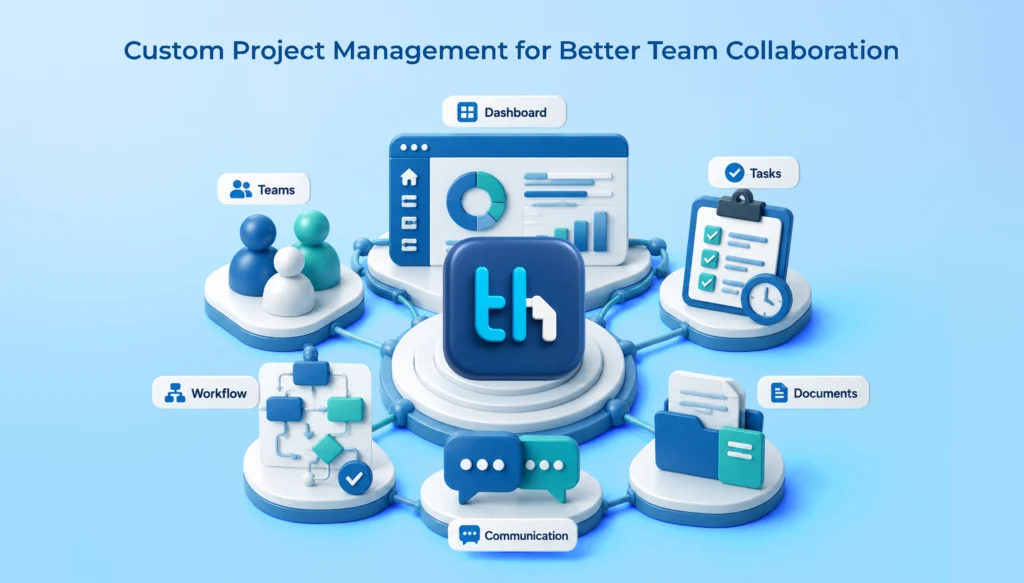
It handles task and project tracking without the bloated complexity some enterprise tools carry around. Team collaboration happens in real time, so updates don’t get lost in a separate chat app somewhere. Workflow automation removes the repetitive status-chasing that eats up a manager’s Monday morning. Time tracking and real-time dashboards give visibility without turning into micromanagement.
Role-based access keeps sensitive project and client data restricted appropriately, useful for teams juggling multiple clients or departments at once. Mobile accessibility keeps field staff and traveling managers connected. And because it’s built to scale, TaskHub works whether you’re a ten-person startup or a growing enterprise adding departments year over year, with deployment that doesn’t pull your IT team away from everything else on their plate.
Teams already using WeekMate’s HRMS and payroll platform or WeekMate Connect for internal communication will find TaskHub rounds out the operational stack, instead of forcing in another disconnected tool.
Conclusion
No universal right answer here. Between cloud-based and on-premise project management software, the choice comes down to business size, budget, compliance obligations, and how much control you genuinely need versus how much speed you need to move.
Startups and SMBs will usually find cloud-based systems the more practical fit. Low overhead, fast deployment, easy scaling. Large enterprises and regulated industries may lean on on-premise or hybrid instead, prioritizing data control and compliance over sheer convenience.
Whichever direction fits, evaluate long-term growth needs before locking anything in. A tool that works for 10 people today should still make sense at 50. Otherwise, switching becomes its own costly project down the road.
If cloud fits, WeekMate’s cloud-based project management software, TaskHub, offers a straightforward way to bring project planning, collaboration, and execution into one platform, without adding to your IT team’s already full plate.
FAQs
1. Is cloud-based project management software safe for sensitive business data?
Reputable cloud vendors use encryption, role-based access controls, and regular security audits. For Indian businesses, it’s worth confirming DPDP Act compliance specifically, not just generic security certifications, since data handling obligations now apply directly to how personal data gets stored and processed.
2. Which is cheaper in the long term, cloud or on-premise project management software?
Cloud usually wins on upfront cost, but subscription fees pile up over years. On-premise costs more initially, though it can work out cheaper over a longer horizon, provided you factor in hardware refresh cycles and IT staffing costs. Most buyers forget to include those.
3. Can a small business use on-premise project management software?
Technically, sure. But it rarely makes sense in practice. The upfront hardware investment and need for dedicated IT support usually outweigh the benefits for teams under 50 people. Cloud-based tools tend to be the more practical fit at that scale.
4. Do I need a dedicated IT team for cloud project management software?
Not really. Vendors handle server maintenance, security patching, and uptime. Your team just needs someone managing user access and integrations, which most SMBs handle without hiring anyone new.
5. Is hybrid deployment, part cloud and part on-premise, a realistic option?
Yes, and larger enterprises use this model often. Sensitive workflows stay on-premise for compliance reasons, while general project collaboration runs on cloud tools for speed and accessibility. Adds some complexity, but the flexibility often makes it worth it.
6. What should I check before signing a project management software contract?
Confirm data residency and compliance details specific to your industry, ask about integration support for tools already in use, check the vendor’s disaster recovery process, and clarify what happens to your data if you decide to switch platforms later. That last one gets skipped more often than it should.