Implementing a new project management software initially sounds exciting. Better tracking, smoother workflows, improved collaboration – everything looks promising on paper.
But here’s the thing: most teams don’t fail because of the tool. They fail because of how they implement it.
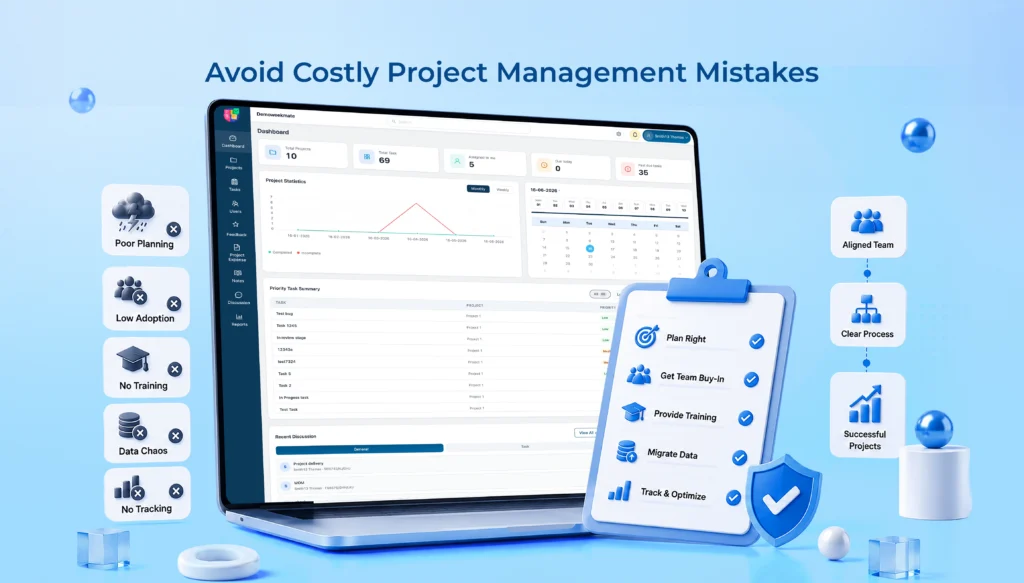
Even after investing time, money, and effort, many businesses struggle with adoption. And it usually comes down to a few very common project management mistakes.
In this blog, we’ll break them down in a practical, no-nonsense way, so your project management software implementation actually works the way it’s supposed to.
Why Project Management Software Implementation Often Fails
Before we jump into mistakes, let’s quickly understand what usually goes wrong.
Most teams:
- Start without a clear plan
- Expect instant results (which rarely happens)
- Don’t prepare their teams for change
- Or simply underestimate the effort required
According to industry insights, around 60 – 70% of software implementations face adoption challenges in the first few months. That’s not a small number.
And yes, even good tools fail under poor execution.
Mistake #1: Choosing Software Without Defining Business Requirements
This is probably the most common one. Teams often pick tools based on popularity, recommendations, or features that look impressive – but don’t actually match their needs.
Understand Your Team’s Needs
Before you even open a comparison spreadsheet of different tools, sit down and figure out what’s actually broken right now. Is it visibility into task status? Missed deadlines? Too many tools with overlapping jobs?
Talk to the people who actually use the software daily. Not just the managers approving the budget.
Ask about:
- Where projects usually get stuck or delayed
- What reporting looks like today and where it falls short
- Which workflows are unique to your team
Once you know the pain points, define what success actually looks like. Faster approvals? Fewer status meetings? Clearer accountability? Write it down.
It’ll matter later when you’re evaluating whether the rollout actually worked.
Create a Feature Checklist
After you clearly understand your team’s needs, list the features you actually need. Also, list down what you think are just nice extras. This will stop you from picking a tool just because it looks impressive.
Also plan for growth. A tool that works nicely for 15 people might not work in the same way for 50. So think beyond just the user count. Can it handle bigger projects? More integrations? More data without slowing down?
You can take a look at our blog that explains how to choose the right project management software for your business.
Mistake #2: Ignoring Existing Project Management Workflow
A new tool doesn’t mean you throw everything away. That’s where many teams go wrong.
Analyze Current Processes
A lot of teams begin the implementation from scratch. Keep in mind your current project management workflow. Even if it is imperfect, it has some structure.
Consider small things. Approvals that get stuck in someone’s inbox for days, tasks that get duplicated across tools, information that never makes it to the right person. These details matter a lot. It gives you a strong base.
Customize Without Overcomplicating
Once you understand the workflow, adapt the software to match it. Not the other way around. Most platforms allow decent customization. But there’s a line between helpful configuration and turning the tool into a mess of custom fields and automations that nobody cares about.
A good rule to follow. If a customization takes more than a few minutes to explain, it’s probably way too complicated.
Mistake #3: Failing to Get Team Buy-In
You can’t force adoption. If your team doesn’t believe in the system, they simply won’t use it properly.
Involve Employees Early
Bring in feedback from actual users before the decision is finalized, not after.
Include key stakeholders from different departments too. What works beautifully for the design team might be a nightmare for finance. Getting that friction out in the open early saves a lot of frustration down the line.
When people feel involved, resistance drops naturally.
Address Resistance to Change
Some people are naturally a bit resistant to change even if the outcome is the best for the team or organization. All depends on who initiates the change and how effectively it will be communicated to and accepted by them.
The bottom line is to use simple and effective communication. Don’t make things sound complicated or technical. Instead of “this enhances the operational efficiency” one would prefer to explain it as “you will not be required to update the three sheets every time a task is moved forward.”
Mistake #4: Skipping Proper Training
This one hurts more than it seems. Because without training, even the best tools feel confusing.
Develop a Training Plan
Don’t just do one generic session. A project manager needs different training than someone just logging their daily tasks. Role-based sessions make the learning relevant instead of overwhelming.
- Offer role-based training
- Keep sessions short and focused
- Use real project examples
People learn better when it feels relevant.
Offer Ongoing Support
Training people is not something that needs to be done once. Set up a basic internal knowledge base where employees search when they can’t recall the right way of performing something, which, by the way, will happen often.
Troubleshooting teams who understand the software well greatly relieve IT of their duties and give people an option to ask questions instead of filing a tiny support ticket.
Short and regular refresher classes help maintain the sharpness of your skill sets as new features will probably be added and more employees will be hired.
Mistake #5: Migrating Data Without a Strategy
Data migration can get messy fast. And if done wrong, it creates long-term issues.
Clean Existing Data
Before anything moves over, clean it up. Remove duplicates, archive information nobody needs anymore, and fix anything obviously outdated. Migrating a mess just gives you a bigger mess in a new tool.
Validate Data Migration
Never go live blindly. Always test the migration on a small batch before doing it for everything.
Check that fields map correctly, dates translate properly, and nothing critical goes missing. And obviously, back up everything before you start.
It sounds basic, but skipping this step has cost more than one team a very bad week.
Mistake #6: Overloading Teams with Too Many Features
Adding more features does not necessarily mean better results. In reality, an overloaded interface may confuse users and be counterproductive.
Start Small
Launch the core functionality first. Task tracking, timelines, basic reporting, and let people get comfortable. Once that becomes comfortable, gradually introduce advanced features like automation, custom dashboards, or integrations.
First, make sure your team focuses on core capabilities, like task tracking, timelines, and basic reporting. Allow them to take the easy part of a tool and make it a part of their daily job. Then you can add more powerful features such as automation, custom dashboards and/or integrations.
Prioritize User Experience
When you can remove complexities, you should definitely go for that. If a simple click was all people needed, and now they have to perform a task with five different steps in this new tool, people will definitely oppose your decision.
An uncomplicated experience leads to more acceptance from users.
That’s not just a suggestion – it’s the whole idea of this approach!
Mistake #7: Not Setting Clear Success Metrics
If you don’t measure success, how do you know it’s working? This is where many teams lose direction.
Define Simple KPIs
Start with basics like:
|
Metric |
What it shows |
| User adoption rate | Are people actually logging in and using it daily |
| Task completion rate | Is work moving through the system efficiently |
| Project timelines | Are projects finishing closer to schedule than before |
| Support ticket volume | Are people struggling or getting comfortable over time |
Keep it practical. No need to overcomplicate.
Monitor and Improve
It is important to collect feedback on a regular basis rather than just once after three months. Brief pulse surveys or check-ins would be a more effective way than long annual reviews.
Feedback can also be used for the optimization of workflows as a means of continuous improvement.
Project Management Software Best Practices for Long-Term Success
Here are a few habits that really help for long-term success of Project Management Software:
- Set a realistic time you will need to set up the system and avoid the pressure of meeting an arbitrary deadline.
- Define the responsible person for each stage so that nothing gets overlooked for who is accountable.
- Promote collaboration between various teams to prevent the project from being owned solely by one department.
- Review the workflows at intervals, simply because what was good one year ago might not be necessarily good today.
- We should not only look at the financial ROI but also consider the time saved and delays avoided when evaluating a project.
- Make your project management practices agile to the changes in the team and the shift in priorities.
Quick Implementation Checklist for Teams
Just to make things easier, here’s a quick checklist you can follow:
- Define business objectives before anything else
- Select the right software based on actual needs, not just popularity
- Prepare and clean your data ahead of migration
- Train users with role-specific, hands-on sessions
- Test thoroughly before going live
- Roll out in phases rather than all at once
- Monitor adoption closely in the first few weeks
- Gather feedback consistently
- Optimize continuously as needs evolve
Simple, but powerful when followed properly.
Conclusion
At the end of the day, successful project management software implementation isn’t about the tool; it’s about how you use it. Most failures come from avoidable mistakes:
- Lack of planning
- Poor training
- No team alignment
- Unrealistic expectations
Fix these, and you’re already ahead of most teams. If you’re planning to implement or upgrade your system, take a step back… plan it right, involve your team, and focus on long-term usability.
That’s what actually drives results.
And if you’re looking for a simpler, more practical way to manage projects, teams, and workflows, it might be worth exploring a solution that’s built for real business needs, not just features.
FAQs
1. What is the biggest mistake in project management software implementation?
Starting without knowing the business needs is, without doubt, the biggest mistake made. Teams quite often select their software based on the available features, not on the ones that they really need, ending up with low user engagement and workflows that are not in sync with the tool.
2. How long does it take to implement project management software successfully?
Well, that really depends. Yet, most implementations take from a couple of weeks up to a couple of months. It depends mostly on planning, team readiness, migration, and how smoothly everything is managed.
3. Why do employees resist new project management tools?
A lack of understanding, inadequate teaching/training methods, and fear of change are the most common reasons for resistance. Team members who do not get it will probably not make it.
4. How can teams improve adoption of new project management software?
The right training and employee involvement should be the starting point and should stay simple. Slow but steady introduction to the new system and regular assistance also help in improving adoption of the new software.
5. What are the key metrics to measure implementation success?
Some of the frequently used indicators are the percentage of users logging in, tasks completed on time by users, and the length of time to complete the whole project or projects. These indicators let you know if the software brings about any positive changes in productivity and workflow efficiency.