
Most sales teams commonly lose deals due to a lead being neglected for six hours while someone was occupied with a spreadsheet. This example shows the downside of manual CRM work and is a key reason why so many departments are reassessing where the CRM should actually come from.
CRM automation is no longer just a catchy buzzword. It is the key factor that differentiates a sales team that is proactive in handling its sales pipeline from one that is always lagging behind.
In this article, we will take you through the concept of CRM automation, the areas where it brings the most substantial changes, and the top CRM automation tools that are definitely worth investing in 2026. Founders, sales managers, or those dealing with revenue operations looking for CRM upgrades will definitely find this post valuable. It is also worth reading if you, for a change, have decided not to chase down your follow-ups anymore manually.
What is CRM Automation?
CRM automation is the process of automating repetitive tasks and manual business processes within your CRM software using predefined rules and event-driven triggers. Apart from automating lead assignment, follow-up reminders, status updates, and internal communications, there are other areas where CRM automation can be of significant help. For example, instead of a sales rep having to move the deal manually from “Contacted” to “Qualified”. The system would do this when a specified condition is met.
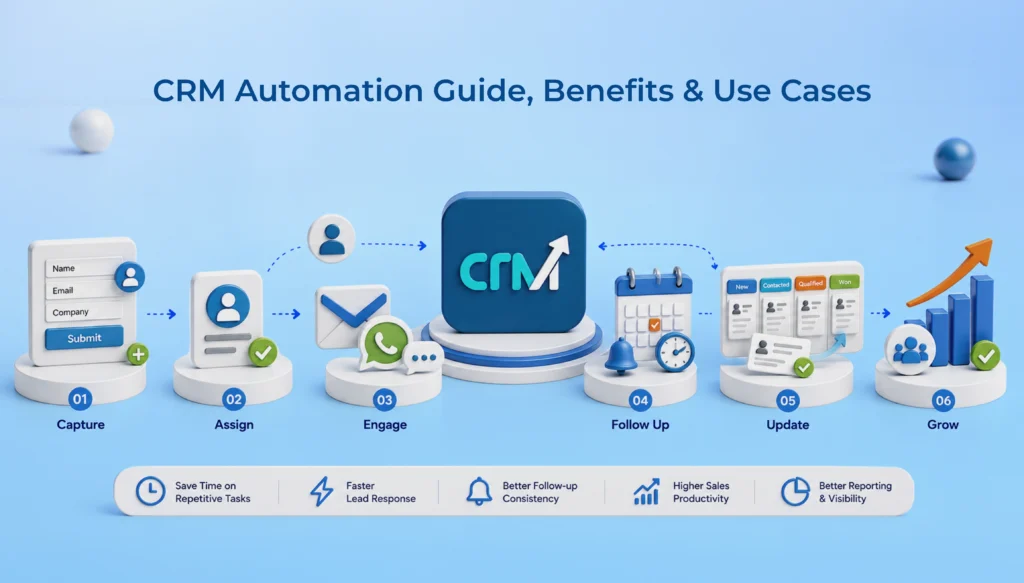
Here’s an example of how automated processes function. First, create a trigger, such as the receipt of a new form submission. A trigger causes an action to happen, and in this case, it assigns the lead to a rep based on territory, sends a welcome email, and creates a follow-up task for 24 hours later. None of it needs manual input. All the rep has to do upon arrival is work on a well-ordered lead who’s prepared to work with him at once.
So why does this matter even more in 2026 than five years ago? Because buyer expectations have changed. Someone who fills out a demo request form wants a reply within the hour. Not the next business day. How is a team relying on manual processes supposed to respond when headcount remains the same and the volume increases? This isn’t about taking jobs away. It’s about providing a system that won’t drop it.
What are the Benefits of CRM Automation?
1. Save time on repetitive tasks
Entering data, updating status, and scheduling follow-ups – none of these tasks require judgment. But still, they consume many hours a week. Automating these tasks would allow the salespeople to use their idle time for calls and negotiating rather than administrative work. Teams that have made this transition usually say they have several hours more per rep per week. Yet the number is highly variable, since the level of manual work can hardly be quantified.
2. Faster lead response
Response time is one of the most powerful factors in conversion. For example, a prospective customer contacted within five minutes of their inquiry is more likely to convert than one contacted an hour later. By automating lead routing and real-time alerts, this time lag is eliminated altogether, meaning there is no need for an employee to constantly monitor their mailbox during work hours.
3. Better follow-up consistency
This is honestly the weak link in most sales processes. A sales agent gets swamped or just busy, overlooks contacting prospects, and a prospect who had already shown some level of interest becomes disinterested. With the help of reminders and contact sequences set to run automatically, such a situation becomes independent of the employee’s memory. The system either pushes a message for an employee to follow up or executes it by itself; nothing is missed as a result.
4. Improved sales productivity
When admin work drops, selling time goes up. It’s a simple equation, but the impact compounds. A team spending less time on data entry and more time in actual conversations closes more deals in the same number of working hours.
Also Read: How Custom CRM Software Improves Sales Performance
5. Better reporting and visibility
Besides gaining a better insight, another important factor is manual reporting. It takes a while, and it’s outdated as soon as the report is compiled. Whereas automated CRMs make it easy to keep dashboards updated. This allows managers to get a look at pipeline health, rep activity, and forecast accuracy, without having to wait for the spreadsheet. That visibility matters more during growth phases, when small process gaps become expensive fast.
Top 6 CRM Automation Workflows & Real-World Examples
Automation touches nearly every stage of the customer lifecycle. A few use cases show up in almost every business, regardless of industry.
1. Lead Capture Automation
Forms, landing pages, and chat widgets feed directly into the CRM. No one is exporting spreadsheets or copying contact details by hand anymore.
2. Lead Assignment
Leads are directed to the right rep automatically. It uses territory, deal size, product interest, and workload balancing. None of that involves a huge chunk of internal back-and-forth.
3. Follow-up Reminders
The CRM will flag stale deals, remind reps before a specified call, and escalate leads that have gone cold for a certain period.
4. Sales Pipeline Automation
Deal stages update based on rep actions or buyer behavior. If a proposal is opened three times in one day, that’s worth flagging, and automation can do it instantly.
5. Email and WhatsApp Automation
The use of email or WhatsApp automations with customized workflows, marketing campaigns, and prewritten automatic replies ensures that your prospects are always engaged, without your business rep manually sending messages every time. In India, in particular, a WhatsApp-based follow-up is almost expected for B2C and also quite a lot of B2B sales.
6. Task and Meeting Automation
Calendar syncing, automatic task creation after a call, meeting reminders. Small things individually, but they add up to a much cleaner day for a sales rep.
Best CRM Automation Tools & Software Platforms
CRM automation is a big part of sales productivity. You need to select the right one. Otherwise, you will have to pay for a lot of features that your team will hardly use. Here are the five best CRM automation tools that we recommend for you.
1. WeekMate CRM
WeekMate’s CRM has one goal: to make reps work in a single environment to handle sales tasks, rather than jump back and forth between different applications. This software package includes a visual sales pipeline, lead and contact management tools, automated lead nurturing, follow-up tracking, and an integrated calendar where all this can be viewed. Also, WhatsApp and emails can be accessed within the CRM, enabling the system to automatically record all messages that have been sent or received against the appropriate lead. There are no screenshots required, nor are you left with uncertainty like “Do you think I already told them that? “.
What catches one’s attention is the level to which the system can be customized to your needs. Pipeline stages, lead tags, territory rules, and workflow triggers can be set up the way your team already sells, instead of making your selling technique adjust to the software. It also offers sales forecasting, multi-currency invoicing, live dashboards, and AI-powered insights from MIRA AI. If you are an Indian startup or SMB wanting automation that is very easy to understand, it should suit you quite well. Major feature: A single pipeline, WhatsApp-based automation, and workflow customization developed with Indian sales teams.
2. HubSpot CRM
HubSpot separates its automation into two layers. Workflows are for handling large automation activities, such as many-to-one-like lead allocation and internal notification. On the flip side, sequences are one-to-one sales outreach, personalized emails that automatically finish when a contact replies or schedules a meeting. In 2026, Breeze AI, another product from HubSpot, enables users to develop workflows merely by describing the objective in natural language, making setup much easier.
Where things become complicated: Professional and Enterprise tiers offer the best results of automation, but unlocking the most value comes from having life stages and pipelines correctly structured from the very beginning. The teams lacking dedicated RevOps support might sometimes find that the setup process is heavier than expected. The main benefit is a powerful and thorough marketing-to-sales automation, plus a large marketplace for integrations.
Also Check: Top HubSpot CRM Alternatives for Growing Sales Teams
3. Zoho CRM
Zoho’s automation combines three things: Blueprint for ensuring compliance with a specific process, Workflow Rules for trigger-based automation, and Zia, the AI, for predictions and anomaly detection. Flexibility is one of the things it has; the price is a very good bargain, and so it is no surprise that Zoho is very attractive to growing businesses in India and APAC.
A quick caveat worth knowing: Zoho’s interface has a learning curve, and unlocking the more advanced automation modules often means navigating a fairly dense settings menu. Worth budgeting onboarding time for. Key strength: Strong customization at a lower price point, particularly for teams already in the Zoho ecosystem.
Must Check : List of Top Zoho CRM Alternatives
4. Freshsales
Freshsales maintains a user-friendly style and does not go for a complex automated system. The AI system named Freddy does lead scoring and suggests the best next steps. Sequences take care of the repetitive communication.
The configuration options are more limited than those of Zoho or HubSpot, but this very reason makes it simpler and easier to use. So, it is a choice of small teams who appreciate user-friendliness more than complexity. You don’t have to struggle to find your way around a system. It is easy to set up, and you have communication tools right out of the box.
5. Salesforce
Salesforce remains the enterprise benchmark. Flow Builder handles complex, multi-step process automation, and Agentforce, its 2026 AI agent layer, extends that into autonomous task handling like research, summarization, and guided actions. For large, multi-department organizations with dedicated admins, there’s arguably nothing more powerful.
Still, one has to weigh this power against its drawbacks. It takes more time to get the system running; there will definitely be more administration involved, and small teams might find themselves spending money on features they wouldn’t utilize to their full potential. There is nothing closer to a perfect fit for large, complex sales organizations than capabilities and scalability.
Also Check: List of Best CRM Software for Indian Businesses
How to Choose the Right CRM Automation Tool for Your Business
A few factors decide whether a CRM automation software rollout actually works or gets slowly abandoned within three months.
1. Business size
The requirements would be different for small, medium, and large businesses. For example, a five-person startup and a 200-person sales team need very different levels of complexity. Buying more than you actually require just adds conflict.
2. Automation features
Carefully check whether the triggers, sequences, and routing rules align with how your team actually sells. Not just what the sales deck promises to deliver.
3. Integrations
Make sure your CRM properly integrates with email, WhatsApp, calendars, and other tools your team already uses.
4. Ease of use
Easy usage is one of the most important factors when choosing a CRM. If the reps find it clunky and not very user-friendly, adoption drops. A CRM nobody updates is worse than having no CRM at all.
5. Budget
Calculate the actual cost. While calculating, include the cost of onboarding, crm implementation, training, and any paid tiers needed to unlock automation features.
6. Migration Feasibility
In case you are migrating from excel/spreadsheets or an existing CRM, make sure the new system can import data from the old one, and that the data is efficiently organized.
7. Customer support
This is very important, especially in the first few months. A responsive support team makes or breaks the rollout.
CRM Automation Best Practices for Maximum Adoption
1. Start with one workflow
Don’t start the CRM workflow automation on day one. Pick the highest-friction process, usually lead assignment or follow-up reminders, and get that working well first.
2. Keep CRM data clean
Automation amplifies whatever’s already in your system. Messy data in means messy automation out, every time.
3. Review workflows regularly
A workflow built for a five-person team often breaks quietly once headcount doubles. Revisit rules every quarter, not just when something goes wrong.
4. Measure results
Track response times, follow-up completion rates, and rep time spent on admin work before and after. Numbers make the case for expanding automation far better than assumptions do.
Conclusion
CRM automation software doesn’t intend to eliminate human effort in sales. Instead, it aims to remove repetitive tasks that were never made for humans in the first place. It helps free up your salespeople, so they can work where their effort really matters: talking to people, building trust, and ultimately, turning prospects into customers.
The ideal implementation practice would be to take one step at a time, track the results, and if things are going well, keep growing your CRM system in that direction. Often, top-performing teams are not the ones with the fanciest or the most complicated automation tools. Their CRM automation is aligned with their company’s sales processes.
Following up manually and using scattered spreadsheets slow down every sales team. To get rid of this, see how WeekMate’s cloud-based CRM Software brings lead management, WhatsApp automation, and pipeline visibility into one place.
Frequently Asked Questions
1. How does CRM automation work?
A trigger, for instance, a new lead form being submitted, causes an automation to be fired. This might result in the lead being passed to a sales representative or automatically sending out a ‘Thanks for your enquiry’ message. These triggers and actions are programmed and executed independently by the system without any person having to intervene.
2. What tasks can be automated?
Some examples include collecting and assigning leads to sales reps, scheduling follow-ups, running email and WhatsApp automations, updating deal phases, setting up tasks, generating reports, and building dashboards, just to mention a few.
3. Is CRM automation worth it for small businesses?
Mostly, yes. A basic level of automation, like lead assignment and sending reminders for follow-ups, will really save time for small teams. This is usually the case when sales reps in the team are already juggling several responsibilities at the same time.
4. Which CRM offers the best automation features?
It depends on team size and workflow complexity. WeekMate CRM works well for Indian startups and SMBs wanting unified, WhatsApp-first automation. HubSpot and Salesforce suit larger teams with dedicated admin support, while Zoho and Freshsales sit comfortably in between on price and flexibility.