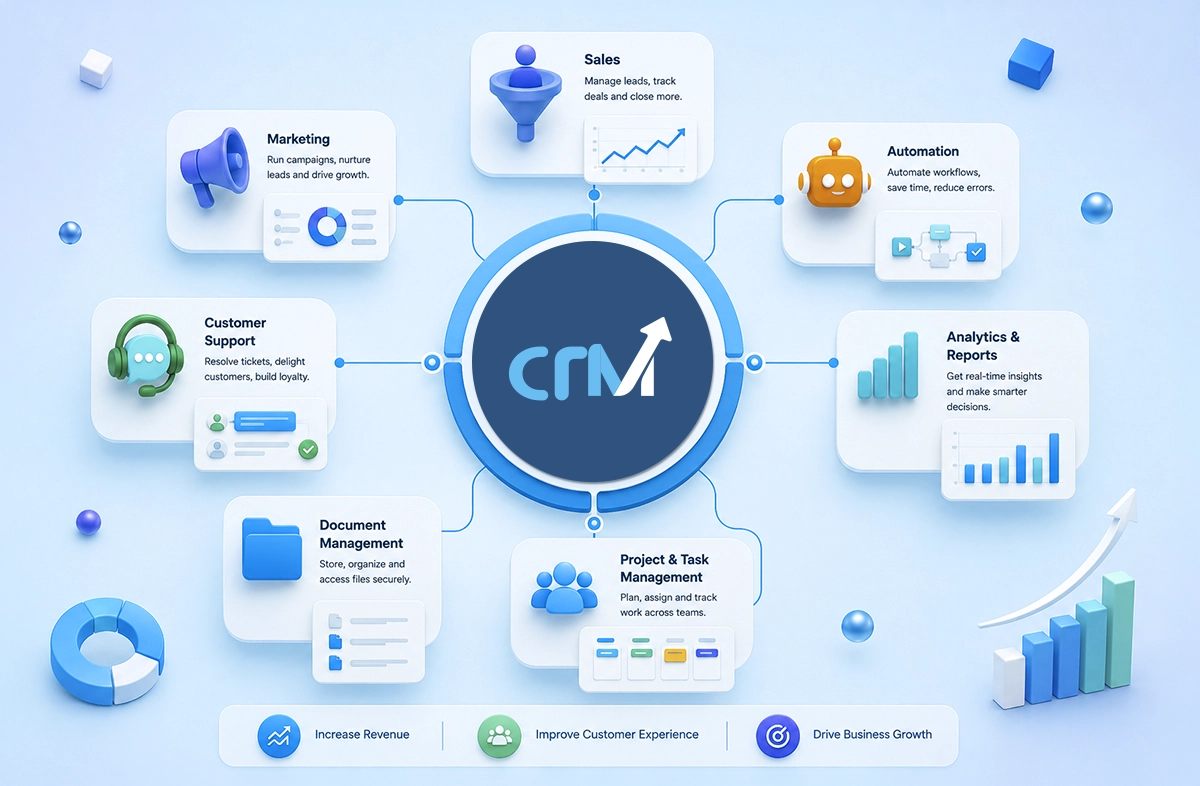
To be honest, most businesses don’t fail because they don’t have tools. That’s rarely the issue. The real problem? Their tools just don’t work together. Here, CRM modules step in.
If you’ve been looking into various CRM software lately, you’ve probably noticed something. It’s no longer just about storing contacts.
A modern CRM system is kind of like a central hub for your business. Everything flows through it. Sales, marketing, support, operations, all in one place, instead of scattered across tools.
And now, in 2026, things have shifted a bit. With AI, automation, and real-time data driving decisions, choosing the right CRM modules isn’t really optional anymore; it’s just something you can’t afford to get wrong.
What are CRM Modules?
CRM modules are different components inside a CRM system. Each of them handles specific business functions. Instead of one bulky tool trying to do everything, CRM software modules divide tasks into dedicated sections like sales, marketing, customer support, and analytics.
Think of it like this:
A CRM isn’t one tool. It’s a collection of tools working together smoothly, if set up right. These customer relationship management modules help businesses:
- Organize customer data
- Automate repetitive tasks
- Track interactions across channels
- Improve decision-making with real insights
And yes, when implemented well, they reduce chaos.
Core CRM Modules
Now, not every CRM is built the same. Here is a key CRM features list that almost every business must have.
1. Sales CRM Module
This is actually where revenue happens. A sales CRM module helps the team manage leads, track deals, and close opportunities without scattered spreadsheets or forgotten follow-ups.
Key functionalities include:
- Lead management
- Pipeline tracking
- Deal management
- Follow-up reminders
The biggest benefit? Visibility. You know exactly where each deal stands. No guessing and no chasing.
2. Marketing CRM Module
Marketing without data is just noise. This module connects your campaigns with actual customer behavior. It helps you attract, nurture, and convert leads more effectively.
Core features include:
- Email campaigns
- Lead nurturing workflows
- Audience segmentation
- Campaign performance tracking
In 2026, this module is heavily powered by AI. It doesn’t just send emails. It predicts when and what to send.
3. Customer Support Module
Customer experience is no longer a “nice-to-have.” It’s the brand. A CRM support module ensures that every customer query is tracked, managed, and resolved efficiently across every channel.
Key features:
- Ticket management
- Query tracking
- SLA (Service Level Agreement) management
- Omnichannel communication
And here’s the thing. Customers don’t care which department they’re talking to. They just want answers. This module makes that possible.
Operational & Productivity CRM Modules
Now this is where things get interesting. These CRM system modules don’t directly generate revenue, but they make everything faster, smoother, and scalable.
1. Workflow Automation Module
Repetitive tasks kill productivity. This module automates processes like:
- Lead assignment
- Follow-up emails
- Task creation
- Status updates
In short, it removes manual work and human errors.
2. Reporting & Analytics Module
This module transforms raw data into actionable insights. You can track:
- Sales performance
- Campaign ROI
- Customer behavior
- Team productivity
Modern CRM tools now include predictive analytics. It means they don’t just show what happened. They suggest what to do next.
3. Project & Task Management Module
For teams juggling multiple clients or campaigns, this module is a lifesaver. It helps:
- Assign tasks
- Track deadlines
- Monitor progress
- Improve team collaboration
Everything stays aligned. No more “I thought someone else was handling it.”
4. Document Management Module
Scattered files are a nightmare. This module centralizes documents like:
- Proposals
- Contracts
- Customer records
With secure access and version control, your team always works with the latest information.
Key CRM Modules at a Glance
|
Module Type |
Primary Function |
Business Impact |
|
Sales CRM |
Manage leads & deals |
Increased revenue |
|
Marketing CRM |
Campaign management |
Better conversions |
|
Customer Support |
Handle queries |
Improved customer experience |
|
Automation |
Streamline workflows |
Higher efficiency |
|
Analytics |
Data insights |
Smarter decisions |
|
Project Management |
Task tracking |
Better collaboration |
|
Document Management |
File organization |
Centralized data |
Also Read: Why Cloud-Based CRM Software is Essential for Businesses?
Benefits of CRM Modules
When implemented correctly, CRM functionalities can transform how a business operates.
Here’s what you actually gain:
1. Better customer management
When all your customer information sits in one place, things just become easier. You’re not digging through emails or spreadsheets anymore. You have context, history, and clarity — which makes every interaction more meaningful.
2. Increased sales productivity
Sales teams spend a surprising amount of time on non-selling work. Updating data, chasing info, setting reminders it adds up. A good CRM takes that weight off, so they can focus more on conversations that actually close deals.
Also Read: How Custom CRM Solutions Improve Sales Performance?
3. Improved collaboration
This one’s subtle, but powerful. When sales, marketing, and support are all working in the same system, things just click better. Less back-and-forth, fewer misunderstandings. Everyone’s on the same page.
4. Workflow automation
You don’t really notice how repetitive your processes are until you stop doing them manually. Follow-ups, task assignments, status updates, once these get automated, your day feels lighter. And way less error-prone.
5. Better reporting
Most businesses have data, but don’t really use it well. A CRM organizes it in a way that actually makes sense. So instead of guessing, you can clearly see what’s working, what’s not and what needs fixing next.
6. Centralized business data
Everything lives in one system: customer details, deals, communication, reports. That means no switching between tools or searching for information. It keeps your operations organized and your team aligned.
Must Read: Benefits of Custom CRM Software
How to Choose the Right CRM Modules?
Now this is where most businesses go wrong. They either choose too many modules or the wrong ones entirely. Here are some simple ways to approach it:
1. Business requirements
First things first… don’t start with the tool. Start with your problems. What’s slowing you down right now? Sales gaps, messy data, missed follow-ups? Choose CRM modules that actually fix those. Not just the ones that sound impressive.
2. Team size
This one’s often overlooked. A small team usually needs something simple, quick to learn, easy to manage. But as your team grows, you’ll need structure – permissions, workflows, maybe even layered access. So yeah, think ahead a bit.
3. Integration capabilities
Your CRM shouldn’t feel like a separate island. It needs to connect with the tools you already use: email, marketing platforms, accounting software. Otherwise, you’re just creating more silos, and that defeats the whole point.
4. Automation features
If your team is still doing repetitive tasks manually, something’s off. A good CRM should take that load off: assigning leads, sending follow-ups, updating statuses. It’s not just about saving time. It’s about reducing mistakes too.
Also Read: Why Custom CRM Software is the Future of Business Automation?
5. Reporting needs
Data is great, but only if it makes sense. Look for CRM modules that give you clear insights, not complicated dashboards you’ll never use. You should be able to glance at it and think, “okay, now I know what to do next.”
6. Scalability
And finally, think long term. Your CRM should grow with you, not hold you back. More users, more data, more processes. It should handle all of that without forcing you to switch systems every couple of years.
CRM Modules Trends in 2026
This space is evolving fast. Here’s what’s shaping modern CRM software:
1. AI-Powered CRM
AI now handles:
- Lead scoring
- Sales forecasting
- Customer segmentation
- Smart recommendations
It’s not replacing humans, but it’s definitely reducing guesswork.
2. Predictive Analytics
CRMs are becoming proactive. Instead of just showing reports, they:
- Predict customer churn
- Suggest next best actions
- Identify high-value leads
It’s like having a strategist built into your system.
3. Omnichannel Communication
These days customers are present everywhere. They are on email, chat, WhatsApp, and social media. Modern CRM modules unify all these channels into one dashboard. So, there is no switching tabs or losing conversations.
4. No-Code Automation
We all know that not every team has developers. That’s okay. In such scenarios, no-code CRM tools allow you to build workflows, and that too without technical skills. Just drag, drop, automate, and it’s done.
5. Unified Customer Data
Data silos are disappearing. With CRM, everything, like sales, marketing, and support, can connect into one unified profile. This in turn, creates a 360-degree view of your customer.
And honestly, that’s where real personalization begins.
Suggested Read: Why CRM Is Essential for Business Competitiveness?
Simplify Customer Management with the Right CRM
CRM isn’t about software anymore. It’s about how your business runs. At the end of the day, the modules aren’t just features. They’re building blocks. The right combination can:
- Streamline your operations
- Improve customer relationships
- Boost revenue predictability
But the wrong setup? It just adds complexity. So take your time and start small. Then scale smartly.
And if you’re looking for a CRM that brings all these modules together, without overwhelming your team, solutions like WeekMate CRM are built exactly for that. It’s flexible, scalable, and actually usable.
The companies winning in 2026 aren’t the ones with the most tools, but the ones using the right CRM tools and modules in the right way.
So yes, choose wisely. Because your CRM doesn’t just store data. It shapes your growth.
Frequently Asked Questions
1. What are CRM modules?
CRM modules are different parts of a bigger CRM system. Each one handles a specific job like managing sales, running marketing campaigns, or handling customers. Instead of a single bulky tool, it’s like a set of dedicated features working together.
2. Which CRM modules matter the most?
It depends mostly on your business. Generally, sales, marketing, customer support, automation, and analytics are the important ones. These are the areas where most teams need structure and visibility.
3. Can small businesses actually use CRM modules effectively?
Yes. In fact, small businesses benefit the most. Many modern CRM tools are built to be simple, scalable, and even no-code. Hence, you don’t need a big team or technical expertise to get started.
4. How do CRM modules improve productivity?
They remove a lot of repetitive work from your plate. Tasks like follow-ups, data entry, and tracking interactions all get simplified. Also, since everything is in one place, teams spend less time searching and more time actually doing.
5. What does the future of CRM modules hold?
It’s moving towards smarter systems. More AI, more automation, and better predictions. CRM tools won’t just store data anymore; they’ll actually guide decisions.