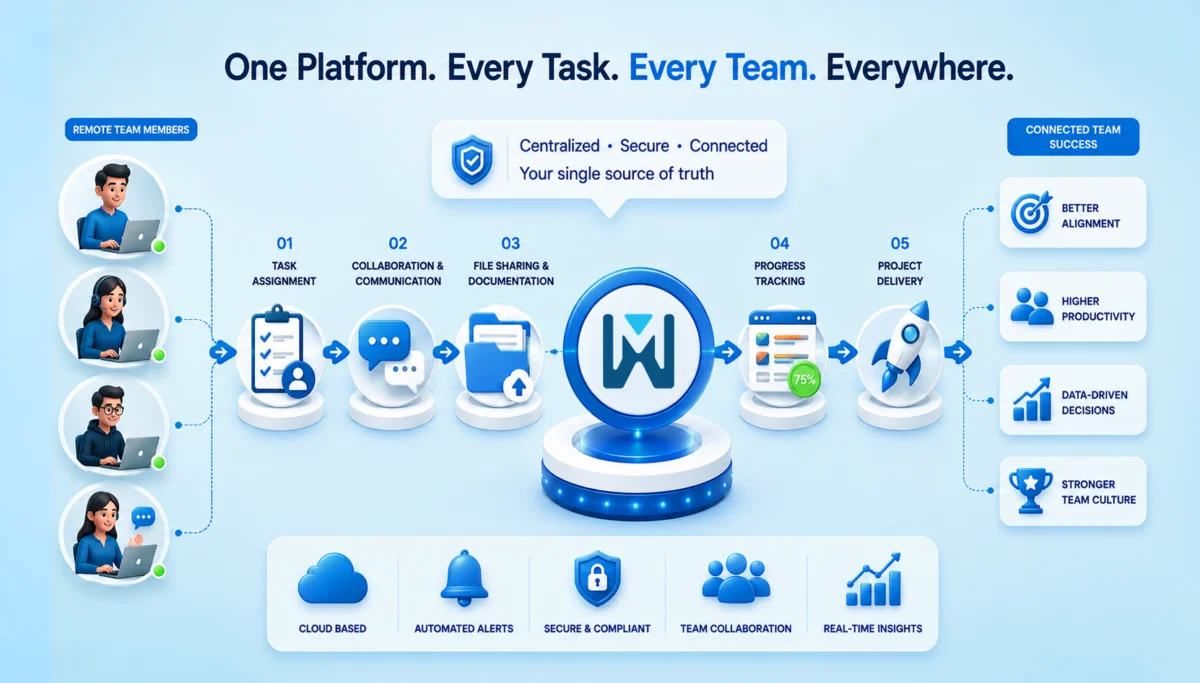
How to Build a Productive Remote and Hybrid Team Culture Using Cloud-Based Task Management Software

Remote work did not suddenly arrive. It quietly settled in and then stayed. It has become the default setup for a large section of the global workforce. Once teams were in offices, and now they are scattered across cities, time zones, and sometimes even continents.

Is it flexible? Yes. But it can also be a bit messy if not managed right. Everyone is supposed to stay aligned, accountable and engaged. And when teams aren’t in the same physical space, small problems like a missed update, an unclear task owner, or a delayed reply can lead to serious productivity issues.

This is where cloud-based project management software steps in. Let’s break this down properly.

The Real Challenges Behind Remote and Hybrid Teams

At first glance, hybrid work sounds ideal. Freedom, flexibility, fewer commutes. But behind the scenes, teams face a different reality. Let’s take a look at some challenges.

Communication Gaps

In an office, conversations happen naturally. A quick desk chat, a spontaneous meeting. Remote teams don’t get that luxury. Instead, communication becomes scheduled, delayed, or, worse, lost in endless threads. And over time, this creates information silos.

Visibility Issues

Managers can’t “see” progress anymore. Not physically, not even intuitively.

  • Who’s working on what?
  • What’s delayed?
  • What’s stuck?

Without proper task assignment and tracking, things get easily blurry. And nobody knows exactly what is happening.

Engagement Slowly Declines

Remote employees often feel disconnected. Not always immediately, but gradually. No casual interactions. No shared moments. Just tasks and deadlines. And culture? It becomes harder to maintain than most companies expect.

Why Task Management Software Is Essential for Hybrid Workforce Productivity

Let’s be honest. Spreadsheets and scattered tools don’t work anymore. If your team is hybrid, you need a system that acts as a single source of information and facts. That’s exactly what modern task management software does.

Centralized Work Management

Tasks, deadlines, files, and updates are all centralized. No more digging through emails or messages. No more “Can you resend that?” Everything is in one place – clear and up to date.

Improved Transparency Across Teams

Everyone instantly sees what’s happening. Task status, ownership and progress are all transparent. It builds accountability without micromanagement. And that balance is extremely important.

Better Time and Resource Management

Workload distribution becomes visible, helping managers improve resource planning and overall workflow efficiency. You can actually see who’s overloaded and who has bandwidth. Which, honestly, is something most teams guess incorrectly without data.

Features to Look for in Workplace Collaboration Solutions

Not all tools are equal. Some look good but don’t solve real problems. Before you feel overwhelmed with too many features, here’s what actually matters.

Task Assignment and Tracking Capabilities

Clear ownership changes everything. When tasks are assigned properly, deadlines are given due importance, confusion around tasks drops, and accountability increases naturally.

Real-Time Collaboration Tools

Think shared workspaces, live discussions, and file sharing. Not scattered tools, but connected workflows.

Automated Notifications and Reminders

Good software reminds people without stressing them out. Missed deadlines are reduced, and follow-ups are automated.

Reporting and Performance Analytics

Decisions shouldn’t rely on assumptions. You get productivity insights, task completion trends, and performance data, which help leadership make informed calls rather than just guess.

Integration with Existing Business Tools

Your task management tool should connect with CRM systems, HR platforms and Communication tools. Because disconnected tools = broken workflows.

Building a Strong Remote and Hybrid Team Culture with Technology

Culture is not something you define and forget. It shows up in everyday actions and in how people work.

Establish Clear Expectations and Workflows

Unclear expectations decrease productivity. It is better to define roles, responsibilities, and workflows clearly and document them in your system.

Promote Transparency and Trust

We all know that transparency builds trust. In fact, it is a critical component of successful hybrid workforce management. When everyone can see progress, blockers, and contributions, teams naturally align better. No chasing. No guessing.

Encourage Collaborative Problem-Solving

There’s a difference. Collaboration means having shared ownership, cross-functional discussions and inputs and collective problem-solving. So, your software should support that, not restrict it.

Recognize Achievements and Milestones

Remote teams need recognition more than office teams. So, use your system to highlight achievements, share milestones and appreciate their contributions. This keeps morale alive and makes them feel connected to the company.

Best Practices for Using Team Productivity Software for Businesses

You don’t need complicated systems. Just consistent ones.

Create Structured Task Workflows

Templates help more than people realize. They reduce setup time and ensure consistency across projects.

Set Measurable Goals and KPIs

Every task should connect to a larger objective. Otherwise, teams stay busy but not productive.

Conduct Regular Check-Ins

Weekly syncs, quick reviews, and progress updates become much more effective when supported by employee productivity insights and performance data.

Encourage Employee Adoption

Even the best software fails if people don’t use it properly. So train your team, simplify onboarding and offer continuous support. Adoption isn’t a one-time step. It’s ongoing.

How Business Collaboration Software Enhances Employee Experience

This part is often overlooked. But it shouldn’t be.

Encourage Continuous Communication

Communication just has to be consistent and not scattered. All the communication has to be in one place – the updates, discussions, and feedback. It reduces isolation. Makes people feel connected.

Flexible Work Arrangements

Cloud-based tools allow you to work from anywhere. Mobile, desktop, remote access; everything stays synced.

Strengthen Team Relationships

When everyone works toward shared goals with visibility, something interesting happens. People feel more involved, more valued and more connected.

Measuring Success in a Hybrid Environment

You cannot improve what you can’t measure. Tracking success in a hybrid setup isn’t just about “are people working?” It’s more about how teams are collaborating, and whether people actually feel good doing it.

Let’s break it down in a practical way.

Productivity Metrics to Track

Task completion rates:  This tells you how consistently work is getting finished. If tasks are piling up or frequently delayed, it’s usually a sign of unclear priorities, overload, or gaps in task assignment and tracking. On the flip side, steady completion rates often mean your workflows are actually working.

Project turnaround times: This is about how long it takes to move from “start” to “done.” If timelines are stretching more than expected, something’s off. Maybe approvals are slow, dependencies aren’t clear, or communication is lagging. Faster turnaround usually indicates a well-aligned, efficient team.

Collaboration Metrics

Team participation levels: Look at how actively people are engaging – commenting on tasks, updating progress, contributing to discussions. Silence in a hybrid setup doesn’t always mean focus. Sometimes it means disengagement.

Cross-department engagement: Hybrid teams often struggle with scattered data. Hence, it is important to track how often the teams actually work together. Strong cross-team collaboration leads to better decisions and fewer shocks.

Employee Satisfaction Indicators

Feedback surveys: Sometimes, the simplest way to understand what’s happening is to ask. Regular, short surveys can show what data can’t. Like frustration, confusion, or even burnout signals. The key is consistent surveys and not complex ones.

Retention and engagement rates: If people are leaving or disengaged, it shows here. High retention means your team feels supported and clear. And honestly, it’s a big thing in a hybrid environment.

Here’s what to track:

Metric Type What to Measure Why It Matters
Productivity Task completion rate, turnaround time Shows efficiency
Collaboration Participation levels, cross-team interaction Reflects teamwork
Employee Experience Feedback, engagement, retention Indicates culture health

These metrics give real insight and not surface-level assumptions.

Choosing the Right Cloud-Based Solution for Your Team

Not every tool fits every team. So don’t rush this. It’s not about the tool that gives you the most number of features. It should always be about what you actually need.

Assess Your Team’s Needs

Always ask how big your team is or how complex your projects are. And then pick based on reality, not trends.

Check Scalability and Security

As your business grows, your system should grow with it. And security? It’s non-negotiable. Especially with distributed teams.

Compare Features and User Experience

Check for the features that you actually need. And further, it should be as easy to use as possible. If it’s hard to use, people won’t use it. Simple as that.

Conclusion

Hybrid work isn’t a temporary shift anymore. It’s how modern businesses operate. And while flexibility is great, it needs structure to truly work. That structure comes from the need for cloud-based task management software that helps teams work together, stay accountable, and stay connected, even from different places.

If you still rely on scattered tools or manual tracking, this might be the right time to rethink things. Because productivity doesn’t just happen. It’s built, supported, and sustained – with the right systems in place.

FAQs

1. What is cloud-based task management software?

It’s a tool that helps teams organize and track their work online. There’s no need to use spreadsheets or scattered messages. Tasks, deadlines, and updates live in one place and can be accessed from anywhere.

2. Is it useful for small businesses?

Yes, very. In fact, small businesses often benefit the most. It helps them stay organized early on, avoid confusion, and manage growing workloads without needing complex systems.

3. How does it improve hybrid workforce productivity?

It brings clarity. Everyone knows what they’re working on and what others are doing. This reduces delays, avoids duplication, and keeps work moving smoothly, even when teams are working from different places.

4. Can it replace communication tools?

Not really. It works alongside them. Task management software turns the conversations in communication tools into structured work that can be tracked and completed.

5. How much time does implementation take?

It depends on the team, but usually not long. Most teams can get started within a few days and begin seeing real benefits in a couple of weeks once everyone gets used to it.
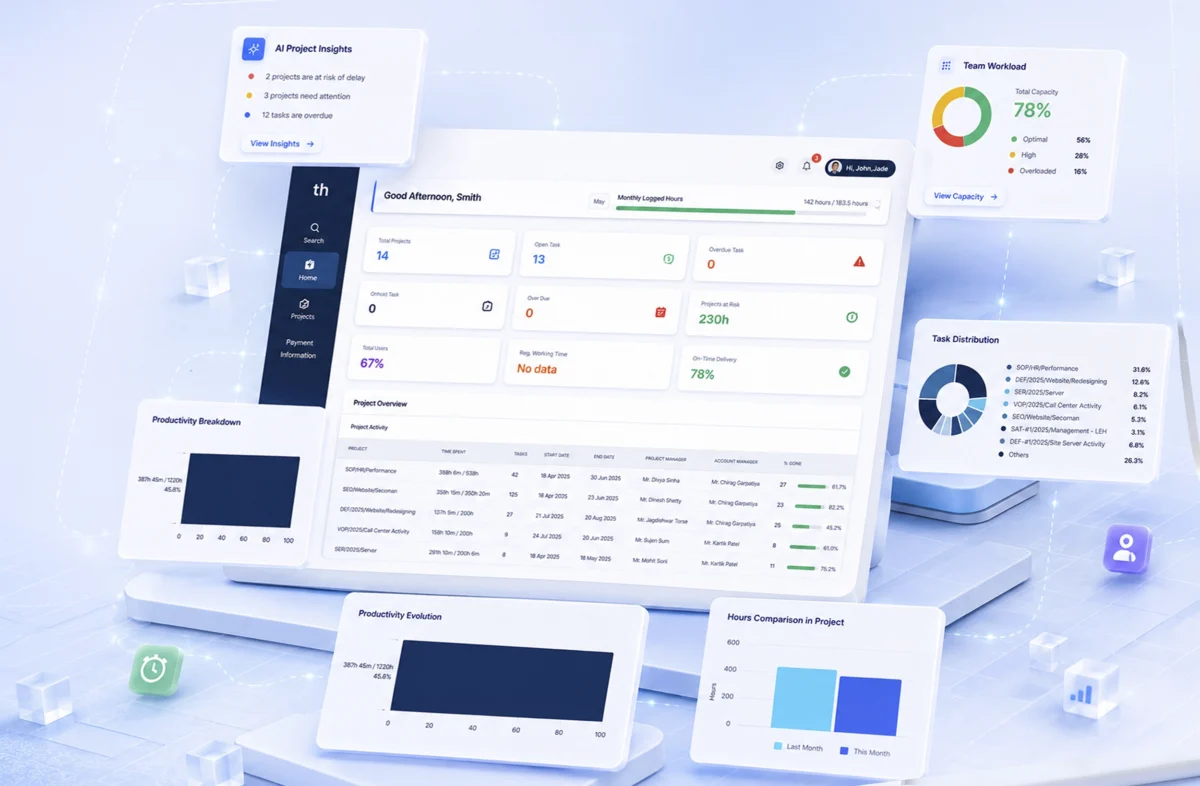
How Project Management Tools Are Expanding Beyond Task Management Software?

Managing a project used to mean a whiteboard or a shared spreadsheet. If you were feeling organized, a color-coded Gantt chart. Simple task management software with checklist boxes was enough for most teams. It isn’t anymore.  

Today’s project management tools are something fundamentally different. They don’t just record work. They shape how work happens through automation and real-time visibility. AI flags problems before anyone’s noticed them. WeekMate is built around this shift: from tracking tasks to actually managing outcomes.   

The Evolution of Project Management Tools

The early tools were functional but limited. Microsoft Project gave enterprise teams digital Gantt charts. Trello gave everyone else a drag-and-drop board. Both were useful. Neither was enough. 

Here’s how the category evolved:

Era What Changed
1990s–2000s Desktop tools, complex Gantt charts, enterprise-only
Early 2010s Cloud tools democratized task tracking: lighter, faster, visual
Mid 2010s Integrations with Slack, GitHub, Google Workspace. The tool became a hub
2020s onward AI, automation, analytics. Tracking gave way to optimizing

The ceiling on task management software became obvious as teams grew, projects multiplied, and remote work removed the organic coordination that used to happen in an office. Teams didn’t just need better to-do lists. They needed systems that could keep up with how they actually worked. Businesses wanted answers to how to manage projects beyond task lists?

Why Task Lists Alone Are No Longer Enough?

A product launch isn’t a list of 40 tasks. It’s a design sprint running parallel to an engineering backlog, a marketing calendar, a legal review, and a budget that keeps getting revised. That too across multiple time zones. A flat list can’t hold that.

There are a few specific ways traditional task management software breaks down:

  • Visibility gaps. Stakeholders need a real picture of project health, not a weekly summary email assembled from 12 different updates.
  • Collaboration friction. When conversation lives outside the project tool (email threads, Slack) context disappears. Decisions become untraceable.
  • Scaling problems. Simple tools buckle when team size grows or cross-team dependencies stack up.
  • Reactive management. Without analytics, you find out about problems after they’ve already burned a deadline.

If you want to manage projects beyond task lists, you need a tool built for that, not one that was designed for task tracking and bolted on extra features.

Key Features of Smart Project Management Systems

The word “smart” gets thrown around a lot. In practice, smart project management systems earn the label through a specific set of capabilities.    

1. AI-Driven Insights

Risk flags, priority suggestions, bottleneck alerts — surfaced automatically, without someone manually reviewing a spreadsheet every morning.

2. Integrated Communication

Conversations tied directly to tasks and milestones. Not a separate Slack channel, not an email chain — context that lives where the work lives.

3. Real-Time Reporting

Live dashboards that every stakeholder can read, without asking someone to compile a status update first.

4. Resource Optimization

Who’s over capacity? Who has bandwidth? Smart project management systems answer that before it becomes a problem, not after someone burns out or misses a deadline.

When these work together, the tool stops being a record-keeper and starts being useful.

Workflow Automation in Project Management Tools

Every status update is written by hand. Every reminder is sent manually. Every reassignment made without context. It adds up. Workflow automation in project management tools removes that load, systematically, at scale.

The numbers aren’t abstract:

  • 68% of managers say repetitive admin cuts into strategic thinking time
  • Teams using automation close projects 3.5x faster on average
  • Automated reminders reduce missed deadlines by roughly 40%

What does that automation actually look like?

  • Auto-assignment — tasks route to the right person based on role or availability, no triage meeting required
  • Status triggers — when a task moves to “in review,” the approver gets notified and a deadline gets set automatically
  • Smart reminders — escalation based on priority, not just how long something’s been sitting there
  • Recurring templates — spin up a sprint cycle, content calendar, or onboarding flow in one click

WeekMate’s automation engine lets teams set rules once and stop thinking about them. The routine runs itself. The manager handles what only a manager can handle.

Also Read: How Project Management Software Improves Workflow Efficiency?

Collaboration and Team Alignment

The best project plan fails if the team executing it isn’t aligned. Duplicate work, unclear ownership, misread priorities. These don’t happen because people are careless. They happen because the tool didn’t surface the right information to the right person at the right time.

1. Centralized Communication

When every conversation, decision, and file is attached to the relevant task or milestone, teams stop losing context. Someone joins mid-project and can actually get up to speed without hunting through email archives.       

2. Remote and Distributed Teams

Hybrid and remote work didn’t kill coordination. It just made synchronous coordination expensive. Good project management tools compensate: asynchronous comments, shared goal trees, status digests, time-zone-aware scheduling. Teams in different continents can stay aligned without a 7am call that nobody wants.

3. Shared Goals and Transparency

When everyone can see not just their task but the project’s broader health, individuals can make smarter judgment calls. They don’t need to escalate every small decision. They understand where things stand.

The Future of Project Management Tools

The future of project management tools isn’t a better to-do list. It’s something closer to an operating system for work.

A few trends that are already materializing:

  • Predictive analytics — AI that forecasts delays and budget overruns before they happen, based on current trajectory and historical patterns
  • Personalized dashboards — a developer, a product manager, and a CFO all need different views of the same project; the tool should know that
  • Deeper integrations — two-way sync with Slack, Figma, GitHub, Jira, CRM platforms; the context-switching tax disappears
  • Natural language interaction — update a task, pull a report, or query project data by typing a sentence. No navigation or  training
  • Outcome metrics — moving past “tasks completed” to track what actually mattered: revenue influenced, time-to-market, customer satisfaction

WeekMate is built with this direction in mind. Not retrofitting AI onto a legacy task tracker, but designing from the ground up for how teams work now.

How WeekMate Helps You Go Beyond Tasks?

WeekMate runs on one assumption: task tracking is the floor, not the destination. Here’s what that looks like in practice.

Capability What It Does
Smart Planning AI-assisted scheduling that balances capacity, deadlines, and priorities
Unified Workspace Tasks, docs, goals, and conversations in one place
Workflow Automation Visual rule-builder. No code required
Live Analytics Real-time dashboards, customizable by role
Team Alignment Shared OKRs, transparent goal tracking across the org
Integrations Slack, Google Workspace, GitHub, Zapier, and more

Whether you’re a solo founder managing a roadmap or an operations manager overseeing five concurrent workstreams, WeekMate scales to what you’re actually dealing with. Less time managing the tool. More time making progress.

Conclusion

Project management tools have come a long way from checklists and Gantt charts. The teams that are consistently shipping, staying aligned, and hitting deadlines aren’t doing it because they work harder. They’re using smarter systems.  

The shift from barely understanding how to manage projects beyond task lists to real project management isn’t a technology upgrade. It’s a change in how work gets done: from reactive to proactive, from scattered to coordinated, from recording activity to driving outcomes.

WeekMate is built for that shift. Try it free and see what project management looks like when it’s designed around results, not checkboxes.

FAQs

1. What’s the difference between task management software and project management tools?

Task management software handles individual to-dos like create, assign, check off. Project management tools cover the whole picture. You can do planning and decide timelines. Assign resources. Get reporting tools. Setup automation. Task management is one feature inside a broader project management system.

2. How do smart project management systems use AI?

They surface what you’d otherwise miss or take too long to find manually. That means predicting delays based on current velocity. They also flag resource conflicts before they blow up. AI can suggest priorities, and generate stakeholder summaries automatically.

3. What are the main benefits of workflow automation in project management tools?

Less manual admin, fewer errors and faster project cycles. Your team can focus on the work that actually needs human judgment. Automation also creates consistency. The process runs the same way every time. No need to rely on anyone to remember the steps.

4. How can I manage projects beyond task lists with WeekMate?

Use the full toolkit: set goals, track milestones and run live dashboards. Keep communication inside the project. Automate your recurring workflows. WeekMate brings that together in one place. So you can zoom between strategic view and task level without switching tools.

5. Is WeekMate suitable for small teams or solo users?

Yes. It scales from individual users managing personal productivity to large teams running complex, multi-stream projects. The interface doesn’t get in your way when things are simple, and it has the depth you need when they’re not.

6. What does the future of project management tools look like?

More AI and tighter integrations with the rest of your tool stack. There’ll be a shift from tracking activity to measuring business outcomes. WeekMate is actively building in that direction.

Why Your Business Need Cloud-Based Task Management Software?

Traditional project management methods were never designed for the speed and flexibility Modern businesses need speed and flexibility. Task management software has now become a necessity.

Work coordination has gotten messier over the last few years. Teams are scattered, projects move faster, and a surprising number of companies are still running on spreadsheets and email chains. At some point that stops working.

That’s what actually solves it. It’s just one platform where tasks live, deadlines are visible, and nobody has to ask “wait, who owns this?” for the fifth time. WeekMate falls into this category. It centralizes the work. You don’t need to manage three apps to figure out where a project stands.

What is Cloud-Based Project Management Software?

Cloud based project management software is a digital platform. It helps businesses plan, organize, track, and manage projects online.

No need to store project files and updates on local systems or spreadsheets. Everything is managed securely on the cloud. Team members can access tasks, updates, files, and project timelines from anywhere using an internet connection.

In simple words, it acts as a centralized workspace where teams collaborate in real time.

Most modern business project management solutions include features like:

  • Task assignment
  • Deadline tracking
  • Team collaboration
  • File sharing
  • Project dashboards
  • Performance tracking
  • Workflow automation

The biggest advantage is accessibility.

Whether your team is working from the office, home, or while traveling, everyone stays connected to the same project environment.

This is why cloud-based tools are no longer considered optional. They’ve become a core part of how businesses manage operations efficiently.

Key Features of Modern Task Management Software

The best platforms focus on simplifying workflows.

Here are some essential features businesses should look for in modern task management software.

Task Creation and Assignment

In just a few clicks, managers can:

  • Create tasks, 
  • Assign responsibilities, 
  • Set priorities, and 
  • Define deadlines.

This removes confusion around ownership. Every team member knows exactly what needs to be done.

Deadline Tracking and Reminders

Missed deadlines often happen because follow-ups are scattered across emails and messages.

Modern tools solve this through:

  • Automated reminders, 
  • Due-date alerts
  • Progress tracking notifications.

Progress Monitoring Dashboards

Instead of asking employees for constant updates, managers can monitor progress through real-time dashboards.

This improves visibility without micromanaging teams.

File Sharing and Centralized Communication

Employees no longer need to search through email chains for documents or discussions.

Everything stays organized within the project itself.

Integration with Other Tools

Most businesses already use multiple tools daily.

Modern platforms integrate with:

  • Communication apps
  • HR software
  • CRM systems
  • File storage tools
  • Calendars
  • Email platforms

This makes workflows smoother and reduces manual work.

Today, task management software for businesses plays a critical role in daily operations because it keeps communication, accountability, and execution connected in one place.

Benefits of Cloud Project Management

Businesses are rapidly adopting cloud-based systems because the advantages go far beyond convenience.

The benefits of cloud project management directly impact productivity, scalability, and operational efficiency.

1. Accessibility Anywhere, Anytime

One of the biggest advantages of cloud platforms is flexibility.

Teams can access projects, tasks, and updates from:

  • Laptops
  • Mobile devices
  • Tablets
  • Remote workstations

This is especially important for remote and hybrid teams.

Employees no longer need to be physically present in the office to stay productive.

Work continues smoothly regardless of location.

2. Improved Team Collaboration

Poor communication slows projects down.

Cloud-based platforms improve collaboration through:

  • Real-time updates
  • Shared workspaces
  • Centralized communication
  • Instant file access

Instead of relying on scattered conversations across multiple channels, everyone works within the same environment.

This is where team management software becomes extremely valuable.

Managers gain better visibility while employees stay aligned on priorities and deadlines.

3. Cost Efficiency

Traditional project management systems often require expensive infrastructure, hardware, and maintenance.

Cloud solutions eliminate most of those costs.

Businesses usually pay through flexible subscription models based on team size and usage.

This makes cloud-based systems more affordable for startups and growing companies.

There’s also less dependency on internal IT maintenance. 

4. Scalability for Growing Businesses

Businesses evolve constantly.

The software you use today should still support your operations two or three years later.

Cloud platforms make scaling easier because businesses can:

  • Add users quickly
  • Expand features when needed
  • Manage larger workflows
  • Support multiple departments

This flexibility makes cloud solutions ideal for fast-growing organizations.

5. Data Security and Backup 

Data loss can seriously impact business operations.

Cloud-based systems offer:

  • Automatic backups
  • Secure cloud storage
  • Regular software updates
  • Access control permissions

Most modern platforms also provide encryption and advanced security measures to protect sensitive business information.

Compared to local systems and spreadsheets, cloud platforms offer far stronger reliability.

How Cloud-Based Tools Improve Team Productivity?

One of the biggest reasons businesses invest in cloud platforms is productivity improvement.

When teams spend less time managing processes manually, they spend more time completing actual work.

Here’s how cloud based project management software improves team efficiency.

Reduced Manual Work

Automation handles repetitive tasks like:

  • Reminders
  • Task updates
  • Notifications
  • Status tracking
  • Workflow approvals

This reduces administrative workload significantly.

Better Accountability

When responsibilities are clearly assigned, there’s less confusion.

Every employee knows:

  • What they’re responsible for
  • When tasks are due
  • What stage the project is in

This improves accountability naturally.

Clear Task Ownership

Without proper systems, tasks often get delayed because ownership is unclear.

Cloud platforms solve this by assigning tasks directly to individuals or teams.

Faster Project Completion

Real-time collaboration reduces delays caused by waiting for approvals, updates, or document sharing.    

Teams can move faster because communication happens instantly.

This is why businesses increasingly rely on task management software for businesses to improve operational speed and execution quality.     

Why Businesses Are Switching to Cloud Solutions?

The shift toward cloud platforms is happening across almost every industry.

And the reasons are practical.

Businesses are tired of:

  • Endless spreadsheets
  • Disconnected communication
  • Manual follow-ups
  • Lost files
  • Delayed reporting

Traditional systems simply cannot keep up with modern operational demands.

Companies today need:

  • Real-time visibility
  • Faster collaboration
  • Flexible workflows
  • Better scalability
  • Remote accessibility

Cloud-based solutions provide all of this within one ecosystem.

Another major factor is agility.

Businesses now need to adapt quickly to changing priorities, client demands, and market conditions.

Cloud tools make that possible.

Organizations that adopt modern business project management solutions are often able to operate faster and more efficiently than competitors still relying on outdated methods.

How WeekMate Helps Businesses Succeed?

WeekMate Project Management Software simplifies tasks management and daily operations.

The platform doesn’t overwhelm users with unnecessary complexity. WeekMate focuses on usability, collaboration, and productivity.

Businesses can manage workflows, track progress and assign responsibilities. Businesses can improve communication from one centralized platform.

Some of the standout features include:

Smart Task Planning

With the smart task planning features your team’s can:

  • Create tasks
  • Organize priorities
  • Set deadlines
  • Monitor project timelines easily

Team Collaboration Tools

Employees don’t need to switch between multiple apps. Team collaboration tools enables your team to use a single platform to

  • Communicate
  • Share updates
  • Collaborate in real time

Performance Tracking

Weekmate Taskhub has intuitive dashboards. Managers get visibility into:

  • Project progress
  • Employee productivity
  • Pending tasks

Easy-to-Use Interface

One of the biggest advantages of WeekMate is simplicity.

Teams don’t need extensive training. They can adopt the platform quickly.

Scalable for Growing Businesses

Whether you’re a startup or a growing organization, WeekMate adapts to changing business requirements without making workflows complicated.

For businesses searching for reliable cloud based project management software, WeekMate offers a practical combination of collaboration, automation, and operational efficiency.

Choosing the Right Project Management Software

Selecting the right platform requires more than comparing feature lists.

The goal is to find software your team will actually use consistently.

Here are a few factors businesses should evaluate before choosing a solution.

Ease of Use

Complicated systems reduce adoption.

Choose a platform with a clean, user-friendly interface.

Integration Capabilities

Your project management software should connect with the tools your business already uses.

This may include:

  • HR systems
  • CRM software
  • Communication tools
  • File-sharing platforms

Pricing Flexibility

Always compare pricing carefully.

Look beyond the base plan and evaluate:

  • User limits
  • Feature restrictions
  • Upgrade costs
  • Support availability

Scalability

Choose software that supports long-term business growth. Switching systems frequently can disrupt operations and reduce productivity.

The best task management software for businesses is the one that balances simplicity, collaboration, automation, and scalability without overwhelming teams.

FAQs

1. What is cloud based project management software?

Cloud based project management software is an online platform that helps businesses manage projects, deadlines, and tasks. It supports collaboration. You can manage workflows from a centralized cloud system.

2. Why are businesses shifting to cloud-based project management tools?

Businesses are switching because cloud platforms improve collaboration. They support remote accessibility. The platforms are easily scalable and improve productivity. Businesses see improvement in operational efficiency.

3. How does task management software improve team productivity?

Task management software reduces manual work. It improves accountability and streamlines communication. The platform helps teams complete projects faster.

4. Is cloud project management software suitable for small businesses?

Yes. Cloud solutions are ideal for startups and SMEs. The price-point is affordable. Most cloud-setups are flexible and scalable.

5. Why is WeekMate a good choice for businesses?

WeekMate offers smart task planning and collaboration tools. It features workflow tracking, and easy usability. The platform is a practical solution for businesses looking to improve productivity and project management efficiency.

Become A Partner